Published by Dyson Ltd
Updated September 16, 2025
Control and monitor your Dyson connected machines from a smartphone.
| Version | 6.4.26040 |
| Size | 128.1 MB |
| What's New | Minor bug fixes and improvements. Install or update to the newest version to check it out! |
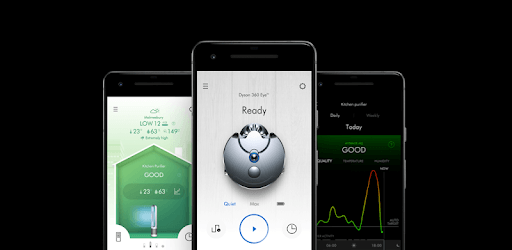
Dyson Link is an Android app developed and published by Dyson Ltd at Google Play Store on Mar 30, 2016 for Android users. Dyson Link is so popular that it has gained 7429969 installs so far and growing.
Dyson Link is a powerful tool that brings convenience and control right to your fingertips. This handy app is designed to manage various Dyson products directly from your smartphone. Whether it's adjusting the fan speed, monitoring air quality, or planning your home's cleanliness schedule, Dyson Link makes it all effortless.
Dyson Link lets you add moisture into the air effortlessly. You can get real-time notifications when it's time to refill, which ensures your home stays comfortable. The app also allows you to control Dyson fans and purifiers, giving you the power to manage the temperature and air quality both inside and outside your home.
One major improvement of Dyson Link is that it now offers better WiFi connectivity. With a stronger connection, you can enjoy uninterrupted control over your devices. This means no more frustrations when trying to operate your Dyson products remotely.
Maintaining your Dyson products is easier with Dyson Link. The app helps you reset filters, such as carbon filters, ensuring your devices run optimally. It's important to note that some functionalities like filter reset are only available through the app. Understanding this feature can make the entire experience smoother for users.
With updates rolled out by Dyson, the app now provides even more detailed information about air quality. This added data can help you make informed decisions about your home's environment. Knowing the specifics of air quality both inside and outside your house can be valuable for maintaining a healthy living space.
The video tutorials available in Dyson Link are incredibly user-friendly. They offer tips for both short and long hair, making it easier for you to manage your Dyson products based on your personal style needs.
If you're an Alexa user, Dyson Link integrates seamlessly, allowing voice commands to control your devices. However, availability varies by region. For instance, New Zealand users might face issues, but Dyson provides support to troubleshoot and resolve such problems.
For those with Dyson robot vacuums, Dyson Link is incredibly useful. You can load the app quickly and set your vacuum to clean specific rooms at specific power levels. This targeted cleaning saves you time and effort, making your home's upkeep more efficient.
Even when you're not home, Dyson Link allows you to preheat rooms, ensuring comfort the moment you walk in the door. This remote functionality enhances the convenience of operating your Dyson devices.
Ultimately, Dyson Link provides instant access to your devices, negating the need for physical remotes. The app allows you to control fan power, wind direction, and oscillation degrees directly from your phone. This level of control, combined with the detailed air quality metrics, makes Dyson Link an invaluable tool for anyone with Dyson products.
Yes, you can run Dyson Link on PC, but first, you will need emulator software installed on your Windows or MAC, which you can download for free. In the below video, you will find Dyson Link in action. Before you install the emulator, check out the minimum and recommended system requirements to run it seamlessly. They may change depending on which version of the emulator you choose. Therefore, we recommend you download the latest version of the emulator. Below you will find three free Android emulators that we have shortlisted based on their popularity:
Up to date graphics drivers from Microsoft or the chipset vendor.
Storage: 1 GB available under installation path, 1.5GB available hard drive space
Internet: Broadband Internet connection
Regardless of which Android emulator you install, the steps to install, configure, and running the Dyson Link app on PC are the same.