Published by App Holdings
Updated March 29, 2026
Survive the zombie apocalypse with friends. Download today!
| Version | 2.15 |
| Size | 113.0 MB |
| What's New | Minor bug fixes and improvements. Install or update to the newest version to check it out! |
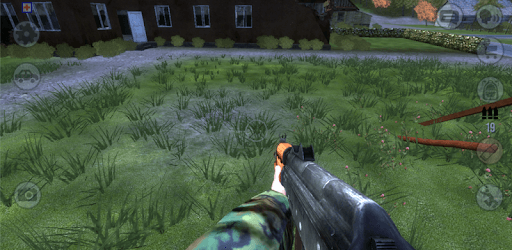
Experiment Z - Zombie is an Android app developed and published by App Holdings at Google Play Store on Jun 20, 2015 for Android users. Experiment Z - Zombie is so popular that it has gained 10000000 installs so far and growing.
Experiment Z - Zombie is an exhilarating game that promises hours of entertainment! Dive into a world where you must defend yourself against menacing zombies while scavenging for loot and crafting items.
The game offers players a rich and immersive experience. You'll find an exciting mix of adventure, strategy, and action. Protect yourself from the relentless zombies, find loot, and team up with others in multiplayer mode.
One of the standout features of Experiment Z - Zombie is its impressive graphics. The game brings to life a post-apocalyptic world with detailed landscapes, lifelike characters, and a wide range of zombies. Some players have noted that certain elements occasionally get stuck in the ground, but this minor hiccup doesn't take away from the overall visual appeal.
A core aspect of the game is scavenging for loot. From weapons to cars, players have access to a myriad of items that can help them survive longer. Whether you need a new gun or are looking to find a vehicle to escape a horde, Experiment Z provides plenty of exciting opportunities for discovery.
Playing Experiment Z - Zombie with friends adds a whole new layer of fun. The multiplayer mode allows you to team up, strategize, and take on zombies together. However, some players have experienced issues where joining a server resets their in-game progress. Despite this, multiplayer remains a favorite for many.
Experiment Z - Zombie keeps players on their toes with regular updates. These updates often include bug fixes, new content, and improvements to gameplay. From adding new zombies and towns to fixing graphical glitches, these updates ensure that the game continuously evolves and stays fun.
For many players, Experiment Z - Zombie evokes a sense of nostalgia. Some remember playing it in their younger years and have fond memories of early gaming experiences. The game’s popularity is further enhanced by its ability to run on various devices, making it accessible to a wide audience.
Players have a special appreciation for the game's unique zombie designs. These monsters are not only challenging but also visually engaging. The addition of more intense and cooler zombie designs could elevate the game to new heights, adding even more excitement for veteran players.
While Experiment Z - Zombie already offers a rich gaming experience, some players have expressed a desire for additional updates. Suggestions include cool new zombies, improved graphics, and fixing snipers getting stuck when scoping. Players also hope for more cars, towns, and even entire cities to explore.
Despite its many strengths, the game does have some quirks. Occasionally, players have trouble with items disappearing or getting stuck. These issues have been acknowledged and are likely to be addressed in future updates to ensure a smoother gameplay experience.
Experiment Z - Zombie continues to be a beloved game, combining thrilling action with strategic survival in a post-apocalyptic world. With its impressive graphics, engaging multiplayer mode, and continuous updates, it's clear why so many enjoy this adventure.
Experiment Z - Zombie is an exhilarating game that promises hours of entertainment! Dive into a world where you must defend yourself against menacing zombies while scavenging for loot and crafting items.
The game offers players a rich and immersive experience. You'll find an exciting mix of adventure, strategy, and action. Protect yourself from the relentless zombies, find loot, and team up with others in multiplayer mode.
One of the standout features of Experiment Z - Zombie is its impressive graphics. The game brings to life a post-apocalyptic world with detailed landscapes, lifelike characters, and a wide range of zombies. Some players have noted that certain elements occasionally get stuck in the ground, but this minor hiccup doesn't take away from the overall visual appeal.
A core aspect of the game is scavenging for loot. From weapons to cars, players have access to a myriad of items that can help them survive longer. Whether you need a new gun or are looking to find a vehicle to escape a horde, Experiment Z provides plenty of exciting opportunities for discovery.
Playing Experiment Z - Zombie with friends adds a whole new layer of fun. The multiplayer mode allows you to team up, strategize, and take on zombies together. However, some players have experienced issues where joining a server resets their in-game progress. Despite this, multiplayer remains a favorite for many.
Experiment Z - Zombie keeps players on their toes with regular updates. These updates often include bug fixes, new content, and improvements to gameplay. From adding new zombies and towns to fixing graphical glitches, these updates ensure that the game continuously evolves and stays fun.
For many players, Experiment Z - Zombie evokes a sense of nostalgia. Some remember playing it in their younger years and have fond memories of early gaming experiences. The game’s popularity is further enhanced by its ability to run on various devices, making it accessible to a wide audience.
Players have a special appreciation for the game's unique zombie designs. These monsters are not only challenging but also visually engaging. The addition of more intense and cooler zombie designs could elevate the game to new heights, adding even more excitement for veteran players.
While Experiment Z - Zombie already offers a rich gaming experience, some players have expressed a desire for additional updates. Suggestions include cool new zombies, improved graphics, and fixing snipers getting stuck when scoping. Players also hope for more cars, towns, and even entire cities to explore.
Despite its many strengths, the game does have some quirks. Occasionally, players have trouble with items disappearing or getting stuck. These issues have been acknowledged and are likely to be addressed in future updates to ensure a smoother gameplay experience.
Yes, you can run Experiment Z - Zombie on PC, but first, you will need emulator software installed on your Windows or MAC, which you can download for free. In the below video, you will find Experiment Z - Zombie in action. Before you install the emulator, check out the minimum and recommended system requirements to run it seamlessly. They may change depending on which version of the emulator you choose. Therefore, we recommend you download the latest version of the emulator. Below you will find three free Android emulators that we have shortlisted based on their popularity:
Up to date graphics drivers from Microsoft or the chipset vendor.
Storage: 1 GB available under installation path, 1.5GB available hard drive space
Internet: Broadband Internet connection
Regardless of which Android emulator you install, the steps to install, configure, and running the Experiment Z - Zombie app on PC are the same.