Published by Candy Rufus Games
Updated September 24, 2025
Explore infinite world and survive in a realistic environment full of animals.
| Version | 1.29.58.0 |
| Size | 14.4 MB |
| What's New | Added link to privacy policy in main menu screen |
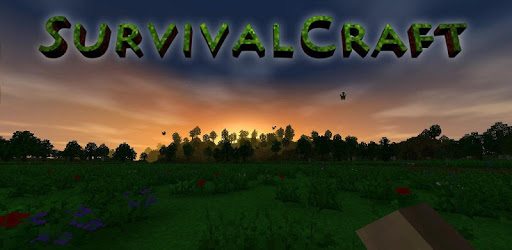
Survivalcraft Demo is an Android app developed and published by Candy Rufus Games at Google Play Store on Oct 14, 2012 for Android users. Survivalcraft Demo is so popular that it has gained 95490247 installs so far and growing.
Survivalcraft Demo is an engaging game that offers players an expansive world to explore and enjoy. From the moment you step into its blocky universe, there's a sense of adventure that pulls you in. But what exactly makes this game so special? Let's dive in and find out.
One of the first things to notice is the game's immersive gameplay. You can build your own world, gather materials, and even face off against various creatures. The environment feels incredibly real, offering an experience that is not only fun but also deeply engaging. Whether you're crafting new tools or trying to survive the night, there’s always something to keep you occupied.
Survivalcraft Demo is packed with unique features. Unlike other crafting games, this one includes elements like ships, guns, and incredible animal interactions. For instance, you might encounter three wolves racing towards you, adding a sense of danger and excitement. This game has features that make it feel like real life, which can be quite thrilling.
Players have a lot of creative freedom in Survivalcraft Demo. You can craft a variety of items, from swords to paint buckets, adding a layer of depth to your creations. The demo limits you to one day, but within that day, you can accomplish a lot. This limitation might actually push you to be even more creative with your time and resources.
Another standout feature is the challenging gameplay. The game forces you to think and strategize. Building a home, gathering resources, and defending yourself from wild animals are just a few of the challenges you’ll face. These elements make the game not only fun but also rewarding when you succeed.
Despite its blocky art style, the game is visually impressive. The world around you feels alive with its rich textures and detailed landscapes. The ships, animals, and other interactive elements add to the game's realism, making it a visually stimulating experience.
The game also has a dedicated community. Players often express their love for the game and share tips and tricks. This sense of community enhances the overall experience and keeps the game fresh and interesting. Ongoing updates also ensure that new features and improvements are regularly added.
Survivalcraft Demo is accessible to a wide audience. It offers a level of depth and complexity that can keep more experienced players engaged, while also being easy enough for newcomers to pick up. This balance makes it a great option for both young and older players alike.
Overall, Survivalcraft Demo is a captivating game that offers an incredible amount of depth and enjoyment. Its unique features, challenging gameplay, and creative freedom set it apart from other crafting games. Whether you’re a seasoned gamer or new to the genre, this game is sure to provide hours of fun and adventure.
Yes, you can run Survivalcraft Demo on PC, but first, you will need emulator software installed on your Windows or MAC, which you can download for free. In the below video, you will find Survivalcraft Demo in action. Before you install the emulator, check out the minimum and recommended system requirements to run it seamlessly. They may change depending on which version of the emulator you choose. Therefore, we recommend you download the latest version of the emulator. Below you will find three free Android emulators that we have shortlisted based on their popularity:
Up to date graphics drivers from Microsoft or the chipset vendor.
Storage: 1 GB available under installation path, 1.5GB available hard drive space
Internet: Broadband Internet connection
Regardless of which Android emulator you install, the steps to install, configure, and running the Survivalcraft Demo app on PC are the same.