Published by 🌟BlackLight Studio Games 🌟
Updated April 19, 2026
Callbreak: Cards game like spades, a popular trick taking card game
| Version | 9.6.30 |
| Size | 26.2 MB |
| What's New | Bug fixes! |
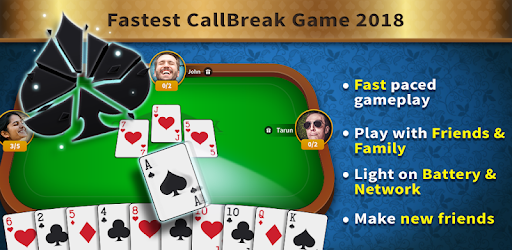
Callbreak: Card Game is an Android app developed and published by 🌟BlackLight Studio Games 🌟 at Google Play Store on Feb 27, 2018 for Android users. Callbreak: Card Game is so popular that it has gained 35856731 installs so far and growing.
Callbreak: Card Game is creating waves among card game enthusiasts. Offering a card game experience that stands out, it has quickly become a favorite pastime for many. In this guide, we'll dive into what makes this game so special and how you can get the most out of your gameplay.
Callbreak: Card Game is a popular trick-taking game that tests your strategy and skill. Players aim to win the maximum number of rounds against opponents by making smart calls. The objective is simple, yet the game’s engaging nature keeps players hooked for hours.
The game successfully blends classic card game mechanics with its own unique twist. It’s a multiplayer game where strategy is key. Each player’s goal is to predict and win exactly the number of tricks (rounds) they bid. This makes every game exciting and unpredictable.
The game comes packed with features that elevate the playing experience:
One common point of confusion for players is the use of power-ups. These in-game boosts can make a big difference, but they're not intuitive for everyone. Here’s a quick tip: Power-ups enhance your abilities but need to be activated strategically. Experiment during gameplay to understand their impact better.
Players often find Callbreak: Card Game to be a delightful experience, filled with endless fun and engagement. It's a perfect way to pass the time and is often considered more enjoyable than other popular games.
While the game is fun on its own, many players feel it could benefit from additional customization options. Imagine creating your own groups within the game. This could enhance the social component, making it even more enjoyable to play with friends and family.
While the game generally runs smoothly, some players have experienced issues linking their accounts, particularly through Facebook. This can be frustrating, especially when players have reached higher levels. Developers are constantly working on these issues, promising better connectivity and user experience in future updates.
From graphics to gameplay, Callbreak: Card Game shines across the board. Its aesthetically pleasing design and smooth user experience make it a must-try for card game lovers. New players often find themselves delighted and quickly become fans.
Playing Callbreak: Card Game can be a great way to spend your free time. The thrill of making strategic calls and winning rounds ensures that it’s never boring. It's a game where you can continually grow and improve, making every moment spent on it worth your while.
If you've never tried a card game like this before, now is the perfect time to start. Experience the joy and excitement of Callbreak: Card Game today!
Yes, you can run Callbreak: Card Game on PC, but first, you will need emulator software installed on your Windows or MAC, which you can download for free. In the below video, you will find Callbreak: Card Game in action. Before you install the emulator, check out the minimum and recommended system requirements to run it seamlessly. They may change depending on which version of the emulator you choose. Therefore, we recommend you download the latest version of the emulator. Below you will find three free Android emulators that we have shortlisted based on their popularity:
Up to date graphics drivers from Microsoft or the chipset vendor.
Storage: 1 GB available under installation path, 1.5GB available hard drive space
Internet: Broadband Internet connection
Regardless of which Android emulator you install, the steps to install, configure, and running the Callbreak: Card Game app on PC are the same.