Published by External Games
Updated April 20, 2026
Cower Defense - Simple and Funny Tower Defence
| Version | 0.9.1 |
| Size | 95.4 MB |
| What's New | Bug fixing |
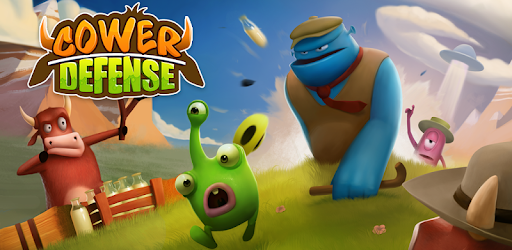
Cower Defense is an Android app developed and published by External Games at Google Play Store on Aug 25, 2016 for Android users. Cower Defense is so popular that it has gained 100000 installs so far and growing.
Are you looking for a game that combines adorable graphics, challenging gameplay, and hours of entertainment? Look no further than Cower Defense! This game has quickly become a favorite among gamers, and it's easy to see why. With its cute cows and addictive gameplay, Cower Defense is a must-play for Android users.
From the moment you start playing Cower Defense, you'll be captivated by its stunning graphics and charming characters. The game takes you on a journey through different levels, each with its own unique challenges and enemies to defeat. As you progress, you'll unlock new troops and upgrades to help you in your quest to protect your herd of cows.
One of the things that sets Cower Defense apart from other games is its high-quality graphics. The attention to detail in the character design and the vibrant colors make the game visually appealing and enjoyable to play. Whether you're a fan of tower defense games or not, Cower Defense is sure to win you over with its charming aesthetic.
Once you start playing Cower Defense, it's hard to put down. The addictive gameplay and challenging levels will keep you coming back for more. Each level presents a new set of obstacles and enemies, requiring you to come up with different strategies to protect your cows. It's a game that keeps you on your toes and constantly engaged.
And the best part? Cower Defense is an offline game, so you can enjoy it anytime, anywhere, without worrying about an internet connection. Whether you're on a long commute or just looking to pass the time, Cower Defense is the perfect game to keep you entertained.
Some players have mentioned that they initially found the game challenging, but once they got past the first few levels, they were hooked. The game gradually introduces new elements and upgrades, allowing you to build a stronger defense and overcome even the toughest enemies. It's a rewarding experience that keeps you motivated to keep playing.
If you've encountered any issues with the game crashing, don't worry. Some players have reported this problem, but a simple solution is to try reinstalling the game. Many users have found that this resolves the issue and allows them to enjoy the game without any interruptions.
No, currently Cower Defense is only available for Android devices. However, there are similar tower defense games available for iOS users.
Yes, Cower Defense is an offline game, so you can play it anytime, anywhere, even without an internet connection.
Yes, Cower Defense offers in-app purchases for additional troops and upgrades. However, these purchases are optional, and you can enjoy the game without spending any money.
Unfortunately, Cower Defense does not currently offer a feature to sync your progress across devices. Your game progress will be saved locally on your device.
The developers of Cower Defense are constantly working on improving the game and adding new content. Keep an eye out for future updates that may introduce exciting new features and levels.
In conclusion, Cower Defense is a delightful tower defense game that offers hours of fun and entertainment. With its charming graphics, addictive gameplay, and offline capabilities, it's a game that is sure to win the hearts of Android users. So why wait? Download Cower Defense now and embark on an exciting adventure to protect your adorable herd of cows!
Yes, you can run Cower Defense on PC, but first, you will need emulator software installed on your Windows or MAC, which you can download for free. In the below video, you will find Cower Defense in action. Before you install the emulator, check out the minimum and recommended system requirements to run it seamlessly. They may change depending on which version of the emulator you choose. Therefore, we recommend you download the latest version of the emulator. Below you will find three free Android emulators that we have shortlisted based on their popularity:
Up to date graphics drivers from Microsoft or the chipset vendor.
Storage: 1 GB available under installation path, 1.5GB available hard drive space
Internet: Broadband Internet connection
Regardless of which Android emulator you install, the steps to install, configure, and running the Cower Defense app on PC are the same.