Published by PowerA
Updated September 5, 2025
The MOGA Pivot™ app pairs your MOGA™ controller to your Android phone or tablet.
| Version | 1.25 |
| Size | 32.0 MB |
| What's New | - Fixed Android 6 connection issues. The app can now pair with the controller properly. Missing Permissions.- Fixed missing games, categories and thumbnails in the Games listing.- Fixed broken links to Google Play Store in Games listings. |
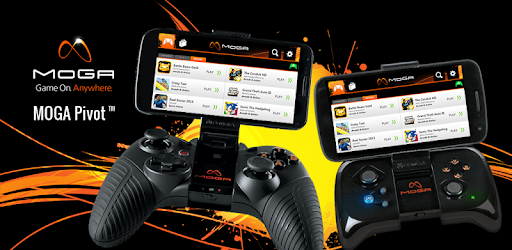
MOGA Pivot is an Android app developed and published by PowerA at Google Play Store on Oct 10, 2012 for Android users. MOGA Pivot is so popular that it has gained 500000 installs so far and growing.
Welcome to the world of MOGA Pivot, where your gaming experience is about to level up. This app brings two exciting features to the table: it's a configuration tool and a game store. Packed with valuable suggestions, MOGA Pivot ensures you discover the perfect games for your MOGA controller. Let's dive into what makes this app stand out.
MOGA Pivot excels at recommending games specifically designed for MOGA controllers. This feature is a game-changer for casual gamers who want to avoid the hassle of sifting through games that don't support their hardware. With MOGA Pivot, you can go straight to the fun part, playing your favorite games seamlessly with your MOGA controller.
Setting up your MOGA controller with MOGA Pivot is effortless. Whether you're using the Galaxy S7 or another device, the controller works seamlessly. The app supports Bluetooth HID profiles, ensuring a smooth connection experience. You can even pair it with your Samsung Gear VR Oculus app suite for an immersive gaming session.
One of the standout features of the MOGA "Pro Power" controller is its ability to charge your phone while you play. This means you can game for hours without worrying about running out of battery. It's a thoughtful addition that enhances your gaming experience.
If you consider yourself a gamer, a MOGA controller is a must-have accessory. These controllers are incredibly responsive, adding a new layer of excitement to your gaming adventures. Playing games like Modern Combat becomes a whole new experience with the precision and control that a MOGA controller offers.
The MOGA Pivot app is robust and user-friendly, with practically no bugs. It boasts an extensive list of games you can enjoy with your MOGA controller, making it easy to expand your gaming library. While it may not show all games, it does a commendable job of keeping you informed about the best ones available.
MOGA Pivot is continually evolving, with updates that enhance its compatibility with various devices. Recently, the app received an update that improved its functionality on LG G5 devices, allowing users to enjoy their MOGA-enhanced games once again. Keeping your app set to auto-update ensures you always have the latest features and improvements.
While MOGA Pivot currently shines in its core features, there is potential for even more. Imagine if more software supported MOGA controllers, turning them into versatile tools like drone or R/C controllers. The possibilities are endless, and the MOGA Pivot community is excited to see what the future holds.
In summary, MOGA Pivot is a game-changer for those who love gaming on their mobile devices. Its versatility, user-friendly setup, and excellent game suggestions make it an indispensable tool for MOGA controller users. Whether you're a casual gamer or a seasoned pro, MOGA Pivot enhances your gaming experience, making it more enjoyable and convenient. Try it out and see how it can transform your gaming adventures!
Yes, you can run MOGA Pivot on PC, but first, you will need emulator software installed on your Windows or MAC, which you can download for free. In the below video, you will find MOGA Pivot in action. Before you install the emulator, check out the minimum and recommended system requirements to run it seamlessly. They may change depending on which version of the emulator you choose. Therefore, we recommend you download the latest version of the emulator. Below you will find three free Android emulators that we have shortlisted based on their popularity:
Up to date graphics drivers from Microsoft or the chipset vendor.
Storage: 1 GB available under installation path, 1.5GB available hard drive space
Internet: Broadband Internet connection
Regardless of which Android emulator you install, the steps to install, configure, and running the MOGA Pivot app on PC are the same.