My Effectiveness: To do, Tasks for PC

My Effectiveness: To do, Tasks for PC

Published by AndTek: Productivity Tools

Updated August 28, 2025

My Effectiveness: advanced productivity!

What's New

Version0.30.1
Size13.4 MB
What's NewMinor bug fixes and improvements. Install or update to the newest version to check it out!

My Effectiveness: To do, Tasks Screenshots

My Effectiveness: To do, Tasks PC screenshot

About My Effectiveness: To do, Tasks For PC

My Effectiveness: To do, Tasks is an Android app developed and published by AndTek: Productivity Tools at Google Play Store on Oct 2, 2011 for Android users. My Effectiveness: To do, Tasks is so popular that it has gained 500000 installs so far and growing.

My Effectiveness: To do, Tasks - Your Ultimate Productivity Companion

Do you often feel overwhelmed by your daily tasks and long-term goals? My Effectiveness: To do, Tasks is here to transform your productivity game. This app serves as an all-in-one solution to help you manage your time, set priorities, and achieve your goals, no matter how big or small.

Plan Your Day, Week, and Month with Ease

One of the standout features of My Effectiveness: To do, Tasks is its ability to easily switch between daily, weekly, and monthly views. This lets you see today's tasks alongside upcoming weekly and monthly objectives. No more shuffling between different planners! Simply choose the day, week, or month view and stay on top of your tasks with convenience.

Goal Setting Simplified

Setting goals has never been easier. My Effectiveness: To do, Tasks allows you to map out complex objectives and daily tasks all in one place. Whether you are planning for a long-term goal or a simple daily to-do list, this app keeps everything organized and accessible.

A Seamless Experience Over the Years

Reliability is key, and My Effectiveness: To do, Tasks delivers just that. Users have experienced consistent performance without any glitches for years. You can trust this app to be your go-to productivity tool without worrying about technical issues. It's a dependable companion that grows with you.

The Covey Factor

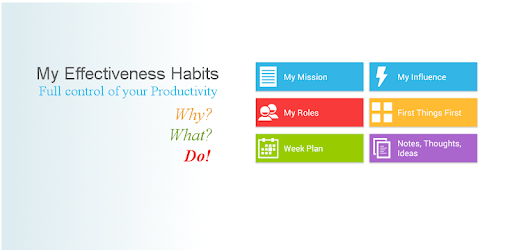
Inspired by Stephen R. Covey's "Seven Habits of Highly Effective People"? My Effectiveness: To do, Tasks integrates principles from this influential book. The app offers features like mission statements, role definitions, and priority-setting based on Covey’s Four Quadrant Theory. This makes it an invaluable tool for anyone looking to implement these habits into their daily life.

All-In-One Productivity Tool

From setting big life missions to smaller daily tasks, My Effectiveness: To do, Tasks covers it all. With goal setting, to-do lists, and weekly planning, everything is in one place. This comprehensive approach ensures that you can focus on what truly matters, helping you sort tasks by priority and stay organized effortlessly.

Flexibility and User-Friendliness

Customization is crucial for any productivity app, and My Effectiveness: To do, Tasks excels here. You can adjust the time duration for tasks, making it adaptable to your unique schedule. Despite its many features, the app is very user-friendly, ensuring you spend less time figuring it out and more time getting things done.

Additional Features and Support

For those who love additional functionalities, My Effectiveness: To do, Tasks doesn't disappoint. Features like voice recording for notes and tasks lighten the load and make note-taking quicker and more efficient. Additionally, syncing your tasks with Google Calendar keeps everything streamlined. Although minor customizations and improvements, such as adding new features, are continually made, the core functionality remains solid.

A Lifesaver for the Distracted Mind

We all get distracted. My Effectiveness: To do, Tasks offers an organized space for all your goals and tasks, helping you filter out the noise. With everything in one app, you can reprioritize tasks and shift focus as needed, providing clarity and making it easier to stay focused.

Making Life Easier and Manageable

In today’s fast-paced world, managing everything can be challenging. My Effectiveness: To do, Tasks simplifies life’s complexities by offering tools that make goal-setting and task management straightforward and effective. Designed to make life easier, this app excels at turning chaotic to-do lists into organized plans.

My Effectiveness: To do, Tasks is more than just an app; it’s a companion that helps you face daily challenges head-on, stay organized, and achieve your goals. Make the leap towards a more productive life today with this amazing tool.

Can I run My Effectiveness: To do, Tasks on PC?

Yes, you can run My Effectiveness: To do, Tasks on PC, but first, you will need emulator software installed on your Windows or MAC, which you can download for free. In the below video, you will find My Effectiveness: To do, Tasks in action. Before you install the emulator, check out the minimum and recommended system requirements to run it seamlessly. They may change depending on which version of the emulator you choose. Therefore, we recommend you download the latest version of the emulator. Below you will find three free Android emulators that we have shortlisted based on their popularity:

How to Install My Effectiveness: To do, Tasks on Windows PC

BlueStacks

Minimum
  • OS: Microsoft Windows 7 and above.
  • Processor: Intel or AMD Processor.
  • RAM: Your PC must have at least 4GB of RAM. (Note that having 4GB or more disk space is not a substitute for RAM)
  • Storage: 5GB Free Disk Space.
  • You must be an Administrator on your PC.
Recommended:
  • OS: Microsoft Windows 10
  • Processor: Intel or AMD Multi-Core Processor with Single Thread benchmark score > 1000.
  • Graphics: Intel/Nvidia/ATI, Onboard or Discrete controller with benchmark score >= 750.
  • Please ensure Virtualization is enabled on your PC/Laptop.
  • RAM: 8GB or higher
  • Storage: SSD (or Fusion/Hybrid Drives)
  • Internet: Broadband connection to access games, accounts and related content.

Up to date graphics drivers from Microsoft or the chipset vendor.

  • To start with, download Bluestacks from its official website. The latest version of BluesStacks is v 5, and it is around 400 MB.
  • Once the download is done, click on the Bluestacks set up file to install it on your Windows PC. Follow the on-screen instructions and install it accordingly.
  • The next step is to launch the emulator using the desktop shortcut and sign in using your Google account.
  • Now, head over to Bluestacks home screen and click on the Google Play Store icon.
  • Hit the search bar in Google Play and search for My Effectiveness: To do, Tasks.
  • Install My Effectiveness: To do, Tasks from the Play Store by clicking the Install option, which completes downloading of My Effectiveness: To do, Tasks on PC.

NoxPlayer

Minimum
  • Operating System: Windows XP SP3, Windows Vista, Windows 7, Windows 8, Windows 10, and DirectX 9.0c
  • Processor: At least dual-core processor, both Intel, and AMD are OK
  • Video: Supports Open GL 2.0 or above
  • Memory: 1.5 GB RAM
Recommended
  • Operating System: Windows 7, Windows 8, Windows 10
  • Processor: Multiple core processors which support VT-x or AMB-V Virtualization Technology, better performance with this function enabled
  • Video: The higher performance, the better
  • Memory: 4 GB RAM

Storage: 1 GB available under installation path, 1.5GB available hard drive space

Internet: Broadband Internet connection

  • Download NoxPlayer from the official website. The latest version of NoxPlayer is v 3, and it is around 600 MB.
  • Now install the emulator using the downloaded setup file. Just go through the on-screen instructions and install NoxPlayer on your computer or laptop.
  • After the installation process, launch the Nox Android emulator and log in using your Google account when it asks you.
  • Click on the Google Play Store icon and head over to the search bar to search My Effectiveness: To do, Tasks. Once found, click on the Install button to install My Effectiveness: To do, Tasks for PC.
  • If you do not find My Effectiveness: To do, Tasks on Google Play Store or if you want to skip logging in to Google, you can sideload APK (download the .APK file from this page and open it with NoxPlayer).
  • Launch My Effectiveness: To do, Tasks from home-screen and start playing it on PC right away!

MEmu

Minimum
  • 2 cores x86/x86_64 Processor (Intel or AMD CPU)
  • WinXP SP3 / Win7 / Win8 / Win10 (Not recommended to run on Server/Enterprise)
  • Latest Windows DirectX 11 / Graphics driver with OpenGL 2.0
  • Hardware Virtualization Technology (Intel VT-x/AMD-V) shall be enabled in BIOS
  • 2GB of RAM (4GB for x64 system)
  • 5GB of hard disk free space
Recommended
  • OS: Microsoft Windows 10 with VT Enabled
  • CPU: Single Thread PassMark score > 1500 (Intel/AMD Multi-Core).
  • Graphics: Intel/Nvidia/ATI, Onboard or Discrete controller with PassMark score > 750.
  • Latest Windows DirectX 11 / Graphics driver with OpenGL 4.5 or higher
  • RAM: 8GB or higher
  • HDD: SSD, 10GB of hard disk free space
  • Internet: Broadband connection with low latency for FPS games
  • Download MEmu Play from the official website. The latest version of NoxPlayer is v 7.5.
  • When the download is completed, install the MEmu emulator on your PC. Follow the on-screen instructions and keep on clicking the Next button until the final step.
  • Now, using the desktop shortcut, look for the MEmu Play emulator and launch it. Once done, it will ask you to log in using your Google account, proceed with the same.
  • MEmu Play will ask you to log in using your Google account. When you log in, it will sync your Google account to MEmu Play. Launch the Google Play Store by clicking on the icon and search for My Effectiveness: To do, Tasks.
  • Click on the Install button once you find My Effectiveness: To do, Tasks from the search results. You can also sideload APK (download the .APK file from this page and open it with MEmu) if you want to skip above step.
  • After the installation of My Effectiveness: To do, Tasks, you're all set to use the app on PC!

Regardless of which Android emulator you install, the steps to install, configure, and running the My Effectiveness: To do, Tasks app on PC are the same.

Download My Effectiveness: To do, Tasks For PC