Stickman Backflip Killer 4 for PC

Stickman Backflip Killer 4 for PC

Published by BeatenPixel

Destroy stickmans using your parkour skill, weapons and epic slowmotion effects

What's New

Version0.1.12
Size149.6 MB
What's NewAdded:- Loading screen- 2 stunts by defaultFixed:- Teleportation on jump bug- Too many limbs being split on stick death- Weapons not rotating when low FPS

Stickman Backflip Killer 4 Screenshots

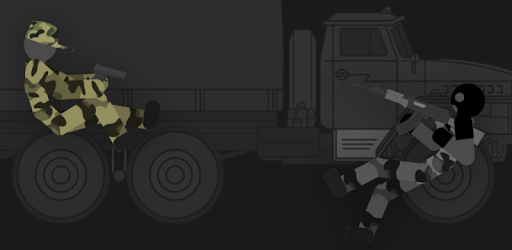
Stickman Backflip Killer 4 PC screenshot

About Stickman Backflip Killer 4 For PC

Stickman Backflip Killer 4 is an Android app developed and published by BeatenPixel at Google Play Store on Dec 9, 2017 for Android users. Stickman Backflip Killer 4 is so popular that it has gained 10178708 installs so far and growing.

Stickman Backflip Killer 4: A Fun and Addictive Game for All Ages

Stickman Backflip Killer 4 is a highly entertaining game that brings back memories of my childhood. With its engaging gameplay and exciting challenges, this game has quickly become one of my favorites. Despite a few minor issues, it offers hours of fun and enjoyment.

Immersive Gameplay and Stunning Graphics

One of the standout features of Stickman Backflip Killer 4 is its captivating gameplay. The game offers a wide range of levels that are neither too easy nor too difficult, striking the perfect balance for players of all skill levels. Whether you're a beginner or a pro, you'll find yourself hooked from the moment you start playing.

Moreover, the graphics in this game are simply stunning. The attention to detail and the smooth animations make for a visually appealing experience. The physics-based mechanics add a realistic touch to the game, making it even more immersive.

Exciting Features and Modes

Stickman Backflip Killer 4 offers a variety of features and modes that keep the gameplay fresh and exciting. One of my favorite features is the menu screen, which allows you to play a level right from the start. It's a unique and enjoyable addition that sets this game apart from others in the genre.

Additionally, the game offers a sandbox mode where you can unleash your creativity and explore different maps. This mode adds a whole new dimension to the gameplay, allowing you to experiment and have even more fun.

Customization and Endless Possibilities

If you're looking for even more excitement, Stickman Backflip Killer 4 allows you to create custom levels. This feature opens up a world of possibilities, as you can design your own maps, add props, and even customize the health of enemies. The ability to personalize your gameplay experience adds a unique touch and ensures that the fun never ends.

A Few Bugs, But Still Worth It

While Stickman Backflip Killer 4 is an amazing game, it does have a few bugs that can be a bit frustrating. However, these issues are minor and do not significantly impact the overall gameplay. The developers are constantly working to improve the game, so I'm confident that these bugs will be fixed in future updates.

Conclusion

In conclusion, Stickman Backflip Killer 4 is a must-play game for anyone seeking a fun and addictive experience. With its engaging gameplay, stunning graphics, and exciting features, it's no wonder that this game has garnered a loyal fan base. Despite a few minor issues, the overall experience is highly enjoyable and will keep you entertained for hours on end. So, grab your phone and start flipping!

Frequently Asked Questions (FAQ)

1. Can I play Stickman Backflip Killer 4 on any device?

Yes, Stickman Backflip Killer 4 is available for both Android and iOS devices, allowing you to enjoy the game on a wide range of smartphones and tablets.

2. Are there any in-game advertisements?

While Stickman Backflip Killer 4 does have some ads, they are not overly intrusive. The developers have made efforts to minimize their presence, ensuring that they do not disrupt the gameplay experience.

3. Is Stickman Backflip Killer 4 suitable for all ages?

Yes, Stickman Backflip Killer 4 is suitable for players of all ages. However, parental guidance is recommended for younger children due to the game's mild violence.

4. Can I create my own levels in Stickman Backflip Killer 4?

Absolutely! Stickman Backflip Killer 4 offers a custom level creation feature that allows you to design your own maps, add props, and customize various aspects of the gameplay. Unleash your creativity and take the game to a whole new level!

5. Are there any plans for future updates?

Yes, the developers are constantly working on improving Stickman Backflip Killer 4. They are dedicated to providing the best possible gaming experience and regularly release updates to address any issues and introduce new features. Stay tuned for exciting updates!

Can I run Stickman Backflip Killer 4 on PC?

Yes, you can run Stickman Backflip Killer 4 on PC, but first, you will need emulator software installed on your Windows or MAC, which you can download for free. In the below video, you will find Stickman Backflip Killer 4 in action. Before you install the emulator, check out the minimum and recommended system requirements to run it seamlessly. They may change depending on which version of the emulator you choose. Therefore, we recommend you download the latest version of the emulator. Below you will find three free Android emulators that we have shortlisted based on their popularity:

How to Install Stickman Backflip Killer 4 on Windows PC

BlueStacks

Minimum
  • OS: Microsoft Windows 7 and above.
  • Processor: Intel or AMD Processor.
  • RAM: Your PC must have at least 4GB of RAM. (Note that having 4GB or more disk space is not a substitute for RAM)
  • Storage: 5GB Free Disk Space.
  • You must be an Administrator on your PC.
Recommended:
  • OS: Microsoft Windows 10
  • Processor: Intel or AMD Multi-Core Processor with Single Thread benchmark score > 1000.
  • Graphics: Intel/Nvidia/ATI, Onboard or Discrete controller with benchmark score >= 750.
  • Please ensure Virtualization is enabled on your PC/Laptop.
  • RAM: 8GB or higher
  • Storage: SSD (or Fusion/Hybrid Drives)
  • Internet: Broadband connection to access games, accounts and related content.

Up to date graphics drivers from Microsoft or the chipset vendor.

  • To start with, download Bluestacks from its official website. The latest version of BluesStacks is v 5, and it is around 400 MB.
  • Once the download is done, click on the Bluestacks set up file to install it on your Windows PC. Follow the on-screen instructions and install it accordingly.
  • The next step is to launch the emulator using the desktop shortcut and sign in using your Google account.
  • Now, head over to Bluestacks home screen and click on the Google Play Store icon.
  • Hit the search bar in Google Play and search for Stickman Backflip Killer 4.
  • Install Stickman Backflip Killer 4 from the Play Store by clicking the Install option, which completes downloading of Stickman Backflip Killer 4 on PC.

NoxPlayer

Minimum
  • Operating System: Windows XP SP3, Windows Vista, Windows 7, Windows 8, Windows 10, and DirectX 9.0c
  • Processor: At least dual-core processor, both Intel, and AMD are OK
  • Video: Supports Open GL 2.0 or above
  • Memory: 1.5 GB RAM
Recommended
  • Operating System: Windows 7, Windows 8, Windows 10
  • Processor: Multiple core processors which support VT-x or AMB-V Virtualization Technology, better performance with this function enabled
  • Video: The higher performance, the better
  • Memory: 4 GB RAM

Storage: 1 GB available under installation path, 1.5GB available hard drive space

Internet: Broadband Internet connection

  • Download NoxPlayer from the official website. The latest version of NoxPlayer is v 3, and it is around 600 MB.
  • Now install the emulator using the downloaded setup file. Just go through the on-screen instructions and install NoxPlayer on your computer or laptop.
  • After the installation process, launch the Nox Android emulator and log in using your Google account when it asks you.
  • Click on the Google Play Store icon and head over to the search bar to search Stickman Backflip Killer 4. Once found, click on the Install button to install Stickman Backflip Killer 4 for PC.
  • If you do not find Stickman Backflip Killer 4 on Google Play Store or if you want to skip logging in to Google, you can sideload APK (download the .APK file from this page and open it with NoxPlayer).
  • Launch Stickman Backflip Killer 4 from home-screen and start playing it on PC right away!

MEmu

Minimum
  • 2 cores x86/x86_64 Processor (Intel or AMD CPU)
  • WinXP SP3 / Win7 / Win8 / Win10 (Not recommended to run on Server/Enterprise)
  • Latest Windows DirectX 11 / Graphics driver with OpenGL 2.0
  • Hardware Virtualization Technology (Intel VT-x/AMD-V) shall be enabled in BIOS
  • 2GB of RAM (4GB for x64 system)
  • 5GB of hard disk free space
Recommended
  • OS: Microsoft Windows 10 with VT Enabled
  • CPU: Single Thread PassMark score > 1500 (Intel/AMD Multi-Core).
  • Graphics: Intel/Nvidia/ATI, Onboard or Discrete controller with PassMark score > 750.
  • Latest Windows DirectX 11 / Graphics driver with OpenGL 4.5 or higher
  • RAM: 8GB or higher
  • HDD: SSD, 10GB of hard disk free space
  • Internet: Broadband connection with low latency for FPS games
  • Download MEmu Play from the official website. The latest version of NoxPlayer is v 7.5.
  • When the download is completed, install the MEmu emulator on your PC. Follow the on-screen instructions and keep on clicking the Next button until the final step.
  • Now, using the desktop shortcut, look for the MEmu Play emulator and launch it. Once done, it will ask you to log in using your Google account, proceed with the same.
  • MEmu Play will ask you to log in using your Google account. When you log in, it will sync your Google account to MEmu Play. Launch the Google Play Store by clicking on the icon and search for Stickman Backflip Killer 4.
  • Click on the Install button once you find Stickman Backflip Killer 4 from the search results. You can also sideload APK (download the .APK file from this page and open it with MEmu) if you want to skip above step.
  • After the installation of Stickman Backflip Killer 4, you're all set to use the app on PC!

Regardless of which Android emulator you install, the steps to install, configure, and running the Stickman Backflip Killer 4 app on PC are the same.