
Published by Power Video
Updated May 4, 2026
Beauty Video best video editor , movie editor application photo slide show maker
| Version | 3.6.2.2 |
| Size | 40.6 MB |
| What's New | 1.Fix bug2.Optimize the user experience |
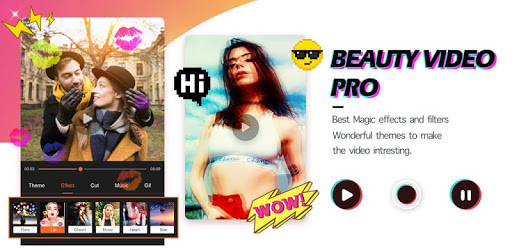
Beauty Video - Music Video Editor & Slide Show is an Android app developed and published by Power Video at Google Play Store on Oct 17, 2018 for Android users. Beauty Video - Music Video Editor & Slide Show is so popular that it has gained 7709500 installs so far and growing.
Are you looking for a user-friendly app that allows you to create beautiful videos effortlessly? Look no further than Beauty Video - Music Video Editor & Slide Show. This app has gained popularity among users for its simplicity, versatility, and stunning effects. Whether you want to create a video for a special occasion or simply express your creativity, this app has got you covered.
One of the standout features of Beauty Video is its ease of use. Users have praised the app for its intuitive interface, making it a breeze to navigate even for beginners. You don't need to be a tech-savvy individual to create stunning videos with this app. Simply download it, and you'll be on your way to producing high-quality videos in no time.
With Beauty Video, you can effortlessly cut and edit your videos to perfection. Whether you want to trim unnecessary parts or merge multiple clips together, the app provides you with all the necessary tools. Say goodbye to complicated editing software and hello to a seamless video editing experience.
When it comes to video editing, aesthetics play a crucial role. Beauty Video understands this, which is why it offers a wide range of stunning effects and themes to choose from. Whether you're creating a video for Christmas, a birthday, or any other special occasion, you'll find the perfect theme to complement your footage.
Users have raved about the quality of the effects provided by Beauty Video. The app ensures that your videos look professional and visually appealing, leaving a lasting impression on your audience. With a simple tap, you can transform your videos into captivating masterpieces.
Another feature that sets Beauty Video apart from other video editing apps is its customizable timing and song sync. This means you can set the timing of your video according to the beats and rhythm of your chosen song. This unique feature allows you to create videos that are perfectly synchronized with the music, enhancing the overall viewing experience.
Furthermore, Beauty Video offers a wide selection of free songs for you to choose from, eliminating the need to search for copyright-free music elsewhere. You can create a video that truly reflects your personality and style, all while maintaining the quality of your footage.
Yes, Beauty Video is available for both Android and iOS devices. You can easily download it from the Google Play Store or the Apple App Store.
Absolutely! Beauty Video allows you to import videos from your camera roll, making it convenient to edit and enhance your existing footage.
No, Beauty Video is a free app that offers a wide range of features without any hidden fees. However, please note that certain effects or themes may require additional purchases.
Yes, Beauty Video allows you to share your videos directly to social media platforms such as Instagram, Facebook, and YouTube. You can easily showcase your creations to your friends and followers with just a few taps.
Absolutely! Beauty Video supports high-resolution video editing, ensuring that your videos maintain their quality even after editing. You can create stunning videos with crystal-clear visuals, perfect for sharing on various platforms.
Download Beauty Video - Music Video Editor & Slide Show today and unleash your creativity like never before. Whether you're a beginner or a seasoned video editor, this app will exceed your expectations and help you create videos that leave a lasting impression.
Yes, you can run Beauty Video - Music Video Editor & Slide Show on PC, but first, you will need emulator software installed on your Windows or MAC, which you can download for free. In the below video, you will find Beauty Video - Music Video Editor & Slide Show in action. Before you install the emulator, check out the minimum and recommended system requirements to run it seamlessly. They may change depending on which version of the emulator you choose. Therefore, we recommend you download the latest version of the emulator. Below you will find three free Android emulators that we have shortlisted based on their popularity:
Up to date graphics drivers from Microsoft or the chipset vendor.
Storage: 1 GB available under installation path, 1.5GB available hard drive space
Internet: Broadband Internet connection
Regardless of which Android emulator you install, the steps to install, configure, and running the Beauty Video - Music Video Editor & Slide Show app on PC are the same.