Published by Peter Österlund
Updated August 28, 2025
The Stockfish chess engine combined with a feature-rich graphical user interface
| Version | 1.86 |
| Size | 33.5 MB |
| What's New | Minor bug fixes and improvements. Install or update to the newest version to check it out! |
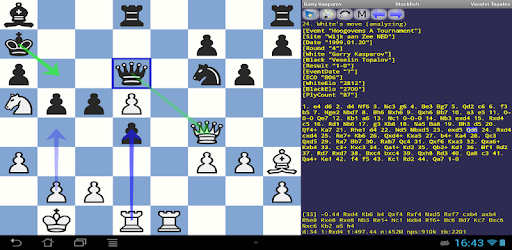
DroidFish Chess is an Android app developed and published by Peter Österlund at Google Play Store on Jul 11, 2010 for Android users. DroidFish Chess is so popular that it has gained 500000 installs so far and growing.
Are you a chess enthusiast looking for the best chess app on Android? Look no further! DroidFish Chess stands out as an amazing tool for both beginners and experienced players. The app is celebrated for its clean interface, robust chess engine, and the absence of intrusive ads.
DroidFish Chess integrates the powerful Stockfish engine, renowned worldwide for its strength and efficiency. This engine enables players to engage in challenging matches, improving their skills with each game. Even seasoned players find it hard to beat this engine, which speaks volumes about its advanced capabilities. Players from all levels can adjust the engine's strength, making it perfect for beginners to grandmasters. It goes up to an ELO rating of 2850, allowing for varied and exciting gameplay.
The interface of DroidFish Chess is intuitive and simple, making it easy to navigate for everyone. From setting up your game to reviewing it for analysis, every feature is designed to enhance user experience. Suggestions for customizable themes, like a wood color theme, could further enhance the visual appeal for users who spend a lot of time in the app.
For those looking to dive deeper, DroidFish Chess is equipped with advanced features. Players can create their own scenarios, study different game positions, and practice openings. The app also speaks every move, which can be especially helpful for those learning the chess board. If you love analyzing your games, the app offers an analysis mode and the capability to view various statistics, though some users have expressed the need for clearer explanations of these stats. Features like a tournament mode and evaluation bar for analysis would also be valuable additions.
One of the most compelling aspects of DroidFish Chess is that it is completely free and free from any ads. No interruptions, just focused chess playing and learning. This ad-free experience ensures that you can concentrate fully on your game, making it a joy to use anytime.
DroidFish Chess remains open to community feedback, welcoming suggestions to improve the app. Whether it's requests for theme customization or improvements in the engine strength settings, the developers are attentive to user needs. This responsiveness ensures that the app remains relevant and continues to meet the needs of its users over time.
Trainers and coaches find DroidFish Chess to be an invaluable tool. Its accuracy, speed, and capability to provide real-time feedback make it a great help for those teaching the game. Coaches can use the PGN viewer with suggested wood sounds to enhance the learning experience, just as other chess applications do.
DroidFish Chess no doubt offers a comprehensive and enjoyable chess experience on Android. With its powerful engine, user-friendly interface, and continuous development, it remains a favorite among chess enthusiasts.
Yes, you can run DroidFish Chess on PC, but first, you will need emulator software installed on your Windows or MAC, which you can download for free. In the below video, you will find DroidFish Chess in action. Before you install the emulator, check out the minimum and recommended system requirements to run it seamlessly. They may change depending on which version of the emulator you choose. Therefore, we recommend you download the latest version of the emulator. Below you will find three free Android emulators that we have shortlisted based on their popularity:
Up to date graphics drivers from Microsoft or the chipset vendor.
Storage: 1 GB available under installation path, 1.5GB available hard drive space
Internet: Broadband Internet connection
Regardless of which Android emulator you install, the steps to install, configure, and running the DroidFish Chess app on PC are the same.