
Published by frameo
Updated October 6, 2023
Share photos from your smartphone to a Frameo WiFi digital photo frame
| Version | v1.37.17 |
| Size | 30.3 MB |
| What's New | More improvements to the send flow to make sending photos and videos even easier and more accessible to everyone. |
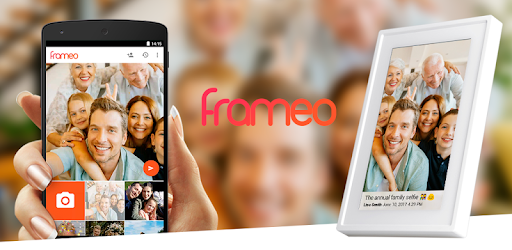
Frameo - Send photos to WiFi digital photo frames is an Android app developed and published by frameo at Google Play Store on Nov 29, 2016 for Android users. Frameo - Send photos to WiFi digital photo frames is so popular that it has gained 10000 installs so far and growing.
Looking for a convenient way to share your precious memories with loved ones? Look no further than Frameo - Send photos to WiFi digital photo frames! This incredible app allows you to effortlessly send photos to WiFi digital photo frames, ensuring that your family and friends can enjoy your captured moments in real-time. With its user-friendly interface and innovative features, Frameo has become a must-have for anyone who wants to stay connected through photos.
Frameo makes sharing photos a breeze. Whether you have a 7-inch or a 10.1-inch digital photo frame, this app is designed to work seamlessly with both. The recent upgrades, including the addition of a clock and weather feature, enhance the overall experience and make it even more enjoyable. It's great to have all these features in one place, making Frameo a truly remarkable app.
One of the standout features of Frameo is its ability to send videos. This means you can now share not only photos but also special moments captured in motion. It adds a new dimension to the app and allows you to relive your favorite memories in a more dynamic way. The possibilities are endless!
Not everyone is active on social media, especially older parents. Frameo bridges this gap by providing a platform for sharing photos without the need for social media accounts. This is a game-changer for those who want to keep their loved ones updated but prefer to stay away from social media. With Frameo, you can easily send photos to their frames and to other family members, ensuring that everyone can see and cherish the moments that matter.
Imagine walking through your living room and being greeted by a slideshow of all the amazing adventures you've had over the years. Frameo makes this possible, bringing a touch of nostalgia and warmth to your home. It's a product that truly enhances the ambiance of any living space.
While Frameo offers an exceptional user experience, there have been some reported issues with WiFi connectivity. However, these are minor setbacks compared to the overall functionality and convenience that the app provides. Many users have praised Frameo for its ease of use and the joy it brings to their family and friends.
The photo selection user interface is optimized for single photos, making it a breeze to upload and share. However, when uploading a large number of photos, expect to spend some time scrolling through your camera roll. This is a small trade-off for the convenience and joy that Frameo brings to your life.
Frameo has become an essential tool for many families, allowing them to effortlessly share event pictures and stay connected. The addition of a small clock in one corner adds a touch of perfection to the overall experience. Furthermore, the ability to send a code to others for photo sharing makes it even more convenient and inclusive.
While some users have reported issues with the durability of the frame, the overall satisfaction with Frameo remains high. Its ease of use and ability to keep you connected to your family from all over the world make it an invaluable app.
Yes, Frameo allows you to send both photos and videos, adding a dynamic touch to your shared memories.
Unfortunately, Frameo currently supports the connection of one device to a digital photo frame. However, you can easily share the code with others to allow them to add photos as well.
Frameo is designed to work with most WiFi digital photo frames, including both 7-inch and 10.1-inch models. However, it's always recommended to check the compatibility before making a purchase.
Frameo allows you to upload up to ten photos at once. If you have a large number of photos, you may need to spend some time scrolling through your camera roll.
Absolutely! Frameo is the perfect solution for those who prefer not to use social media. You can easily send photos to WiFi digital photo frames without the need for any social media accounts.
If you experience any issues with your Frameo digital photo frame, it's recommended to contact customer support for assistance. They will be able to guide you through troubleshooting steps or provide a replacement if necessary.
Frameo - Send photos to WiFi digital photo frames is truly a game-changer when it comes to sharing memories with loved ones. Its user-friendly interface, seamless connectivity, and innovative features make it the perfect app for anyone who wants to stay connected through photos. Try Frameo today and start sharing your cherished moments with the people who matter most!
Yes, you can run Frameo - Send photos to WiFi digital photo frames on PC, but first, you will need emulator software installed on your Windows or MAC, which you can download for free. In the below video, you will find Frameo - Send photos to WiFi digital photo frames in action. Before you install the emulator, check out the minimum and recommended system requirements to run it seamlessly. They may change depending on which version of the emulator you choose. Therefore, we recommend you download the latest version of the emulator. Below you will find three free Android emulators that we have shortlisted based on their popularity:
Up to date graphics drivers from Microsoft or the chipset vendor.
Storage: 1 GB available under installation path, 1.5GB available hard drive space
Internet: Broadband Internet connection
Regardless of which Android emulator you install, the steps to install, configure, and running the Frameo - Send photos to WiFi digital photo frames app on PC are the same.