Published by Gira Mobile
Updated April 28, 2026
Countdown days left and never forget another birthday, anniversary or event!
| Version | 3.2.0 |
| Size | 55.1 MB |
| What's New | We're always making changes and improvements to the app: - Added time selection for countdowns - Added list option for countdowns - Added themed icon for launcher screen - Pesky bugs have been removed Thanks for using the Countdown app! |
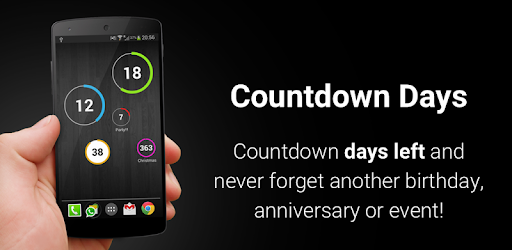
Countdown Days - App & Widget is an Android app developed and published by Gira Mobile at Google Play Store on Mar 24, 2013 for Android users. Countdown Days - App & Widget is so popular that it has gained 13177996 installs so far and growing.
Are you tired of forgetting important events or deadlines? Look no further! Countdown Days - App & Widget is the ultimate solution to help you stay on top of your schedule. With its user-friendly interface and customizable widgets, this app is a must-have for anyone who wants to work better and never miss an important date.
Countdown Days - App & Widget stands out from the crowd with its simple yet powerful widgets. Unlike other apps that overwhelm you with unnecessary features, this app focuses on what truly matters – helping you keep track of your countdowns effortlessly.
Setting up and viewing your countdowns is a breeze with the easy-to-use widgets. The countdown circle visually represents the time left until your event, making it even more engaging and motivating. You can choose from different widget sizes, allowing you to place them anywhere on your home screen. Plus, you have the option to display the title or keep it minimalistic – it's all up to you!
We understand that everyone has different preferences when it comes to design. That's why Countdown Days - App & Widget offers a wide range of color and font themes for each widget. You can customize your widgets to match your style or even assign different themes to different categories. Whether you're counting down to a special event or tracking multiple deadlines, this app has got you covered.
One unique feature that sets this app apart is the "decrease circle with time" option. It provides a visual representation of how long the countdown has been running, keeping you motivated and excited as the event draws near. It's these little touches that make Countdown Days - App & Widget a standout choice.
Yes, you can! Countdown Days - App & Widget allows you to set a specific date and time for your countdowns. Whether it's a weekly reminder or a one-time event, you have the flexibility to customize your countdowns according to your needs.
Adding multiple widgets is a breeze! Simply click the three dots on your new widget, and a menu will appear. From there, select the option to add the widget to your home screen. You can set up as many countdowns as you like, ensuring that you never miss an important date.
The premium version of Countdown Days - App & Widget offers additional features such as customizable fonts and colors. If you want to create a perfectly matched widget to complement your background or screen colors, the premium version is definitely worth considering. However, rest assured that the free version already provides all the essential features you need to stay organized and never miss a countdown.
Countdown Days - App & Widget is the countdown app you've been waiting for. Its simplicity, customization options, and intuitive widgets make it a standout choice for anyone who wants to stay on top of their schedule. Download it now and experience the power of a well-designed countdown app!
Yes, you can run Countdown Days - App & Widget on PC, but first, you will need emulator software installed on your Windows or MAC, which you can download for free. In the below video, you will find Countdown Days - App & Widget in action. Before you install the emulator, check out the minimum and recommended system requirements to run it seamlessly. They may change depending on which version of the emulator you choose. Therefore, we recommend you download the latest version of the emulator. Below you will find three free Android emulators that we have shortlisted based on their popularity:
Up to date graphics drivers from Microsoft or the chipset vendor.
Storage: 1 GB available under installation path, 1.5GB available hard drive space
Internet: Broadband Internet connection
Regardless of which Android emulator you install, the steps to install, configure, and running the Countdown Days - App & Widget app on PC are the same.