Published by DK Technologies
Updated November 16, 2026
Make your own poster using Poster Maker With Name and Image app.
| Version | 26.1.5 |
| Size | 76.3 MB |
| What's New | ✨Big Update✨- Poster Frame Changeable - Frame Multi Color Options Available- Business Profile Option Added- Easily create poster with multiple business profile- 2000+ poster categories & templates like promotional posters, advertisements poster, festival posters, birthday greetings and invitation cards, wedding invitations, book covers, and more.- Different sizes of posters for your shop, restaurant, office, or social media post.- Improved UI.- Easy to Use. |
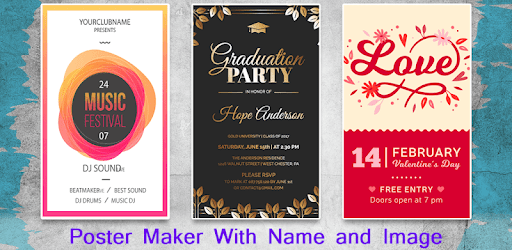
Poster Maker With Name and Image is an Android app developed and published by DK Technologies at Google Play Store on Jul 23, 2018 for Android users. Poster Maker With Name and Image is so popular that it has gained 3267659 installs so far and growing.
Looking for an easy and efficient way to create stunning posters? Look no further than Poster Maker With Name and Image! This incredible app is designed to help you unleash your creativity and design eye-catching posters in a matter of minutes. Whether you need a poster for a special event, a promotional campaign, or simply want to add a personal touch to your social media posts, this app has got you covered.
One of the standout features of Poster Maker With Name and Image is its user-friendly interface. Even if you have no prior experience in graphic design, you'll find this app incredibly easy to navigate. With just a few taps, you can select your preferred background, add text, insert images, and customize your poster to perfection.
Forget about complicated design software or the need to hire a professional designer. With Poster Maker With Name and Image, you have all the tools you need right at your fingertips. The intuitive controls and simple layout make it a breeze to create professional-looking posters, even if you're a complete beginner.
One of the things that sets Poster Maker With Name and Image apart from other similar apps is its wide range of options. With an extensive collection of background options and templates, you'll never run out of ideas for your posters. Whether you're looking for something elegant, playful, or bold, this app has the perfect design elements to suit your needs.
But that's not all. Poster Maker With Name and Image also allows you to add your own images, giving you even more creative freedom. Simply upload your favorite photos, logos, or illustrations, and watch as your poster comes to life.
One of the biggest frustrations when using apps is the constant interruption of annoying ads. Luckily, Poster Maker With Name and Image understands the importance of a seamless user experience. Say goodbye to irritating interruptions, as this app is completely ad-free. Focus on your creativity without any distractions and enjoy a smooth and uninterrupted design process.
At Poster Maker With Name and Image, we believe in supporting and encouraging our users. We appreciate your feedback and are constantly working to improve our app based on your suggestions. Your wish for more background options and templates has been heard, and we are committed to continuously expanding our collection to meet your needs.
We also understand the importance of community support. Good apps should be encouraged, and we are grateful for your support and love for Poster Maker With Name and Image. Join our growing community of satisfied users and let your creativity shine.
Absolutely! Poster Maker With Name and Image allows you to easily upload and incorporate your own images into your posters. Add a personal touch to your designs and make them truly unique.
Yes, Poster Maker With Name and Image is available for free. You can enjoy all the features and design options without any hidden costs or in-app purchases.
No, there is no watermark added to the posters created with Poster Maker With Name and Image. Your designs will be clean and professional, ready to be shared or printed.
Definitely! Poster Maker With Name and Image allows you to easily customize the text in your posters. Choose from a variety of fonts, sizes, and colors to make your message stand out.
Yes, Poster Maker With Name and Image is available for both Android and iOS devices. You can download it from the Google Play Store or the Apple App Store.
Yes, you can run Poster Maker With Name and Image on PC, but first, you will need emulator software installed on your Windows or MAC, which you can download for free. In the below video, you will find Poster Maker With Name and Image in action. Before you install the emulator, check out the minimum and recommended system requirements to run it seamlessly. They may change depending on which version of the emulator you choose. Therefore, we recommend you download the latest version of the emulator. Below you will find three free Android emulators that we have shortlisted based on their popularity:
Up to date graphics drivers from Microsoft or the chipset vendor.
Storage: 1 GB available under installation path, 1.5GB available hard drive space
Internet: Broadband Internet connection
Regardless of which Android emulator you install, the steps to install, configure, and running the Poster Maker With Name and Image app on PC are the same.