Published by Igor Apps
Updated November 23, 2025
English King James Bible with Ang Biblia (Tagalog TLAB)
| Version | 5.9.3 |
| Size | 60.0 MB |
| What's New | We fixed bugs and improved the performance |
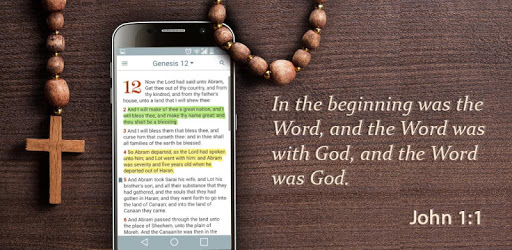
English Tagalog Bible is an Android app developed and published by Igor Apps at Google Play Store on Jul 19, 2016 for Android users. English Tagalog Bible is so popular that it has gained 100000 installs so far and growing.
Looking for a bilingual Bible that brings you closer to God's word in both English and Tagalog? The English Tagalog Bible is an excellent choice. This resource is perfect for anyone who wants to delve deeper into Scripture while enjoying the beauty of both languages.
The English Tagalog Bible is very user-friendly, making it ideal for beginners and advanced users alike. Whether you prefer tapping through the pages or searching for specific terms, this Bible makes navigation a breeze. You don't need to be highly proficient in either language to benefit from its features.
If you often find yourself studying for Sabbath School lessons, this Bible can enhance your experience. The bilingual feature allows you to switch between English and Tagalog seamlessly. Not sure what a word means in English? No worries, the Tagalog translation is right there to help you understand better.
One of the standout features of the English Tagalog Bible is its portability. Carry it with you wherever you go, and use it anytime you need inspiration or guidance. This Bible fits neatly into your daily life, making it a reliable companion on your spiritual journey.
The bilingual aspect isn't just a gimmick; it's deeply beneficial. For instance, if you're a native Tagalog speaker but want to improve your English, this Bible acts as a helpful tool. On the flip side, if you're an English speaker looking to learn Tagalog, you'll find it equally useful.
Some might find it helpful to have the option to hide one translation and reveal it when needed. A side-by-side or parallel view can also make reading easier and more enjoyable. While the current version is fantastic, these additional features could make it even better.
This Bible stays true to the message, providing accurate and trustworthy translations. It's committed to maintaining the integrity of God's word while offering the convenience of bilingual text. Whether you're reading Matthew 1:19 or another passage, you can rely on this Bible to guide you correctly.
Imagine sharing this resource with someone who struggles with understanding certain aspects of God's word. This Bible can be a wonderful tool for those wishing to explore their faith deeper. Whether helping a physical therapist from Manila or a church friend, this dual-language Bible can bridge gaps in understanding.
Imagine having a bookmark feature to easily pick up where you left off. This could save you time and keep you focused on your spiritual reading. Also, having a history or recently read pages feature would further enhance your experience.
One of the most efficient features of the English Tagalog Bible is that it can be used offline. No internet? No problem. This makes it perfect for those moments when you're on the go but still want to remain spiritually connected.
Searching for specific phrases or verses is straightforward, even if you can't remember the exact wording. This is a handy feature for anyone who's ever found themselves stumped, trying to recall a particular gospel message or passage.
At the core, this Bible helps deepen your understanding of the Lord's teachings. It's a source of grace, love, wisdom, and hope, presented in a way that's easy to understand. No matter your level of biblical knowledge, this Bible offers something valuable to your spiritual journey.
Yes, you can run English Tagalog Bible on PC, but first, you will need emulator software installed on your Windows or MAC, which you can download for free. In the below video, you will find English Tagalog Bible in action. Before you install the emulator, check out the minimum and recommended system requirements to run it seamlessly. They may change depending on which version of the emulator you choose. Therefore, we recommend you download the latest version of the emulator. Below you will find three free Android emulators that we have shortlisted based on their popularity:
Up to date graphics drivers from Microsoft or the chipset vendor.
Storage: 1 GB available under installation path, 1.5GB available hard drive space
Internet: Broadband Internet connection
Regardless of which Android emulator you install, the steps to install, configure, and running the English Tagalog Bible app on PC are the same.