Published by Live Earth Camera Studio
Updated October 16, 2025
Explore live world webcams or earth cam & see world with the eye of world cam
| Version | 1.1.2 |
| Size | 9.3 MB |
| What's New | Minor bug fixes and improvements. Install or update to the newest version to check it out! |
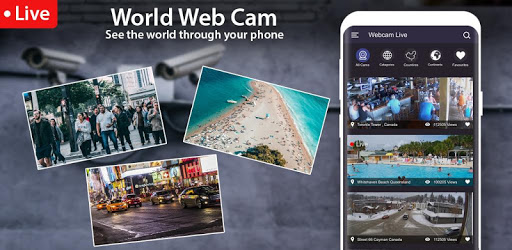
World Live Camera Viewer : Webcam, Earth cam is an Android app developed and published by Live Earth Camera Studio at Google Play Store on May 28, 2019 for Android users. World Live Camera Viewer : Webcam, Earth cam is so popular that it has gained 10000 installs so far and growing.
Welcome to World Live Camera Viewer: Webcam, Earth Cam, a fantastic app that lets you explore the world right from your device. This app is simple to use and offers a plethora of features that make it an outstanding choice for all camera enthusiasts. Let's dive into why this app stands out.
One of the primary reasons people love World Live Camera Viewer: Webcam, Earth Cam is its simplicity. The app is designed to be user-friendly, so you can start exploring live cameras around the world without any hassle. Whether you're tech-savvy or a beginner, you'll find this app easy to navigate and enjoy.
Imagine being able to see what’s happening in cities across the globe in real-time. With World Live Camera Viewer: Webcam, Earth Cam, you can do just that. Whether you're curious about the weather in a different city or just want to see what’s happening on busy streets, this app has got you covered.
With webcams located across various countries, the World Live Camera Viewer: Webcam, Earth Cam allows you to have a global perspective right at your fingertips. This Earth cam feature enables you to explore different places without leaving your home, giving you a virtual window into the world.
If you enjoy sharing moments with loved ones, this app is perfect for you. You can use Chromecasts to display live camera feeds directly on your television, making it easier to enjoy with others. It’s a great way to share interesting cityscapes or scenic views with family and friends.
Not only does World Live Camera Viewer: Webcam, Earth Cam let you see beautiful landscapes and cityscapes, but it is also handy for keeping up with the weather in different regions. Whether you are planning a trip or just want to check the weather where your relatives live, this app is a helpful tool.
The app offers a variety of views, from bustling streets to serene landscapes. You can observe different animals in their natural habitats and enjoy stunning buildings from afar. The diverse range of cameras ensures that there is always something interesting to look at.
Many users have found World Live Camera Viewer: Webcam, Earth Cam to be a brilliant app. Its versatility, ease of use, and wide range of views make it highly recommended for everyone. Whether you're curious about different places or just enjoy watching live feeds, this app is sure to meet your needs.
Don't miss out on the chance to explore the world with World Live Camera Viewer: Webcam, Earth Cam. Discover new places, enjoy live views, and share your experience with others today!
Yes, you can run World Live Camera Viewer : Webcam, Earth cam on PC, but first, you will need emulator software installed on your Windows or MAC, which you can download for free. In the below video, you will find World Live Camera Viewer : Webcam, Earth cam in action. Before you install the emulator, check out the minimum and recommended system requirements to run it seamlessly. They may change depending on which version of the emulator you choose. Therefore, we recommend you download the latest version of the emulator. Below you will find three free Android emulators that we have shortlisted based on their popularity:
Up to date graphics drivers from Microsoft or the chipset vendor.
Storage: 1 GB available under installation path, 1.5GB available hard drive space
Internet: Broadband Internet connection
Regardless of which Android emulator you install, the steps to install, configure, and running the World Live Camera Viewer : Webcam, Earth cam app on PC are the same.