Published by Wegmans Food Markets, Inc.
Updated September 24, 2025
You asked and we listened! Super-fast help – in a super simple app!
| Version | 29.53.1 |
| Size | 122.2 MB |
| What's New | Bug fixes and performance improvements |
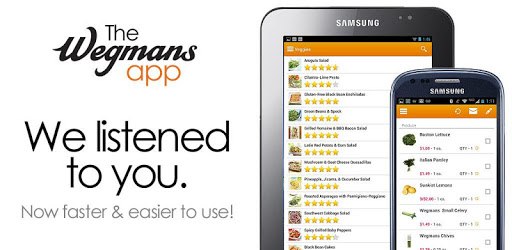
Wegmans is an Android app developed and published by Wegmans Food Markets, Inc. at Google Play Store on Jan 2, 2013 for Android users. Wegmans is so popular that it has gained 2289536 installs so far and growing.
Wegmans is not just a grocery store; it’s a seamless shopping experience available right at your fingertips. The app offers a range of features that make shopping convenient, efficient, and enjoyable. If you're looking for a hassle-free way to do your grocery shopping, stay tuned as we dive into what makes Wegmans truly special.
With Wegmans, you can easily create a shopping list as you think of items you need. This feature allows for a more planned and less impulsive shopping trip. Imagine saving lists for holidays or even adding items like milk and bread to all your lists in just a few clicks!
The app makes it incredibly easy to find items in the store. You can use the in-store list feature to know exactly where to find each item. This is particularly helpful if you're in a rush or if walking long distances is a challenge for you. Knowing where everything is saved a lot of time and effort.
Changing your pickup method or opting for delivery is a breeze with Wegmans. The app is designed to switch between delivery and pickup with a few simple taps. Whether you want to pick up your groceries yourself or have them delivered, Wegmans has got you covered.
Wegmans offers a dependable delivery service that makes grocery shopping worry-free. The app ensures that you can order groceries and have them delivered directly to your door. This service has been particularly beneficial to those who may find it difficult to navigate large stores.
The app is straightforward to use and highly intuitive. Whether you are tech-savvy or not, you will find it easy to navigate through its features. For instance, creating a shopping list, switching pickup methods, or adding and removing items from your cart is made simple.
Although some might prefer to use Instacart for their grocery needs, the Wegmans app stands out with its own unique benefits. You can even take advantage of Instacart Express through the Wegmans app, making it even more economical and straightforward to shop from one place.
The app also promises high-quality service, mirrored by the helpfulness and kindness of store employees. Whether it's assisting with delivery or aiding in-store navigation, the team at Wegmans is always ready to help.
One of the standout features of Wegmans is the ability to save lists for future use, including lists tailored for holiday shopping. This feature is a time-saver and ensures you never forget essential items. Moreover, it keeps a running list of groceries, making it easy to add items throughout the week until you’re ready to place your order.
While the app is highly functional, there are minor tweaks that could make it even better. For instance, it would be handy if saved list items were automatically added to the cart with a single click. Additionally, making the “add to cart” and “delete from list” buttons more distinguishable would help avoid accidental removals.
If you're debating between various grocery apps, Wegmans stands out for its unique features and exceptional service. The app is not without its minor issues, but the convenience and reliability far outweigh the cons. Plus, with the added benefits of list reuse and easy navigation, your grocery shopping is set to be a hassle-free experience.
Using Wegmans means more time saved, less stress, and a much more enjoyable grocery shopping experience overall.
Yes, you can run Wegmans on PC, but first, you will need emulator software installed on your Windows or MAC, which you can download for free. In the below video, you will find Wegmans in action. Before you install the emulator, check out the minimum and recommended system requirements to run it seamlessly. They may change depending on which version of the emulator you choose. Therefore, we recommend you download the latest version of the emulator. Below you will find three free Android emulators that we have shortlisted based on their popularity:
Up to date graphics drivers from Microsoft or the chipset vendor.
Storage: 1 GB available under installation path, 1.5GB available hard drive space
Internet: Broadband Internet connection
Regardless of which Android emulator you install, the steps to install, configure, and running the Wegmans app on PC are the same.