Published by Sports Fans Coalition
Updated January 26, 2024
A public service to Americans offer local broadcast signals in select markets.
| Version | 1.24.9 |
| Size | 33.9 MB |
| What's New | Performance bug fixes |
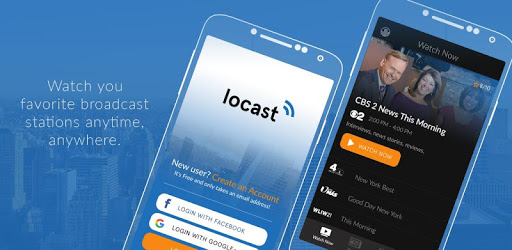
Locast is an Android app developed and published by Sports Fans Coalition at Google Play Store on Jul 25, 2018 for Android users. Locast is so popular that it has gained 5000 installs so far and growing.
Are you tired of missing out on your favorite local channels because of weak indoor signals or expensive cable subscriptions? Look no further than Locast, the app that brings you all the basic local channels for news, events, and information, and so much more. Locast is here to revolutionize the way you watch TV, giving you access to channels that cable networks don't show and old TV shows that you love.
Locast is not just another streaming app; it's a game-changer. With Locast, you can enjoy a wide range of local channels without the need for an expensive cable subscription or installing an air antenna on your roof. Say goodbye to the frustration of weak signals and hello to uninterrupted entertainment.
Whether you're a fan of local news, live events, or classic TV shows, Locast has got you covered. With its extensive channel lineup, you'll never miss out on the content you love. From the latest MCU/DC films to beloved shows like Soap and Designing Women, Locast brings you a diverse range of entertainment options.
Locast offers a seamless streaming experience that caters to your needs. Here's why users are raving about this app:
Locast is the perfect solution for those who want to enjoy local TV without the hassle and expense of traditional cable subscriptions. With Locast, you can finally cast your favorite channels to your TV and experience the joy of hearing audio that matches the visuals.
Join the thousands of satisfied users who have made Locast their go-to app for local TV. Say goodbye to cable and hello to a more affordable and convenient way of watching your favorite shows.
1. How do I cancel my subscription?
To cancel your subscription, simply log in to the Locast website and go to your profile. You'll find the option to cancel your subscription there.
2. What should I do if the app freezes and doesn't play despite subscribing?
If you're experiencing freezing issues, make sure you have confirmed your email. Check your inbox for any confirmation emails from Locast.
3. Can I use Locast on multiple devices?
Absolutely! Locast is available on laptops, TVs, and phones. You can enjoy your favorite local channels on all your devices.
4. How does Locast compare to cable or satellite TV?
Locast is an excellent alternative to cable or satellite TV. It offers a wide range of local channels at an affordable price, making it a cost-effective choice for entertainment.
5. Can I record shows with Locast?
While Locast doesn't offer built-in recording features, you can pair it with Stremium DVR for recording your favorite shows.
6. Is Locast available in my area?
Locast is continuously expanding its coverage. Visit the Locast website to check if it's available in your area.
Don't miss out on the incredible benefits of Locast. Download the app today and start enjoying local TV like never before!
Yes, you can run Locast on PC, but first, you will need emulator software installed on your Windows or MAC, which you can download for free. In the below video, you will find Locast in action. Before you install the emulator, check out the minimum and recommended system requirements to run it seamlessly. They may change depending on which version of the emulator you choose. Therefore, we recommend you download the latest version of the emulator. Below you will find three free Android emulators that we have shortlisted based on their popularity:
Up to date graphics drivers from Microsoft or the chipset vendor.
Storage: 1 GB available under installation path, 1.5GB available hard drive space
Internet: Broadband Internet connection
Regardless of which Android emulator you install, the steps to install, configure, and running the Locast app on PC are the same.