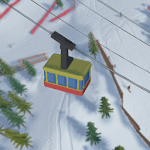
Grand Mountain Adventure for PC

Grand Mountain Adventure for PC

Published by Toppluva AB

Updated September 20, 2026

An open world skiing adventure.

What's New

Version1.229
Size504.9 MB
What's NewUpdate billing library to 7.0Minor bug fixes and optimizationsUpdate target SDK to version 33

Grand Mountain Adventure Screenshots

Grand Mountain Adventure PC screenshot

About Grand Mountain Adventure For PC

Grand Mountain Adventure is an Android app developed and published by Toppluva AB at Google Play Store on Mar 27, 2019 for Android users. Grand Mountain Adventure is so popular that it has gained 14064621 installs so far and growing.

Experience the Thrill of the Mountains with Grand Mountain Adventure

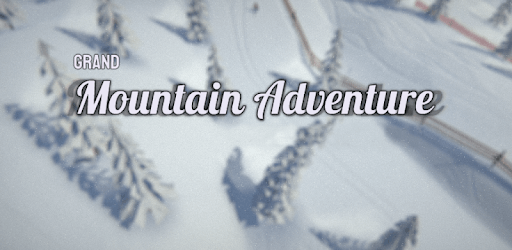
Are you ready for an adventure like no other? Look no further than Grand Mountain Adventure, the game that will transport you to breathtaking snowy peaks and provide you with hours of excitement and relaxation. Strap on your skis and get ready to explore the vast open world of this incredible mobile game.

Uncover Hidden Challenges

Grand Mountain Adventure is not your average skiing game. It offers a unique twist with hidden challenges waiting to be discovered. As you navigate through the game, keep an eye out for these hidden gems that will test your skills and add an extra layer of excitement to your experience. It's like a treasure hunt on the slopes!

A Game That Keeps on Giving

One of the standout features of Grand Mountain Adventure is its longevity. Players have reported playing this game for over a year and still finding it absolutely amazing. With multiple mountains to conquer and the fluidity of gameplay, you'll find yourself coming back for more time and time again. The developers have truly created a game that stands the test of time.

An Unfortunate Setback

While Grand Mountain Adventure offers an incredible experience, there have been some setbacks that have left players disappointed. The transition to a paid game resulted in the loss of progress for some players, which is undeniably frustrating. This incident has left some questioning whether the game is still worth the purchase. However, it's important to note that the overall consensus is that Grand Mountain Adventure is still one of the best games out there.

A Therapeutic Escape

One of the most common praises for Grand Mountain Adventure is its ability to provide a relaxing and almost therapeutic experience. Many players have found solace in the game's serene atmosphere and the joy of playing it with friends and family. While more free mountains would be appreciated, players are still pleased with the overall experience and the variety of maps and challenges available.

Constant Improvements

Grand Mountain Adventure has come a long way since its initial release. The developers have put in a tremendous amount of effort to improve the game, and it shows. Players who purchased the game years ago have attested to its worth, and even now, it continues to impress. With regular updates and enhancements, Grand Mountain Adventure is a game that keeps on giving.

Two Small Suggestions

While Grand Mountain Adventure is a fantastic game, there are a couple of minor suggestions that players have voiced. Some players wish for a closer camera angle to truly immerse themselves in the action. Additionally, the open-world nature of the game has left some players longing for hidden lore or secrets to uncover. These suggestions, however, do not detract from the overall enjoyment of the game.

Frequently Asked Questions

1. Is Grand Mountain Adventure worth the purchase?

Despite a setback in progress loss, Grand Mountain Adventure is still considered one of the best games available. Its longevity, stunning visuals, and addictive gameplay make it a worthwhile investment.

2. Are there any free mountains in the game?

While more free mountains would be appreciated, players still find satisfaction in the variety of maps and challenges available. The game offers a great balance between free content and paid options.

3. Can I play Grand Mountain Adventure with friends?

Absolutely! Grand Mountain Adventure provides an enjoyable experience for solo players as well as those who want to play with friends and family. The game's relaxing atmosphere and cooperative gameplay make it a great choice for shared adventures.

4. Are there regular updates for Grand Mountain Adventure?

Yes, the developers of Grand Mountain Adventure are dedicated to improving the game and providing players with new content. Regular updates and enhancements ensure that the game stays fresh and exciting.

5. Can I expect more hidden challenges in the future?

While the game already offers hidden challenges, the developers are always looking for ways to enhance the player experience. It's possible that future updates may introduce even more hidden gems to discover on the slopes.

Overall, Grand Mountain Adventure is a game that delivers on its promise of an exhilarating skiing experience. With its hidden challenges, stunning visuals, and addictive gameplay, it's no wonder players consider it one of the best games they've ever played. So, grab your skis and embark on an adventure you won't soon forget!

Can I run Grand Mountain Adventure on PC?

Yes, you can run Grand Mountain Adventure on PC, but first, you will need emulator software installed on your Windows or MAC, which you can download for free. In the below video, you will find Grand Mountain Adventure in action. Before you install the emulator, check out the minimum and recommended system requirements to run it seamlessly. They may change depending on which version of the emulator you choose. Therefore, we recommend you download the latest version of the emulator. Below you will find three free Android emulators that we have shortlisted based on their popularity:

How to Install Grand Mountain Adventure on Windows PC

BlueStacks

Minimum
  • OS: Microsoft Windows 7 and above.
  • Processor: Intel or AMD Processor.
  • RAM: Your PC must have at least 4GB of RAM. (Note that having 4GB or more disk space is not a substitute for RAM)
  • Storage: 5GB Free Disk Space.
  • You must be an Administrator on your PC.
Recommended:
  • OS: Microsoft Windows 10
  • Processor: Intel or AMD Multi-Core Processor with Single Thread benchmark score > 1000.
  • Graphics: Intel/Nvidia/ATI, Onboard or Discrete controller with benchmark score >= 750.
  • Please ensure Virtualization is enabled on your PC/Laptop.
  • RAM: 8GB or higher
  • Storage: SSD (or Fusion/Hybrid Drives)
  • Internet: Broadband connection to access games, accounts and related content.

Up to date graphics drivers from Microsoft or the chipset vendor.

  • To start with, download Bluestacks from its official website. The latest version of BluesStacks is v 5, and it is around 400 MB.
  • Once the download is done, click on the Bluestacks set up file to install it on your Windows PC. Follow the on-screen instructions and install it accordingly.
  • The next step is to launch the emulator using the desktop shortcut and sign in using your Google account.
  • Now, head over to Bluestacks home screen and click on the Google Play Store icon.
  • Hit the search bar in Google Play and search for Grand Mountain Adventure.
  • Install Grand Mountain Adventure from the Play Store by clicking the Install option, which completes downloading of Grand Mountain Adventure on PC.

NoxPlayer

Minimum
  • Operating System: Windows XP SP3, Windows Vista, Windows 7, Windows 8, Windows 10, and DirectX 9.0c
  • Processor: At least dual-core processor, both Intel, and AMD are OK
  • Video: Supports Open GL 2.0 or above
  • Memory: 1.5 GB RAM
Recommended
  • Operating System: Windows 7, Windows 8, Windows 10
  • Processor: Multiple core processors which support VT-x or AMB-V Virtualization Technology, better performance with this function enabled
  • Video: The higher performance, the better
  • Memory: 4 GB RAM

Storage: 1 GB available under installation path, 1.5GB available hard drive space

Internet: Broadband Internet connection

  • Download NoxPlayer from the official website. The latest version of NoxPlayer is v 3, and it is around 600 MB.
  • Now install the emulator using the downloaded setup file. Just go through the on-screen instructions and install NoxPlayer on your computer or laptop.
  • After the installation process, launch the Nox Android emulator and log in using your Google account when it asks you.
  • Click on the Google Play Store icon and head over to the search bar to search Grand Mountain Adventure. Once found, click on the Install button to install Grand Mountain Adventure for PC.
  • If you do not find Grand Mountain Adventure on Google Play Store or if you want to skip logging in to Google, you can sideload APK (download the .APK file from this page and open it with NoxPlayer).
  • Launch Grand Mountain Adventure from home-screen and start playing it on PC right away!

MEmu

Minimum
  • 2 cores x86/x86_64 Processor (Intel or AMD CPU)
  • WinXP SP3 / Win7 / Win8 / Win10 (Not recommended to run on Server/Enterprise)
  • Latest Windows DirectX 11 / Graphics driver with OpenGL 2.0
  • Hardware Virtualization Technology (Intel VT-x/AMD-V) shall be enabled in BIOS
  • 2GB of RAM (4GB for x64 system)
  • 5GB of hard disk free space
Recommended
  • OS: Microsoft Windows 10 with VT Enabled
  • CPU: Single Thread PassMark score > 1500 (Intel/AMD Multi-Core).
  • Graphics: Intel/Nvidia/ATI, Onboard or Discrete controller with PassMark score > 750.
  • Latest Windows DirectX 11 / Graphics driver with OpenGL 4.5 or higher
  • RAM: 8GB or higher
  • HDD: SSD, 10GB of hard disk free space
  • Internet: Broadband connection with low latency for FPS games
  • Download MEmu Play from the official website. The latest version of NoxPlayer is v 7.5.
  • When the download is completed, install the MEmu emulator on your PC. Follow the on-screen instructions and keep on clicking the Next button until the final step.
  • Now, using the desktop shortcut, look for the MEmu Play emulator and launch it. Once done, it will ask you to log in using your Google account, proceed with the same.
  • MEmu Play will ask you to log in using your Google account. When you log in, it will sync your Google account to MEmu Play. Launch the Google Play Store by clicking on the icon and search for Grand Mountain Adventure.
  • Click on the Install button once you find Grand Mountain Adventure from the search results. You can also sideload APK (download the .APK file from this page and open it with MEmu) if you want to skip above step.
  • After the installation of Grand Mountain Adventure, you're all set to use the app on PC!

Regardless of which Android emulator you install, the steps to install, configure, and running the Grand Mountain Adventure app on PC are the same.
Download Grand Mountain Adventure For PC