Published by Tesseract Mobile
Updated November 7, 2026
Play the #1 solitaire card game collection for free! Made in the U.S.A 🇺🇸
| Version | 18.4.1(1603152) |
| Size | 52.2 MB |
| What's New | "A new version of Solitaire Super Pack is here! Here’s what’s new:Customize your game with additional card facesGeneral optimizations & stability improvementsThanks for playing Solitaire Super Pack! Have questions or feedback? Email us at [email protected] for fast & friendly support." |
Solitaire Free Pack is an Android app developed and published by Tesseract Mobile at Google Play Store on Jan 29, 2010 for Android users. Solitaire Free Pack is so popular that it has gained 8536332 installs so far and growing.
If you're a fan of solitaire games, then Solitaire Free Pack is the perfect app for you. With a wide variety of games to choose from and an easy-to-use interface, this app provides endless hours of entertainment. Whether you're a beginner or an experienced player, there's something for everyone in this free pack.
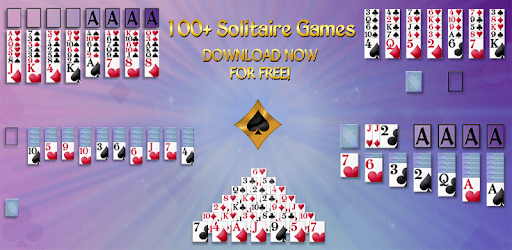
One of the highlights of Solitaire Free Pack is the vast selection of games available. From classic solitaire to unique variations, you'll never run out of options. Whether you prefer Klondike, Spider, Pyramid, or any other solitaire game, this app has it all. Each game offers a different set of challenges and strategies, keeping you engaged and entertained.
Another great feature of Solitaire Free Pack is the ability to customize the visual options. You can choose from a variety of card faces, backgrounds, and animations to create a personalized gaming experience. Whether you prefer a classic look or something more vibrant and modern, this app allows you to tailor the visuals to your liking.
The user interface of Solitaire Free Pack is designed to be intuitive and easy to navigate. With simple controls and clear instructions, even beginners can quickly learn how to play different solitaire games. The app provides a seamless and enjoyable gaming experience, allowing you to focus on the game itself without any distractions.
While some apps bombard you with ads after every game, Solitaire Free Pack takes a different approach. The developers understand that ads can be annoying, so they have minimized the number of ads in the app. This means you can enjoy uninterrupted gameplay without constant interruptions, allowing you to fully immerse yourself in the solitaire experience.
To remove the side bar, simply tap an empty space on the screen. This will make the bar disappear along with the row of buttons along the bottom. If you want to bring them back, just tap again.
No, Solitaire Free Pack has minimized the number of ads in the app to provide uninterrupted gameplay. You won't have to worry about ads popping up after every game.
Absolutely! Solitaire Free Pack allows you to customize the card faces, backgrounds, and animations to create a personalized gaming experience. You can choose from a variety of options to suit your preferences.
Yes, each solitaire game in the pack offers a different level of difficulty. Whether you're a beginner or an expert, you'll find games that match your skill level. Challenge yourself and improve your solitaire skills with the diverse selection of games available.
Yes, the developers of Solitaire Free Pack are committed to providing the best user experience. They regularly update the app to fix any glitches and improve performance. You can expect a smooth and enjoyable gaming experience with each update.
In conclusion, Solitaire Free Pack is a must-have app for solitaire enthusiasts. With its diverse selection of games, customizable visual options, user-friendly interface, and minimal ads, it offers a fantastic solitaire experience. Download the app today and start enjoying hours of fun and challenging gameplay!
Yes, you can run Solitaire Free Pack on PC, but first, you will need emulator software installed on your Windows or MAC, which you can download for free. In the below video, you will find Solitaire Free Pack in action. Before you install the emulator, check out the minimum and recommended system requirements to run it seamlessly. They may change depending on which version of the emulator you choose. Therefore, we recommend you download the latest version of the emulator. Below you will find three free Android emulators that we have shortlisted based on their popularity:
Up to date graphics drivers from Microsoft or the chipset vendor.
Storage: 1 GB available under installation path, 1.5GB available hard drive space
Internet: Broadband Internet connection
Regardless of which Android emulator you install, the steps to install, configure, and running the Solitaire Free Pack app on PC are the same.