Published by Tapinator, Inc. (Ticker: TAPM)
Updated November 25, 2026
Howdy! Are you ready to get rich farming!?
| Version | 1.6 |
| Size | 35.2 MB |
| What's New | -Controls improved-Tutorial improved-Issues resolved-Machines automatically start on reaching the field |
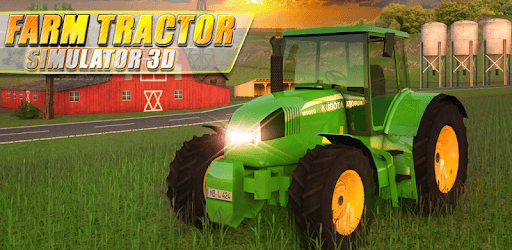
Farm Tractor Simulator 3D is an Android app developed and published by Tapinator, Inc. (Ticker: TAPM) at Google Play Store on Apr 1, 2015 for Android users. Farm Tractor Simulator 3D is so popular that it has gained 5000000 installs so far and growing.
Are you ready to experience the life of a farmer right from your own home? Meet Farm Tractor Simulator 3D! This game lets you dive into the exciting world of farming and manage your own virtual farm. You get to drive a tractor, plant crops like canola, wheat, or barley, and even harvest them to sell. It's a thrilling, educational, and fun experience all in one.
One of the most exciting parts of Farm Tractor Simulator 3D is driving the tractor. Imagine yourself steering a powerful machine across vast fields, planting seeds, and tending to your crops. The game offers an authentic driving experience that lets you feel like a real farmer. It's slow-paced in some areas, but that adds to the authenticity, giving you time to plan and manage your farm properly.
Farm Tractor Simulator 3D lets you plant a variety of crops such as canola, wheat, and barley. Once you've planted your seeds, you’ll need to take care of them and wait for them to grow. When it's harvest time, the excitement really begins. Use your tractor to gather your crops and prepare them for sale. It's a rewarding process that mirrors real-life agriculture.
After harvesting, it’s time to sell your produce. Farm Tractor Simulator 3D includes different local markets where you can take your crops. The market stations and the mill are some of the places where you can sell your goods. This adds another layer of strategy to the game as you decide where to sell for the best profit. It’s a great way to learn about the agricultural supply chain.
Farm Tractor Simulator 3D is not just about driving and harvesting. It’s also about managing your farm efficiently. You need to plan when and where to plant, how to take care of your crops, and when is the best time to harvest and sell them. The game gives you a sense of ownership and responsibility, making it a fantastic educational tool.
The fun doesn’t stop there. Farm Tractor Simulator 3D is always improving with new updates. Players are eagerly waiting for these updates, which promise to enhance the graphics of the vehicles and add new features. These updates ensure that the game stays fresh and exciting, keeping you engaged for hours of farming fun.
Whether you’re playing on your mobile device or on a laptop, Farm Tractor Simulator 3D offers an excellent experience. The intuitive controls and engaging gameplay make it perfect for passing time. It’s not just a game for kids; adults will find joy and relaxation in managing their virtual farm too.
Despite having one small bug like the map not always showing your location, the game is still incredibly immersive and fun. You may find yourself wandering around like in a maze, but that just adds to the adventure. The game's charm and the fun tasks you get to do make it an enjoyable experience from start to finish.
So, gear up and start your farming adventure today with Farm Tractor Simulator 3D. It's an engaging, educational, and fun way to experience farming like never before.
Yes, you can run Farm Tractor Simulator 3D on PC, but first, you will need emulator software installed on your Windows or MAC, which you can download for free. In the below video, you will find Farm Tractor Simulator 3D in action. Before you install the emulator, check out the minimum and recommended system requirements to run it seamlessly. They may change depending on which version of the emulator you choose. Therefore, we recommend you download the latest version of the emulator. Below you will find three free Android emulators that we have shortlisted based on their popularity:
Up to date graphics drivers from Microsoft or the chipset vendor.
Storage: 1 GB available under installation path, 1.5GB available hard drive space
Internet: Broadband Internet connection
Regardless of which Android emulator you install, the steps to install, configure, and running the Farm Tractor Simulator 3D app on PC are the same.