Published by Real Free Soccer
Updated October 1, 2026
Become a Soccer Superstar while you score your way to the top!
| Version | 0.3.58 |
| Size | 173.1 MB |
| What's New | Add new seasonsNew events update : Star Carnival Challenge & Retro JigsawUI & localized text improvementsBug fix |
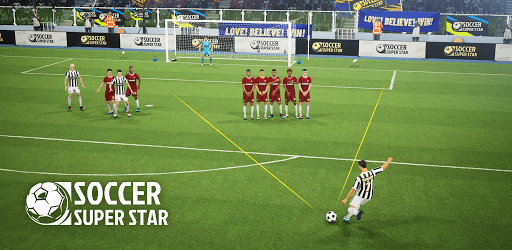
Soccer Super Star is an Android app developed and published by Real Free Soccer at Google Play Store on Sep 28, 2020 for Android users. Soccer Super Star is so popular that it has gained 449408457 installs so far and growing.
Are you a soccer fan looking for a game that will keep you entertained for hours? Look no further than Soccer Super Star! This game has exceeded all expectations and has quickly become a favorite among players of all ages. With its addictive gameplay and impressive graphics, it's no wonder why this game has gained such popularity.
Upon starting the game, you'll be pleasantly surprised by how engaging it is. The gameplay is so immersive that you can easily lose track of time. One user even mentioned playing for a whopping 2 hours without realizing it! That's how captivating Soccer Super Star can be.
Whether you prefer playing online or offline, this game has got you covered. You can enjoy it anytime, anywhere, making it the perfect companion for those long commutes or lazy afternoons. The ability to play offline ensures that you never have to worry about a stable internet connection.
As you progress through the game, you'll face various challenges that will test your skills. One user mentioned reaching level 2840, which is an impressive feat. However, they expressed disappointment that they couldn't continue to the next season as easily as they had hoped. This shows that Soccer Super Star offers a challenge that keeps players engaged and motivated to improve.
Another user mentioned that they were pleasantly surprised by how much fun the game was, especially considering their real-life experience playing soccer. They found it to be even more enjoyable than they had initially expected. This just goes to show how Soccer Super Star manages to capture the essence of the sport and deliver an exciting experience.
While the game has received overwhelmingly positive reviews, some users have shared a few suggestions for improvement. One user mentioned that they would love to see corner kicks added when the defender or goalkeeper kicks the ball out. This small addition would enhance the realism of the game and make it even more enjoyable.
Additionally, some users found the game to be a bit too easy, with opponents not being as active as they would have liked. They suggested increasing the difficulty level to provide a greater challenge. However, despite these minor suggestions, users still praised Soccer Super Star for its overall quality and addictive gameplay.
Yes, you can enjoy Soccer Super Star both online and offline, allowing you to play anytime, anywhere.
Absolutely! Soccer Super Star is suitable for players of all ages, from young soccer enthusiasts to seasoned fans.
Yes, there are ads in the game. However, they do not hinder the overall gameplay experience.
Yes, you have the option to create your main character, choose their country, and even become the captain of your team.
Yes, Soccer Super Star is available on various devices, including smartphones and tablets, ensuring that you can enjoy the game on your preferred platform.
Overall, Soccer Super Star is a game that delivers on its promise of providing a fun and addictive soccer experience. With its engaging gameplay, impressive graphics, and the ability to play online or offline, it's no wonder why players are raving about it. So, lace up your virtual boots and get ready to score some goals in Soccer Super Star!
Yes, you can run Soccer Super Star on PC, but first, you will need emulator software installed on your Windows or MAC, which you can download for free. In the below video, you will find Soccer Super Star in action. Before you install the emulator, check out the minimum and recommended system requirements to run it seamlessly. They may change depending on which version of the emulator you choose. Therefore, we recommend you download the latest version of the emulator. Below you will find three free Android emulators that we have shortlisted based on their popularity:
Up to date graphics drivers from Microsoft or the chipset vendor.
Storage: 1 GB available under installation path, 1.5GB available hard drive space
Internet: Broadband Internet connection
Regardless of which Android emulator you install, the steps to install, configure, and running the Soccer Super Star app on PC are the same.