Terra Craft: Build Your Dream Block World for PC

Terra Craft: Build Your Dream Block World for PC

Published by Survival, Explore and Craft Games

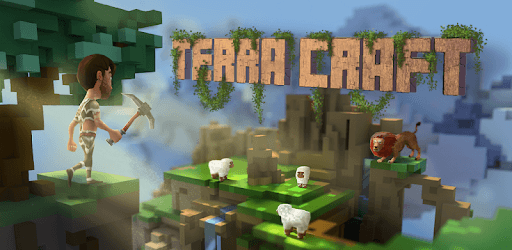
New Crafting & Survival Game for Free! Explore & Build & Craft in Cubes Worlds!

What's New

Version1.7.2
Size66.7 MB
What's NewWhat’s new in 1.7:- Quests. Complete quests in Survival mode and obtain useful items as a reward;- Console commands. Use commands in Creative mode to change time, teleport to another place or enchant items instantly. Type /help in the console to find out more about commands;- Map. Displays a terrain around a player;- Sign. Place tips and useful descriptions wherever you want in your world;- Elephant. New pet that can accompany you in journey. Tame an elephant and ride around your world.

Terra Craft: Build Your Dream Block World Screenshots

Terra Craft: Build Your Dream Block World PC screenshot

About Terra Craft: Build Your Dream Block World For PC

Terra Craft: Build Your Dream Block World is an Android app developed and published by Survival, Explore and Craft Games at Google Play Store on Apr 5, 2019 for Android users. Terra Craft: Build Your Dream Block World is so popular that it has gained 5000 installs so far and growing.

Terra Craft: Build Your Dream Block World - A Game Worth Exploring!

Are you ready to embark on an exciting adventure in a world filled with endless possibilities? Look no further than Terra Craft: Build Your Dream Block World! This game has been receiving rave reviews from players all around the globe, and it's not hard to see why. With its immersive gameplay and captivating features, Terra Craft is sure to keep you hooked for hours on end.

Unleash Your Creativity

One of the standout features of Terra Craft is its ability to let you unleash your creativity like never before. Build your dream world from scratch, brick by brick, and watch it come to life right before your eyes. With a wide range of blocks and materials at your disposal, the possibilities are truly endless. Whether you want to construct towering skyscrapers, intricate underground tunnels, or even a bustling city, the choice is yours.

Discover Exciting New Features

Terra Craft doesn't stop at just building. It goes above and beyond to provide you with an immersive gaming experience. Explore the vast landscapes and uncover hidden treasures along the way. Encounter fascinating creatures and befriend them as your loyal companions. From peacocks to sharks, the game offers a diverse range of animals to interact with.

Endless Adventures Await

Get ready to embark on thrilling adventures in Terra Craft. Dive into massive ravines, navigate treacherous terrains, and conquer challenging obstacles. The game offers a sense of excitement and exploration that will keep you coming back for more. With each new adventure, you'll uncover new surprises and unlock the true potential of your block world.

Frequently Asked Questions

1. Can I play Terra Craft for free?

Yes, Terra Craft is a free-to-play game, allowing you to dive into the world of block building without any cost. Enjoy all the features and gameplay without breaking the bank!

2. Can I play Terra Craft with my friends?

Currently, Terra Craft does not support multiplayer functionality. However, the developers are constantly working on updates and improvements, so keep an eye out for future multiplayer options.

3. Are there any plans to add new features to Terra Craft?

Absolutely! The developers of Terra Craft are dedicated to providing players with a constantly evolving gaming experience. They are actively working on adding new features, such as transportation options like cars, bikes, and even helicopters. Stay tuned for exciting updates!

4. How can I enhance my gameplay in Terra Craft?

To enhance your gameplay in Terra Craft, consider exploring different building techniques, experimenting with various block combinations, and challenging yourself with new adventures. Let your creativity run wild and make the most out of the game's vast possibilities.

So what are you waiting for? Dive into the world of Terra Craft: Build Your Dream Block World and let your imagination soar. Create, explore, and embark on unforgettable adventures. The only limit is your imagination!

Can I run Terra Craft: Build Your Dream Block World on PC?

Yes, you can run Terra Craft: Build Your Dream Block World on PC, but first, you will need emulator software installed on your Windows or MAC, which you can download for free. In the below video, you will find Terra Craft: Build Your Dream Block World in action. Before you install the emulator, check out the minimum and recommended system requirements to run it seamlessly. They may change depending on which version of the emulator you choose. Therefore, we recommend you download the latest version of the emulator. Below you will find three free Android emulators that we have shortlisted based on their popularity:

How to Install Terra Craft: Build Your Dream Block World on Windows PC

BlueStacks

Minimum
  • OS: Microsoft Windows 7 and above.
  • Processor: Intel or AMD Processor.
  • RAM: Your PC must have at least 4GB of RAM. (Note that having 4GB or more disk space is not a substitute for RAM)
  • Storage: 5GB Free Disk Space.
  • You must be an Administrator on your PC.
Recommended:
  • OS: Microsoft Windows 10
  • Processor: Intel or AMD Multi-Core Processor with Single Thread benchmark score > 1000.
  • Graphics: Intel/Nvidia/ATI, Onboard or Discrete controller with benchmark score >= 750.
  • Please ensure Virtualization is enabled on your PC/Laptop.
  • RAM: 8GB or higher
  • Storage: SSD (or Fusion/Hybrid Drives)
  • Internet: Broadband connection to access games, accounts and related content.

Up to date graphics drivers from Microsoft or the chipset vendor.

  • To start with, download Bluestacks from its official website. The latest version of BluesStacks is v 5, and it is around 400 MB.
  • Once the download is done, click on the Bluestacks set up file to install it on your Windows PC. Follow the on-screen instructions and install it accordingly.
  • The next step is to launch the emulator using the desktop shortcut and sign in using your Google account.
  • Now, head over to Bluestacks home screen and click on the Google Play Store icon.
  • Hit the search bar in Google Play and search for Terra Craft: Build Your Dream Block World.
  • Install Terra Craft: Build Your Dream Block World from the Play Store by clicking the Install option, which completes downloading of Terra Craft: Build Your Dream Block World on PC.

NoxPlayer

Minimum
  • Operating System: Windows XP SP3, Windows Vista, Windows 7, Windows 8, Windows 10, and DirectX 9.0c
  • Processor: At least dual-core processor, both Intel, and AMD are OK
  • Video: Supports Open GL 2.0 or above
  • Memory: 1.5 GB RAM
Recommended
  • Operating System: Windows 7, Windows 8, Windows 10
  • Processor: Multiple core processors which support VT-x or AMB-V Virtualization Technology, better performance with this function enabled
  • Video: The higher performance, the better
  • Memory: 4 GB RAM

Storage: 1 GB available under installation path, 1.5GB available hard drive space

Internet: Broadband Internet connection

  • Download NoxPlayer from the official website. The latest version of NoxPlayer is v 3, and it is around 600 MB.
  • Now install the emulator using the downloaded setup file. Just go through the on-screen instructions and install NoxPlayer on your computer or laptop.
  • After the installation process, launch the Nox Android emulator and log in using your Google account when it asks you.
  • Click on the Google Play Store icon and head over to the search bar to search Terra Craft: Build Your Dream Block World. Once found, click on the Install button to install Terra Craft: Build Your Dream Block World for PC.
  • If you do not find Terra Craft: Build Your Dream Block World on Google Play Store or if you want to skip logging in to Google, you can sideload APK (download the .APK file from this page and open it with NoxPlayer).
  • Launch Terra Craft: Build Your Dream Block World from home-screen and start playing it on PC right away!

MEmu

Minimum
  • 2 cores x86/x86_64 Processor (Intel or AMD CPU)
  • WinXP SP3 / Win7 / Win8 / Win10 (Not recommended to run on Server/Enterprise)
  • Latest Windows DirectX 11 / Graphics driver with OpenGL 2.0
  • Hardware Virtualization Technology (Intel VT-x/AMD-V) shall be enabled in BIOS
  • 2GB of RAM (4GB for x64 system)
  • 5GB of hard disk free space
Recommended
  • OS: Microsoft Windows 10 with VT Enabled
  • CPU: Single Thread PassMark score > 1500 (Intel/AMD Multi-Core).
  • Graphics: Intel/Nvidia/ATI, Onboard or Discrete controller with PassMark score > 750.
  • Latest Windows DirectX 11 / Graphics driver with OpenGL 4.5 or higher
  • RAM: 8GB or higher
  • HDD: SSD, 10GB of hard disk free space
  • Internet: Broadband connection with low latency for FPS games
  • Download MEmu Play from the official website. The latest version of NoxPlayer is v 7.5.
  • When the download is completed, install the MEmu emulator on your PC. Follow the on-screen instructions and keep on clicking the Next button until the final step.
  • Now, using the desktop shortcut, look for the MEmu Play emulator and launch it. Once done, it will ask you to log in using your Google account, proceed with the same.
  • MEmu Play will ask you to log in using your Google account. When you log in, it will sync your Google account to MEmu Play. Launch the Google Play Store by clicking on the icon and search for Terra Craft: Build Your Dream Block World.
  • Click on the Install button once you find Terra Craft: Build Your Dream Block World from the search results. You can also sideload APK (download the .APK file from this page and open it with MEmu) if you want to skip above step.
  • After the installation of Terra Craft: Build Your Dream Block World, you're all set to use the app on PC!

Regardless of which Android emulator you install, the steps to install, configure, and running the Terra Craft: Build Your Dream Block World app on PC are the same.