Published by Robi Axiata Ltd
Updated November 24, 2026
| Version | 32 |
| Size | 9.9 MB |
| What's New | Minor bug fixes and improvements. Install or update to the newest version to check it out! |
Robi Tv is an Android app developed and published by Robi Axiata Ltd at Google Play Store on for Android users. Robi Tv is so popular that it has gained 500 installs so far and growing.
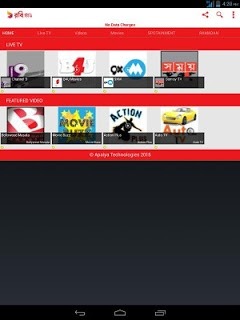
Robi Tv is a dynamic app that offers a wide range of TV channels at your fingertips. Designed to cater to the diverse preferences of viewers, this app is packed with exciting features to enhance your viewing experience.
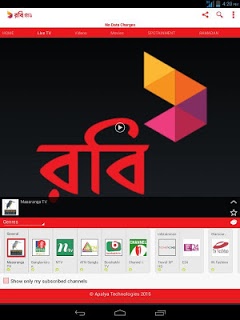
Robi Tv boasts an extensive list of channels, ensuring there's something for everyone. From sports to movies, to news and entertainment, the variety ensures no matter what you're in the mood for, you'll find it here.
One of the most remarkable aspects of Robi Tv is its smooth streaming capability. Thanks to its optimized services, users can watch their favorite shows and channels without the annoying interruptions caused by buffering. This makes for an enjoyable and seamless viewing experience.
Robi Tv caters to the modern viewer by offering accessibility at any time and from anywhere. Whether you're at home, at work, or on the go, you can count on Robi Tv to keep you connected with your favorite channels and shows.
The app has also shown adaptability by listening to the preferences and requests of its users. Channels like Peace TV have been added to meet viewer demands. This responsiveness ensures that the content stays current and relevant to its audience.
Navigating Robi Tv is as easy as pie. Its user-friendly interface makes it simple for viewers of all ages to find and enjoy their desired content. The app is designed to be intuitive, so you can start watching without any hassle.
To cater to regional preferences, Robi Tv features local channels that provide content specific to the area. This personalized touch ensures that viewers can enjoy shows and news that are relevant to their culture and interests.
Your favorite shows and channels are now on-the-go with Robi Tv. This means you can take your entertainment with you wherever you happen to be, providing flexibility and convenience in your viewing habits.
Robi Tv constantly updates and expands its library of channels, keeping the content fresh and varied. This means you can always look forward to finding new and exciting channels to watch.
Incorporating user feedback and continuous modernization, Robi Tv remains a top choice for TV streaming. With its wide array of channels, reliable streaming quality, and user-friendly features, it promises an exceptional viewing experience tailored just for you.
Yes, you can run Robi Tv on PC, but first, you will need emulator software installed on your Windows or MAC, which you can download for free. In the below video, you will find Robi Tv in action. Before you install the emulator, check out the minimum and recommended system requirements to run it seamlessly. They may change depending on which version of the emulator you choose. Therefore, we recommend you download the latest version of the emulator. Below you will find three free Android emulators that we have shortlisted based on their popularity:
Up to date graphics drivers from Microsoft or the chipset vendor.
Storage: 1 GB available under installation path, 1.5GB available hard drive space
Internet: Broadband Internet connection
Regardless of which Android emulator you install, the steps to install, configure, and running the Robi Tv app on PC are the same.