Published by Prisma3D
Updated April 1, 2026
Prisma 3D: Create 3D Models, Animation, Rigging and Rendering to Video
| Version | 3.2.2 |
| Size | 86.0 MB |
| What's New | - Improved keyframe interpolation (for ease in/out)- IK rigs of upscaled characters are now stable- Displaying frame numbers in horizontal orientation- Usability improvements and bug fixes |
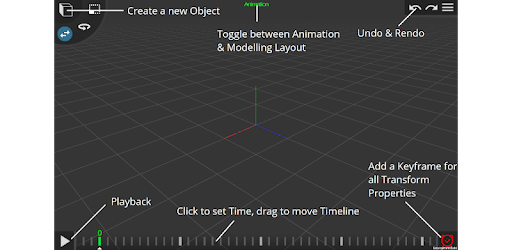
Prisma3D - 3D Modeling, Animation, Rendering is an Android app developed and published by Prisma3D at Google Play Store on Aug 23, 2018 for Android users. Prisma3D - 3D Modeling, Animation, Rendering is so popular that it has gained 13136292 installs so far and growing.
Prisma3D offers a versatile platform to create lifelike animations and models. With a plethora of features, it allows users to craft everything from simple shapes to complex characters, much like popular professional tools. The ability to export models as .obj files for free further enhances its utility for any 3D enthusiast.
One of the standout aspects of Prisma3D is its range of tools. Users can effortlessly navigate through various shapes like cubes, spheres, and prisms, making modifications to achieve their desired outcome. This adaptability ensures that each creation is unique and tailored to specific needs.
Although Prisma3D is packed with features, there are a few suggestions for improvement:
1. **Selective Coloring:** The ability to color only selected faces of a model would bring more precision and detail to creations.
2. **Sculpting Mode:** Adding a sculpting mode could allow for more intricate and organic modeling, similar to other professional-grade software.
3. **Improvement in Stability:** Reducing the frequency of crashes would greatly enhance the user experience, making it more reliable for larger projects.
Prisma3D is not just a tool for seasoned animators. It serves as an excellent starting point for those new to 3D modeling and animation. Simple enough for beginners yet equipped with advanced features for experts, it offers something for everyone. The humanoid rigging feature lets users easily move and animate characters, which is particularly helpful for creating realistic animations.
While Prisma3D allows for importing models, it can sometimes face challenges with larger files. Enhancements in handling big models could make the app even more robust. Despite these minor hitches, it remains a strong contender in the realm of mobile 3D modeling and animation apps.
The community has requested several features that could make future versions of Prisma3D even more powerful:
- **VFX (Visual Effects):** Including effects like breaking glass, fire, and water could add a cinematic touch to animations.
- **Motion Graphics:** Introducing motion graphics tools can help in creating dynamic visual elements.
- **Voice Acting and Music:** These additions would allow for more comprehensive storytelling within the app.
- **Enhanced Character Creator:** More options for character customization, like different facial features and clothing, could broaden creative possibilities.
- **Animatable Color and Gradient:** These features could enable smoother transitions and more sophisticated animations.
The introduction of a premium feature set could also benefit Prisma3D. A one-time purchase to remove ads and access additional pre-made models would be a welcome addition. This could not only enhance user experience but also support the further development of the app.
For mobile animators, Prisma3D stands out due to its performance and feature set. Its ability to create detailed animations on mobile devices sets it apart from other tools in the market. Continued updates and improvements could solidify its place as a go-to app for on-the-go 3D modeling and animation.
With Prisma3D, the world of 3D animation and modeling is more accessible than ever. Whether you are creating a Minecraft movie or experimenting with new features, Prisma3D provides the tools and opportunities to bring your visions to life.
Yes, you can run Prisma3D - 3D Modeling, Animation, Rendering on PC, but first, you will need emulator software installed on your Windows or MAC, which you can download for free. In the below video, you will find Prisma3D - 3D Modeling, Animation, Rendering in action. Before you install the emulator, check out the minimum and recommended system requirements to run it seamlessly. They may change depending on which version of the emulator you choose. Therefore, we recommend you download the latest version of the emulator. Below you will find three free Android emulators that we have shortlisted based on their popularity:
Up to date graphics drivers from Microsoft or the chipset vendor.
Storage: 1 GB available under installation path, 1.5GB available hard drive space
Internet: Broadband Internet connection
Regardless of which Android emulator you install, the steps to install, configure, and running the Prisma3D - 3D Modeling, Animation, Rendering app on PC are the same.