Published by Pixatel
Updated April 4, 2026
The best lightweight notepad app. Stay organized & never forget anything again!
| Version | 1.7.87 |
| Size | 17.1 MB |
| What's New | We're excited to announce that Ultimate Notepad has been updated! This version includes performance enhancements for smoother operation and is fully compatible with the latest OS to ensure the best user experience. |
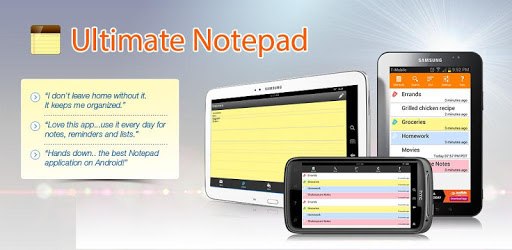
Ultimate Notepad - #1 Notes App with Cloud Sync is an Android app developed and published by Pixatel at Google Play Store on Dec 26, 2011 for Android users. Ultimate Notepad - #1 Notes App with Cloud Sync is so popular that it has gained 6232443 installs so far and growing.
Are you tired of juggling multiple notebooks and struggling to keep your thoughts and tasks organized? Look no further than Ultimate Notepad - the #1 notes app with cloud sync. This powerful tool is designed to make your life easier by providing a seamless note-taking experience that can be accessed from any device. Whether you're a student, professional, or simply someone who loves to jot down their thoughts, Ultimate Notepad has got you covered.
One of the standout features of Ultimate Notepad is its ability to store all your notes in an organized way. Say goodbye to the days of searching through stacks of paper or scrolling endlessly through digital files. With Ultimate Notepad, you can easily categorize your notes, making it a breeze to find exactly what you're looking for. Whether it's your daily to-do list, important reminders, or creative ideas, this app ensures that everything is neatly stored and easily accessible.
Ultimate Notepad takes note-taking to the next level with its cloud sync feature. This means that you can access your notes from any device, anytime, anywhere. Whether you're on your phone, tablet, or computer, your notes will always be at your fingertips. No more worrying about leaving your notebook behind or losing important information. With Ultimate Notepad, your notes are securely backed up in the cloud, giving you peace of mind and ultimate convenience.
One of the things that sets Ultimate Notepad apart is its user-friendly interface. This app is designed to be easy to use, even for those who are not tech-savvy. The recent update has brought back the "button" to add a note at the bottom, making it even more convenient to work with. Whether you're a beginner or a seasoned note-taker, Ultimate Notepad is intuitive and straightforward, ensuring a smooth and enjoyable experience.
Ultimate Notepad is not just any ordinary note-taking app. It's a versatile tool that caters to all your note-taking needs. Whether you need to edit, dictate, import, export, create lists, or jot down memos, this app has got you covered. The scrolling feature works flawlessly in most areas, ensuring a seamless note-taking experience. However, some users have reported a minor scrolling issue within longer notes. Rest assured, the developers are working to resolve this hiccup, making Ultimate Notepad even better.
Yes, absolutely! Ultimate Notepad offers seamless cloud sync, allowing you to access your notes from any device.
Definitely! Ultimate Notepad provides effortless note organization, making it simple to categorize and find your notes.
Yes, you can! Ultimate Notepad has a trash feature that allows you to recover accidentally deleted notes with ease.
Yes, it does! Ultimate Notepad allows you to color-code your notes, making it easy to prioritize and categorize your thoughts and tasks.
Absolutely! Ultimate Notepad allows you to share your notes with others via email or Bluetooth, making collaboration a breeze.
Experience the ultimate note-taking app today and say goodbye to disorganized thoughts and cluttered notebooks. Try Ultimate Notepad - the #1 notes app with cloud sync and take your note-taking game to the next level!
Yes, you can run Ultimate Notepad - #1 Notes App with Cloud Sync on PC, but first, you will need emulator software installed on your Windows or MAC, which you can download for free. In the below video, you will find Ultimate Notepad - #1 Notes App with Cloud Sync in action. Before you install the emulator, check out the minimum and recommended system requirements to run it seamlessly. They may change depending on which version of the emulator you choose. Therefore, we recommend you download the latest version of the emulator. Below you will find three free Android emulators that we have shortlisted based on their popularity:
Up to date graphics drivers from Microsoft or the chipset vendor.
Storage: 1 GB available under installation path, 1.5GB available hard drive space
Internet: Broadband Internet connection
Regardless of which Android emulator you install, the steps to install, configure, and running the Ultimate Notepad - #1 Notes App with Cloud Sync app on PC are the same.