
Published by Picmax
Updated September 8, 2025
Create your own personal sticker packs for WhatsApp, with Text. WAStickerApps.
| Version | 1.3.3 |
| Size | 81.9 MB |
| What's New | - Minor bug fixes and improvements |
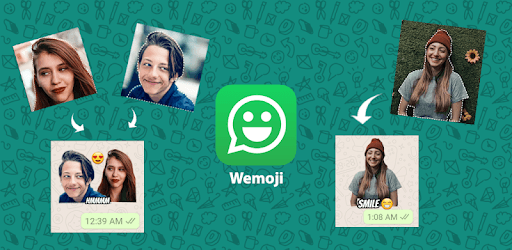
Wemoji - WhatsApp Sticker Maker is an Android app developed and published by Picmax at Google Play Store on Dec 16, 2018 for Android users. Wemoji - WhatsApp Sticker Maker is so popular that it has gained 50000 installs so far and growing.
Creating custom stickers for WhatsApp has never been easier or more fun, thanks to Wemoji - WhatsApp Sticker Maker. This app is designed to let you take any photo and transform it into a sticker, making your conversations more lively and personal. With a wide range of tools and features, Wemoji offers a fantastic way to express yourself.
Wemoji stands out because of its ability to create stickers without needing an internet connection. You can take any photo from your gallery or snap a new one and turn it into a sticker instantly. This feature is not only convenient but also ensures you can keep making stickers wherever you are, even in places without Wi-Fi or mobile data.
The app comes with a variety of editing options that allow you to customize your stickers in detail. You can crop your photos into different shapes like circles, squares, rectangles, or use the free lasso crop for precise cuts. This flexibility ensures that your stickers are just the way you want them.
Personalizing your stickers doesn't stop with cropping. Wemoji allows you to add text in various fonts and colors. This is perfect for adding funny captions or heartfelt messages to your stickers. You can also include emojis, making your stickers even more expressive and fun to use.
One of the impressive features of Wemoji is how quickly the stickers you've created appear on WhatsApp. Once you’ve made your sticker and saved it, you can immediately use it in your chats. This seamless integration ensures that your creative efforts pay off quickly and can be enjoyed by you and your friends without any delay.
Wemoji is designed to provide a smooth user experience with minimal interruptions. Ads can be a major drawback for many apps, but here they are kept to a minimum. This means you can focus on creating your stickers without having to worry about constant ad disruptions.
Creating stickers with Wemoji is not only easy but also a lot of fun. Whether you're making stickers of your favorite characters, or personalized stickers for friends and family, this app makes it enjoyable. You can experiment and make something unique every time.
Wemoji continually receives updates to enhance the user experience and add new features. This commitment to improvement shows that the developers are keen on maintaining the app's high quality and functionality.
Whether you're new to making stickers or an experienced user, Wemoji caters to all levels. It's simple enough for beginners to use but has enough features to satisfy the needs of more advanced users. Creating memorable and engaging stickers is a breeze for everyone.
With Wemoji - WhatsApp Sticker Maker, expressing yourself creatively in your chats is simpler and more enjoyable than ever. Download the app and start making your unique stickers to share with friends and family.
Yes, you can run Wemoji - WhatsApp Sticker Maker on PC, but first, you will need emulator software installed on your Windows or MAC, which you can download for free. In the below video, you will find Wemoji - WhatsApp Sticker Maker in action. Before you install the emulator, check out the minimum and recommended system requirements to run it seamlessly. They may change depending on which version of the emulator you choose. Therefore, we recommend you download the latest version of the emulator. Below you will find three free Android emulators that we have shortlisted based on their popularity:
Up to date graphics drivers from Microsoft or the chipset vendor.
Storage: 1 GB available under installation path, 1.5GB available hard drive space
Internet: Broadband Internet connection
Regardless of which Android emulator you install, the steps to install, configure, and running the Wemoji - WhatsApp Sticker Maker app on PC are the same.