Published by Moulik
Updated May 6, 2026
Easy Access to Bangladesh Railway Services ( Ticketing Information / Tracking )
| Version | 1.3.24 |
| Size | 7.9 MB |
| What's New | Updated app to follow Google's SMS access policy |
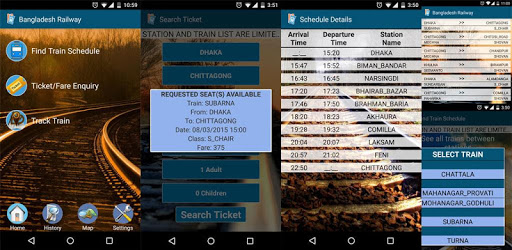
Bangladesh Railway is an Android app developed and published by Moulik at Google Play Store on Jul 18, 2014 for Android users. Bangladesh Railway is so popular that it has gained 10000 installs so far and growing.
Are you a frequent train traveler in Bangladesh? If so, then you need to check out the Bangladesh Railway app. This app is a game-changer for anyone who relies on trains for their daily commute or occasional journeys. With its user-friendly interface and comprehensive features, it has become a must-have for train enthusiasts.
The Bangladesh Railway app is your one-stop solution for all train-related information. Whether you're planning a trip from Dhaka to Khulna or Rajshahi or vice versa, this app has got you covered. It provides detailed train schedules, ensuring that you never miss your train again. However, the app doesn't stop there. It constantly updates its database to include new routes and schedules, making it an invaluable tool for regular train travelers.
We understand that every app has room for improvement, and the developers of Bangladesh Railway app are committed to enhancing the user experience. They appreciate user feedback and are constantly working on updates to make the app even better. One suggestion that has been made is to include the train time schedule for journeys from Rajshahi or Khulna to Dhaka. This addition would complete the app's functionality and ensure that users have access to comprehensive information.
Another suggestion is to include the train time schedule for trips between Dhaka and Mymensingh. By adding this information, the app would cater to an even wider audience and become an indispensable tool for all Bangladeshi train travelers.
The developers behind the Bangladesh Railway app have a clear vision - to serve the people of Bangladesh with their train travel needs. They are determined to provide the best service possible and are actively seeking support from BD Railways to further enrich the app. With their dedication and the support of the railway authorities, this app has the potential to become a must-have for all BD pupils.
Imagine being able to purchase or book train tickets directly from your smartphone. While this feature is not currently available in the Bangladesh Railway app, it is a suggestion that has been put forward by users. If implemented, it would take the convenience of this app to a whole new level, making it an indispensable tool for all Bangladeshi train travelers.
The Bangladesh Railway app has revolutionized the way people access railway services. With just a click, users can now view comprehensive train schedules, track their journeys, and plan their trips more efficiently. The app's simple and intuitive design ensures that even those who are not tech-savvy can easily navigate and benefit from its features.
One user has suggested an enhancement to the last destination search field. They propose that the last search alphabet should be the starting point, which would be particularly useful if a user accidentally selects the wrong destination. This improvement would further streamline the app's functionality and enhance the user experience.
Currently, the app does not support ticket purchasing or booking. However, this feature has been suggested by users and may be considered in future updates.
Yes, the developers of the Bangladesh Railway app are committed to providing the most up-to-date train schedules. They constantly update the app's database to include new routes and schedules.
Currently, the app only provides train time schedules for journeys from Dhaka to Rajshahi or Khulna. However, the developers are actively working on expanding the app's functionality to include schedules for return journeys as well.
Currently, the app does not include train time schedules for trips between Dhaka and Mymensingh. However, this is a suggestion that has been put forward by users, and the developers are considering adding this information in future updates.
The app is designed with simplicity and ease of use in mind. Its user-friendly interface ensures that even those who are not tech-savvy can navigate and benefit from its features effortlessly.
Overall, the Bangladesh Railway app is a game-changer for train travelers in Bangladesh. With its comprehensive features, commitment to updates, and potential for future enhancements, it has the potential to become an essential tool for all BD pupils. Download the app today and experience the convenience of effortless train travel planning.
Yes, you can run Bangladesh Railway on PC, but first, you will need emulator software installed on your Windows or MAC, which you can download for free. In the below video, you will find Bangladesh Railway in action. Before you install the emulator, check out the minimum and recommended system requirements to run it seamlessly. They may change depending on which version of the emulator you choose. Therefore, we recommend you download the latest version of the emulator. Below you will find three free Android emulators that we have shortlisted based on their popularity:
Up to date graphics drivers from Microsoft or the chipset vendor.
Storage: 1 GB available under installation path, 1.5GB available hard drive space
Internet: Broadband Internet connection
Regardless of which Android emulator you install, the steps to install, configure, and running the Bangladesh Railway app on PC are the same.