Published by MobileFusion Apps Ltd
Updated September 12, 2025
This is a 3d version of the classic sea game.
| Version | 4.9 |
| Size | 62.5 MB |
| What's New | Minor bug fixes and improvements. Install or update to the newest version to check it out! |
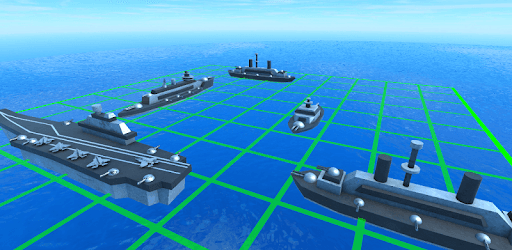
Ship Sea Battle Ultra is an Android app developed and published by MobileFusion Apps Ltd at Google Play Store on Apr 19, 2015 for Android users. Ship Sea Battle Ultra is so popular that it has gained 936597 installs so far and growing.
Ship Sea Battle Ultra is an engaging game that takes you back to the nostalgic feel of the traditional Battleship game, but with a lot more flair. If you’re looking to relive those classic moments, this game brings it all with exceptional graphics, addictive gameplay, and a sense of realism like never before. What sets Ship Sea Battle Ultra apart is its ability to amalgamate cherished memories with contemporary gaming technology.
The visual effects in Ship Sea Battle Ultra are simply stellar. The graphics are detailed and dynamic, offering a realistic battleground ambiance. When you launch a missile, the 3D effects make it feel like you're truly in the middle of a sea battle. The visual elements are not just eye-catching, but they also contribute significantly to the overall taste of the game.
The sound effects in Ship Sea Battle Ultra are nothing short of spectacular. Each shot, missile, and explosion is accompanied by sound that brings the action to life. The auditory experience makes the game more immersive, amplifying the thrill with every move. Even the quiet moments in between shots are filled with anticipation, thanks to the excellent sound design.
Ship Sea Battle Ultra is incredibly addictive. With traditional gameplay that fans of the classic Battleship game will instantly recognize, it’s hard to put this game down once you start. Whether you're playing alone or with someone else, you'll find yourself spending hours strategizing and making moves. Parents and kids alike can enjoy the game, and it brings family members closer as they pass the device back and forth in friendly competition.
While the solo play is immensely enjoyable, the game really shines when played with others. Ship Sea Battle Ultra supports two-player gameplay, offering a fantastic way to challenge friends or family members. This feature provides an additional layer of excitement, making it a versatile game suitable for different social settings.
One of the standout features of Ship Sea Battle Ultra is its offline capability. You can enjoy intense sea battles without needing an internet connection. Whether you're stuck in a no-signal zone or simply prefer offline gaming, this aspect ensures that playtime is uninterrupted and convenient.
Navigating through Ship Sea Battle Ultra is straightforward and user-friendly. The interface is designed to resemble the traditional paper grid setup, offering familiarity and a touch of nostalgia. Exiting the game is a breeze, akin to putting your old Battleship game sheet back into the satchel once playtime is over.
Ship Sea Battle Ultra appeals to a wide range of ages. Older players who have cherished memories of the board game will find this digital version an excellent recreation of the classic. Younger players will be drawn to the vibrant graphics and fast-paced gameplay. It’s a game that bridges generations, making it a fantastic addition to any family’s game collection.
The developers of Ship Sea Battle Ultra are dedicated to enhancing the game further. They pay attention to gameplay mechanics and continually seek ways to improve player experience. From perfecting missile trajectories to ensuring that impactful moves feel rewarding, everything is meticulously crafted.
Ship Sea Battle Ultra goes beyond simple battleship gameplay. The addition of bombs and various power-ups adds an extra layer of excitement to each match. Every move feels significant, and the stakes always feel high, keeping you engaged and eager for more.
In summary, Ship Sea Battle Ultra brings the beloved Battleship game to the digital age with style and flair. With exceptional graphics, riveting sound effects, and engaging gameplay, it offers a fantastic experience for players of all ages. Dive into the realms of naval warfare and enjoy countless hours of fun with Ship Sea Battle Ultra!
Yes, you can run Ship Sea Battle Ultra on PC, but first, you will need emulator software installed on your Windows or MAC, which you can download for free. In the below video, you will find Ship Sea Battle Ultra in action. Before you install the emulator, check out the minimum and recommended system requirements to run it seamlessly. They may change depending on which version of the emulator you choose. Therefore, we recommend you download the latest version of the emulator. Below you will find three free Android emulators that we have shortlisted based on their popularity:
Up to date graphics drivers from Microsoft or the chipset vendor.
Storage: 1 GB available under installation path, 1.5GB available hard drive space
Internet: Broadband Internet connection
Regardless of which Android emulator you install, the steps to install, configure, and running the Ship Sea Battle Ultra app on PC are the same.