Published by Mind Blowing Software
Updated April 3, 2026
Your interior design app; create your plans, arrange your décor and see it in 3D
| Version | 7.502 |
| Size | 21.3 MB |
| What's New | Minor bug fixes and improvements. Install or update to the newest version to check it out! |
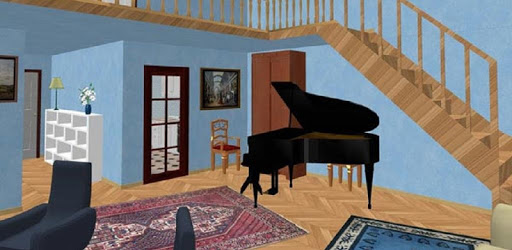
Renovations 3D is an Android app developed and published by Mind Blowing Software at Google Play Store on Feb 16, 2017 for Android users. Renovations 3D is so popular that it has gained 979909 installs so far and growing.
Have you ever wanted to redesign your home without lifting a hammer or painting a wall? "Renovations 3D" makes that possible. This app allows you to reimagine your space with ease, all from the convenience of your mobile device. Let's explore what Renovations 3D has to offer.
Renovations 3D brings the powerful capabilities of home design software to your phone. It runs smoothly, even on various devices, ensuring a seamless design experience. Users appreciate the app's resemblance to more robust desktop applications, meaning you get professional features in a mobile-friendly package.
Renovations 3D offers a wide range of features that make designing fun and effective. From arranging furniture to creating entire floor plans, the app does it all. One of the standout features is the ability to design multiple floors, though users often ask for additional features like a walk mode to explore their designs in more detail.
Renovations 3D has an excellent user interface that makes it simple to start designing right away. Even kids find it enjoyable, turning home design into a fun and educational activity. The app's intuitive controls and easy-to-navigate menus mean you don’t need to be a professional to create stunning designs.
The app features a substantial library of furniture items to choose from. Whether you're designing a cozy living room or a modern kitchen, you'll find something to fit your style. Users continue to request more furniture to make their designs even more comprehensive, and the developers are constantly updating the app.
One of the best aspects of Renovations 3D is its stability. While occasional glitches can occur, such as surfaces turning black, simply reloading the project usually solves the issue. These minor hiccups don’t take away from the app’s overall reliability.
The app offers an option to remove ads through in-app purchases. This feature enhances the user experience, making the design process smoother and more enjoyable. It's an investment worth considering for those who spend a lot of time on the app.
The app does most functions you'd expect from a full-fledged desktop application. It even surpasses expectations in some areas. For example, the app's developers are exploring advanced features like integrating VR options so users can virtually walk through their designs.
Renovations 3D is not just an app; it’s a community of design enthusiasts. The app continues to evolve based on user feedback, making it better with each update. By choosing Renovations 3D, you're joining a community that's passionate about making home design accessible to everyone.
Ready to transform your space? Renovations 3D provides all the tools you need, right at your fingertips. Whether you're a kid dreaming up a new room or an adult planning a major remodel, this app has something for everyone.
Yes, you can run Renovations 3D on PC, but first, you will need emulator software installed on your Windows or MAC, which you can download for free. In the below video, you will find Renovations 3D in action. Before you install the emulator, check out the minimum and recommended system requirements to run it seamlessly. They may change depending on which version of the emulator you choose. Therefore, we recommend you download the latest version of the emulator. Below you will find three free Android emulators that we have shortlisted based on their popularity:
Up to date graphics drivers from Microsoft or the chipset vendor.
Storage: 1 GB available under installation path, 1.5GB available hard drive space
Internet: Broadband Internet connection
Regardless of which Android emulator you install, the steps to install, configure, and running the Renovations 3D app on PC are the same.