Published by Lemur Vehicle Monitors
Updated April 6, 2026
BlueDriver® is a Premium Diagnostic OBD2 Scan Tool. www.BlueDriver.com
| Version | 8.7.1 |
| Size | 156.5 MB |
| What's New | We want you to have the best possible BlueDriver experience. This update includes a redesigned onboarding flow to help you get connected and scanning faster, along with bug fixes and performance improvements to ensure a smooth, reliable experience. |
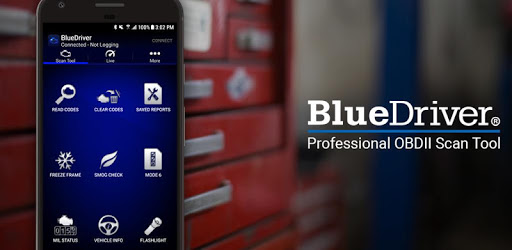
BlueDriver OBD2 Scan Tool is an Android app developed and published by Lemur Vehicle Monitors at Google Play Store on Jan 20, 2014 for Android users. BlueDriver OBD2 Scan Tool is so popular that it has gained 2034064 installs so far and growing.
Are you tired of constantly worrying about the health of your vehicle? Do you want a reliable and efficient way to diagnose and fix any issues that may arise? Look no further than the BlueDriver OBD2 Scan Tool. This all-in-one device, paired with its powerful app, provides you with all the information you could ever need to keep your vehicle running smoothly. Let's dive into why the BlueDriver OBD2 Scan Tool is a must-have for any car owner.
One of the standout features of the BlueDriver OBD2 Scan Tool is its user-friendly interface. Whether you're a seasoned mechanic or a complete novice, this tool is designed to be intuitive and easy to navigate. With just a few taps on your smartphone, you can access a wealth of information about your vehicle's performance. No more guesswork or complicated manuals - the BlueDriver OBD2 Scan Tool simplifies the diagnostic process for everyone.
When it comes to diagnosing issues with your vehicle, the BlueDriver OBD2 Scan Tool leaves no stone unturned. It provides you with real-time data on various parameters, including engine coolant temperature, transmission temperature, and more. This means you can monitor your vehicle's vital signs in real time, giving you peace of mind and the ability to catch any potential problems before they escalate.
Furthermore, the BlueDriver OBD2 Scan Tool goes beyond just displaying data. It also offers comprehensive diagnostics and advice for repairs. Whether you're a DIY enthusiast or prefer to leave the repairs to the professionals, this tool equips you with the knowledge you need to make informed decisions. Say goodbye to costly and unnecessary trips to the mechanic - the BlueDriver OBD2 Scan Tool empowers you to take control of your vehicle's maintenance.
Unlike generic OBD2 readers, the BlueDriver OBD2 Scan Tool boasts exceptional connectivity to your vehicle. This ensures a seamless and reliable connection, allowing you to retrieve codes and data with ease. The tool's compatibility with a wide range of vehicles further enhances its versatility, making it a valuable asset for any car owner.
What sets the BlueDriver OBD2 Scan Tool apart from the competition is its commitment to customer support. The team behind BlueDriver genuinely cares about their users and actively engages with them. They listen to feedback and provide helpful responses, ensuring that you have the best experience possible. With BlueDriver, you're not just purchasing a tool - you're joining a community of passionate car enthusiasts.
Yes, the BlueDriver OBD2 Scan Tool is compatible with a wide range of vehicles. It supports all OBD2 protocols, ensuring that you can use it with confidence.
Absolutely! The BlueDriver OBD2 Scan Tool is designed to be user-friendly, making it accessible to both experts and beginners. Its intuitive interface and clear instructions guide you through the diagnostic process effortlessly.
Definitely! By providing you with accurate diagnostic information, the BlueDriver OBD2 Scan Tool allows you to identify issues before they become major problems. This knowledge empowers you to make informed decisions and avoid unnecessary expenses.
No, the BlueDriver OBD2 Scan Tool is a one-time purchase. There are no hidden fees or subscriptions involved. You get access to all the features and updates without any additional costs.
Invest in the BlueDriver OBD2 Scan Tool today and experience the convenience and peace of mind that comes with having a reliable automotive companion by your side. Don't let car troubles hold you back - take control of your vehicle's health with BlueDriver.
Yes, you can run BlueDriver OBD2 Scan Tool on PC, but first, you will need emulator software installed on your Windows or MAC, which you can download for free. In the below video, you will find BlueDriver OBD2 Scan Tool in action. Before you install the emulator, check out the minimum and recommended system requirements to run it seamlessly. They may change depending on which version of the emulator you choose. Therefore, we recommend you download the latest version of the emulator. Below you will find three free Android emulators that we have shortlisted based on their popularity:
Up to date graphics drivers from Microsoft or the chipset vendor.
Storage: 1 GB available under installation path, 1.5GB available hard drive space
Internet: Broadband Internet connection
Regardless of which Android emulator you install, the steps to install, configure, and running the BlueDriver OBD2 Scan Tool app on PC are the same.