Published by King
Updated October 15, 2025
Match 3 to Grow & Harvest Cropsies in this Fun Challenging Switcher Puzzle Game!
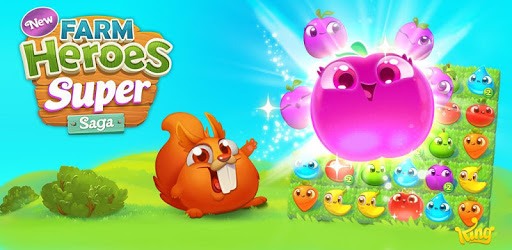
Farm Heroes Super Saga is an Android app developed and published by King at Google Play Store on Jun 27, 2016 for Android users. Farm Heroes Super Saga is so popular that it has gained 51916043 installs so far and growing.
Farm Heroes Super Saga is a captivating and fun-filled puzzle game that offers endless hours of entertainment. This cheerful game is designed to keep your brain active with its unique challenges and cute animated characters. With an emphasis on simple yet engaging gameplay, it's no wonder players of all ages are drawn to this charming farming-themed game.
One of the standout features of Farm Heroes Super Saga is its delightful gameplay. The game involves matching crops and solving puzzles to advance through different levels. Each level brings new challenges and obstacles, such as pesky crows and sneaky butterflies. You will need to think strategically to overcome these hurdles and collect the needed crops.
The addition of elements like bushes and flowers adds a layer of complexity, making the game more intriguing and enjoyable. The presence of cheerful hedgehogs with big smiles offers helpful tips, making the journey more approachable despite the increasing difficulty. Whether it's the challenging wheat sheaf collections or the ghostly blooms, you'll find every moment thrilling and engaging.
Farm Heroes Super Saga is known for its challenging levels that keep players on their toes. While some levels might require multiple attempts to conquer, the sense of accomplishment when you finally succeed is highly rewarding. Players often find themselves eagerly waiting for new challenges and levels, which keeps the excitement and anticipation alive.
The game's design is such that it tests your patience and strategic thinking. However, the availability of bonuses and rewards makes the effort worthwhile. There's always something new on the horizon, whether it's new challenges or fresh content like bigger flowers and clouds, adding to the overall enjoyment.
One of the key aspects that make Farm Heroes Super Saga a hit is its interactive nature. The game encourages players to connect with friends by sending and receiving lives, keeping the social aspect intact. This element enhances the fun and allows for friendly competition, adding a layer of community and connection to the gaming experience.
Moreover, the playful characters and vibrant graphics make the game visually appealing. Each character, from the smiling hedgehogs to the animated crops, brings a touch of liveliness that enhances the overall gaming experience.
Farm Heroes Super Saga is not just about fun; it's also a fantastic way to relax and de-stress. The light-hearted nature of the game, combined with its engaging puzzles, makes it an excellent choice for unwinding. Whether you're taking a break from your daily routine or winding down after a long day, the game offers a perfect escape.
Additionally, the game's puzzles are a great way to keep your brain active. The continuous need to strategize and solve problems provides cognitive benefits, making it a valuable addition to your daily routine. For players of all ages, from kids to adults, the game offers a stimulating yet enjoyable experience.
Farm Heroes Super Saga is designed to provide a seamless user experience. The game is easy to install and navigate, making it accessible to everyone, even those who are not tech-savvy. The clear instructions and straightforward gameplay ensure that players can dive right in without any hassle.
However, it's worth mentioning the importance of keeping the game updated and ensuring a smooth experience without any glitches. Players can expect periodic updates and improvements that add new features and challenges, keeping the game fresh and exciting.
Farm Heroes Super Saga is a delightful puzzle game that offers endless entertainment and engagement. With its immersive gameplay, challenging levels, and interactive features, it provides a perfect blend of fun and cognitive stimulation. Whether you're looking to relax, connect with friends, or sharpen your strategic thinking skills, Farm Heroes Super Saga is a game that ticks all the boxes. Dive into this charming world of crops and critters and experience the joy of farming adventure!
Yes, you can run Farm Heroes Super Saga on PC, but first, you will need emulator software installed on your Windows or MAC, which you can download for free. In the below video, you will find Farm Heroes Super Saga in action. Before you install the emulator, check out the minimum and recommended system requirements to run it seamlessly. They may change depending on which version of the emulator you choose. Therefore, we recommend you download the latest version of the emulator. Below you will find three free Android emulators that we have shortlisted based on their popularity:
Up to date graphics drivers from Microsoft or the chipset vendor.
Storage: 1 GB available under installation path, 1.5GB available hard drive space
Internet: Broadband Internet connection
Regardless of which Android emulator you install, the steps to install, configure, and running the Farm Heroes Super Saga app on PC are the same.