AtHome Camera - Home security video surveillance for PC

AtHome Camera - Home security video surveillance for PC

Published by ichano

Updated April 23, 2026

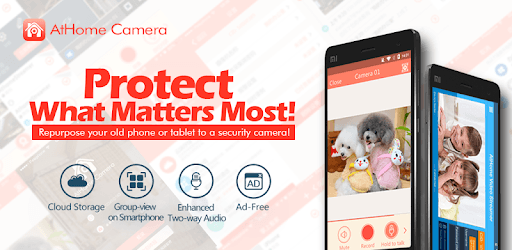
Mobile home security app, for remote monitor with cloud video recording

What's New

Version5.8.5
Size78.2 MB
What's NewMinor bug fixes and improvements. Install or update to the newest version to check it out!

AtHome Camera - Home security video surveillance Screenshots

AtHome Camera - Home security video surveillance PC screenshot

About AtHome Camera - Home security video surveillance For PC

AtHome Camera - Home security video surveillance is an Android app developed and published by ichano at Google Play Store on May 31, 2012 for Android users. AtHome Camera - Home security video surveillance is so popular that it has gained 1000000 installs so far and growing.

AtHome Camera - Home Security Video Surveillance

Welcome to the world of standardized home security with AtHome Camera. This incredible app ensures that your home remains secure, providing peace of mind to users around the clock. Let’s explore some of its key features and understand why it stands out in the crowded space of home security apps.

Crystal Clear Video Quality

One of the most impressive aspects of AtHome Camera is its video quality. It offers clear video feeds, enabling you to monitor your house and loved ones effectively. Whether you're watching your child sleep during the day or keeping an eye on your home while you're away, the video clarity is exceptionally good. It allows users to feel reassured, knowing they can see everything in detail.

Handy Two-Way Audio

AtHome Camera boasts a two-way audio feature that is perfectly suited for real-time communication. This makes it easy to interact with loved ones or even ward off potential intruders. Having the ability to hear what’s happening on the other end adds a layer of interaction and security that’s invaluable.

Intuitive Motion Detection

Motion detection is a vital aspect of any home security system, and AtHome Camera excels in this area. The app is designed to notify users through push notifications whenever motion is detected. This keeps you instantly informed about any unusual activity, letting you take timely action if necessary.

Affordable Peace of Mind

When talking about affordability, AtHome Camera shines. For those who might be cautious about subscription plans, the cost is relatively low compared to the value it offers. A yearly subscription brings you comprehensive security at a fraction of what traditional security systems might charge. Moreover, the free features are robust enough for basic surveillance needs, making this app a great choice for every budget.

Compatibility with Old Phones

One of the standout aspects of AtHome Camera is its compatibility with older phones. This means you can turn any old smartphone into a security camera, reducing waste and maximizing usability. It's heartening to see technology making effective use of devices that might otherwise be discarded.

User-Friendly Interface

Ease of use is paramount, and AtHome Camera delivers a straightforward, user-friendly interface. You won't need to navigate through complex settings to get it up and running. The intuitive design ensures that anyone can set it up and start using it without a hitch. This directly translates to stress-free monitoring and peace of mind.

Coverage and Flexibility

The coverage this app provides is excellent. It works seamlessly across different devices, whether it's a Samsung phone or an old BLU X3. The flexibility of AtHome Camera makes it incredibly versatile, allowing various setups to ensure your security needs are met. Furthermore, it would be an added benefit if the app offered more feature settings like controlling the motion sensor distance, which would make it even more customizable.

Additionally, AtHome Camera includes extra features like flash control, ensuring you can see clear images even in varying light conditions. While it does not currently integrate with Google Home, this could be an exciting feature for future versions to incorporate smart home integration.

AtHome Camera stands out in the realm of home security apps due to its comprehensive features, affordability, and ease of use. By offering excellent video quality, motion detection, and two-way audio, it ensures your home and loved ones are protected around the clock. If you're looking for a reliable home security solution, AtHome Camera is certainly worth considering.

Can I run AtHome Camera - Home security video surveillance on PC?

Yes, you can run AtHome Camera - Home security video surveillance on PC, but first, you will need emulator software installed on your Windows or MAC, which you can download for free. In the below video, you will find AtHome Camera - Home security video surveillance in action. Before you install the emulator, check out the minimum and recommended system requirements to run it seamlessly. They may change depending on which version of the emulator you choose. Therefore, we recommend you download the latest version of the emulator. Below you will find three free Android emulators that we have shortlisted based on their popularity:

How to Install AtHome Camera - Home security video surveillance on Windows PC

BlueStacks

Minimum
  • OS: Microsoft Windows 7 and above.
  • Processor: Intel or AMD Processor.
  • RAM: Your PC must have at least 4GB of RAM. (Note that having 4GB or more disk space is not a substitute for RAM)
  • Storage: 5GB Free Disk Space.
  • You must be an Administrator on your PC.
Recommended:
  • OS: Microsoft Windows 10
  • Processor: Intel or AMD Multi-Core Processor with Single Thread benchmark score > 1000.
  • Graphics: Intel/Nvidia/ATI, Onboard or Discrete controller with benchmark score >= 750.
  • Please ensure Virtualization is enabled on your PC/Laptop.
  • RAM: 8GB or higher
  • Storage: SSD (or Fusion/Hybrid Drives)
  • Internet: Broadband connection to access games, accounts and related content.

Up to date graphics drivers from Microsoft or the chipset vendor.

  • To start with, download Bluestacks from its official website. The latest version of BluesStacks is v 5, and it is around 400 MB.
  • Once the download is done, click on the Bluestacks set up file to install it on your Windows PC. Follow the on-screen instructions and install it accordingly.
  • The next step is to launch the emulator using the desktop shortcut and sign in using your Google account.
  • Now, head over to Bluestacks home screen and click on the Google Play Store icon.
  • Hit the search bar in Google Play and search for AtHome Camera - Home security video surveillance.
  • Install AtHome Camera - Home security video surveillance from the Play Store by clicking the Install option, which completes downloading of AtHome Camera - Home security video surveillance on PC.

NoxPlayer

Minimum
  • Operating System: Windows XP SP3, Windows Vista, Windows 7, Windows 8, Windows 10, and DirectX 9.0c
  • Processor: At least dual-core processor, both Intel, and AMD are OK
  • Video: Supports Open GL 2.0 or above
  • Memory: 1.5 GB RAM
Recommended
  • Operating System: Windows 7, Windows 8, Windows 10
  • Processor: Multiple core processors which support VT-x or AMB-V Virtualization Technology, better performance with this function enabled
  • Video: The higher performance, the better
  • Memory: 4 GB RAM

Storage: 1 GB available under installation path, 1.5GB available hard drive space

Internet: Broadband Internet connection

  • Download NoxPlayer from the official website. The latest version of NoxPlayer is v 3, and it is around 600 MB.
  • Now install the emulator using the downloaded setup file. Just go through the on-screen instructions and install NoxPlayer on your computer or laptop.
  • After the installation process, launch the Nox Android emulator and log in using your Google account when it asks you.
  • Click on the Google Play Store icon and head over to the search bar to search AtHome Camera - Home security video surveillance. Once found, click on the Install button to install AtHome Camera - Home security video surveillance for PC.
  • If you do not find AtHome Camera - Home security video surveillance on Google Play Store or if you want to skip logging in to Google, you can sideload APK (download the .APK file from this page and open it with NoxPlayer).
  • Launch AtHome Camera - Home security video surveillance from home-screen and start playing it on PC right away!

MEmu

Minimum
  • 2 cores x86/x86_64 Processor (Intel or AMD CPU)
  • WinXP SP3 / Win7 / Win8 / Win10 (Not recommended to run on Server/Enterprise)
  • Latest Windows DirectX 11 / Graphics driver with OpenGL 2.0
  • Hardware Virtualization Technology (Intel VT-x/AMD-V) shall be enabled in BIOS
  • 2GB of RAM (4GB for x64 system)
  • 5GB of hard disk free space
Recommended
  • OS: Microsoft Windows 10 with VT Enabled
  • CPU: Single Thread PassMark score > 1500 (Intel/AMD Multi-Core).
  • Graphics: Intel/Nvidia/ATI, Onboard or Discrete controller with PassMark score > 750.
  • Latest Windows DirectX 11 / Graphics driver with OpenGL 4.5 or higher
  • RAM: 8GB or higher
  • HDD: SSD, 10GB of hard disk free space
  • Internet: Broadband connection with low latency for FPS games
  • Download MEmu Play from the official website. The latest version of NoxPlayer is v 7.5.
  • When the download is completed, install the MEmu emulator on your PC. Follow the on-screen instructions and keep on clicking the Next button until the final step.
  • Now, using the desktop shortcut, look for the MEmu Play emulator and launch it. Once done, it will ask you to log in using your Google account, proceed with the same.
  • MEmu Play will ask you to log in using your Google account. When you log in, it will sync your Google account to MEmu Play. Launch the Google Play Store by clicking on the icon and search for AtHome Camera - Home security video surveillance.
  • Click on the Install button once you find AtHome Camera - Home security video surveillance from the search results. You can also sideload APK (download the .APK file from this page and open it with MEmu) if you want to skip above step.
  • After the installation of AtHome Camera - Home security video surveillance, you're all set to use the app on PC!

Regardless of which Android emulator you install, the steps to install, configure, and running the AtHome Camera - Home security video surveillance app on PC are the same.

Download AtHome Camera - Home security video surveillance For PC