BoneBox™ - Dental Lite for PC

BoneBox™ - Dental Lite for PC

Published by iSO-FORM, LLC

Updated August 13, 2025

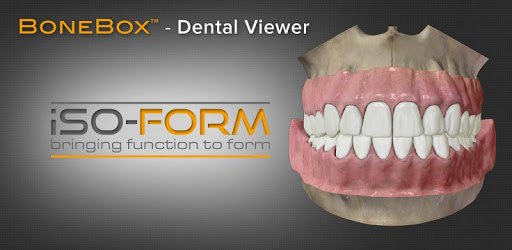
BoneBox™ - Dental Lite is a beautiful high resolution dental anatomy tool.

What's New

Version2.0.0
Size66.7 MB
What's NewUpdated UI and quizzing experience.We improved models and textures.We have added the ability to switch between naming systems.

BoneBox™ - Dental Lite Screenshots

BoneBox™ - Dental Lite PC screenshot

About BoneBox™ - Dental Lite For PC

BoneBox™ - Dental Lite is an Android app developed and published by iSO-FORM, LLC at Google Play Store on Jul 29, 2014 for Android users. BoneBox™ - Dental Lite is so popular that it has gained 100000 installs so far and growing.

BoneBox™ - Dental Lite: A Comprehensive Dental App for Students and Professionals

Are you a dentistry student or a dental professional looking for a reliable and informative app to enhance your knowledge of dental anatomy? Look no further than BoneBox™ - Dental Lite! This app is designed to provide a comprehensive understanding of teeth and their structures, making it an invaluable tool for anyone in the dental field.

Exploring Dental Anatomy

One of the standout features of BoneBox™ - Dental Lite is its detailed 3D models of teeth. These models are crafted with extreme accuracy, capturing the natural gloss and forms of real teeth. With the ability to rotate and examine the teeth from different angles, users can gain a deeper understanding of dental anatomy.

Whether you are a dentistry student, a dentist, or a laboratory technician, this app offers a wealth of information that can help you in your profession. The app covers a wide range of topics, including eruption and root completion, which are crucial for understanding tooth development. It also provides a distinctive feature for each tooth, allowing users to learn about the unique characteristics of different teeth.

Interactive Quizzes for Enhanced Learning

What sets BoneBox™ - Dental Lite apart from other dental apps is its interactive quizzes. These quizzes not only test your knowledge of dental anatomy but also serve as a fun and engaging way to reinforce what you have learned. By challenging yourself with these quizzes, you can ensure that you know your tooth numbers and other important dental information.

Whether you are a dental assistant, a dental hygienist, or a dental student, this app is a great tool to have at your disposal. It offers a convenient way to study and review dental anatomy on the go, helping you stay sharp and confident in your profession.

Future Updates and Features

The creators of BoneBox™ - Dental Lite are continuously working to improve the app and provide even more value to its users. While the app already offers a wealth of information, there are plans to add more features in future updates. Some of the requested features include the inclusion of deciduous teeth and the ability to draw and write notes on the app.

Additionally, users have suggested implementing the palmer system for numbering teeth, which would further enhance the app's usability. The creators are dedicated to listening to user feedback and incorporating these suggestions to make BoneBox™ - Dental Lite an even more comprehensive and user-friendly app.

Conclusion

In conclusion, BoneBox™ - Dental Lite is a must-have app for anyone in the dental field. With its detailed 3D models, interactive quizzes, and continuous updates, it provides a comprehensive and engaging learning experience. Whether you are a student, a dentist, or a dental technician, this app will help you expand your knowledge of dental anatomy and stay at the top of your game. Download BoneBox™ - Dental Lite today and take your dental education to the next level!

Frequently Asked Questions:

1. Can I use BoneBox™ - Dental Lite to study tooth development?

Yes, BoneBox™ - Dental Lite provides information on tooth eruption and root completion, making it a valuable resource for studying tooth development.

2. Is there a quiz feature in BoneBox™ - Dental Lite?

Absolutely! BoneBox™ - Dental Lite offers interactive quizzes that test your knowledge of dental anatomy and help reinforce your learning.

3. Are there plans to add more features to the app?

Yes, the creators of BoneBox™ - Dental Lite are dedicated to improving the app and have plans to add features such as deciduous teeth and the ability to draw and write notes.

4. Can I suggest new features or provide feedback?

Yes, the creators of BoneBox™ - Dental Lite welcome user feedback and suggestions. They value your input and strive to make the app even better based on user needs.

Can I run BoneBox™ - Dental Lite on PC?

Yes, you can run BoneBox™ - Dental Lite on PC, but first, you will need emulator software installed on your Windows or MAC, which you can download for free. In the below video, you will find BoneBox™ - Dental Lite in action. Before you install the emulator, check out the minimum and recommended system requirements to run it seamlessly. They may change depending on which version of the emulator you choose. Therefore, we recommend you download the latest version of the emulator. Below you will find three free Android emulators that we have shortlisted based on their popularity:

How to Install BoneBox™ - Dental Lite on Windows PC

BlueStacks

Minimum
  • OS: Microsoft Windows 7 and above.
  • Processor: Intel or AMD Processor.
  • RAM: Your PC must have at least 4GB of RAM. (Note that having 4GB or more disk space is not a substitute for RAM)
  • Storage: 5GB Free Disk Space.
  • You must be an Administrator on your PC.
Recommended:
  • OS: Microsoft Windows 10
  • Processor: Intel or AMD Multi-Core Processor with Single Thread benchmark score > 1000.
  • Graphics: Intel/Nvidia/ATI, Onboard or Discrete controller with benchmark score >= 750.
  • Please ensure Virtualization is enabled on your PC/Laptop.
  • RAM: 8GB or higher
  • Storage: SSD (or Fusion/Hybrid Drives)
  • Internet: Broadband connection to access games, accounts and related content.

Up to date graphics drivers from Microsoft or the chipset vendor.

  • To start with, download Bluestacks from its official website. The latest version of BluesStacks is v 5, and it is around 400 MB.
  • Once the download is done, click on the Bluestacks set up file to install it on your Windows PC. Follow the on-screen instructions and install it accordingly.
  • The next step is to launch the emulator using the desktop shortcut and sign in using your Google account.
  • Now, head over to Bluestacks home screen and click on the Google Play Store icon.
  • Hit the search bar in Google Play and search for BoneBox™ - Dental Lite.
  • Install BoneBox™ - Dental Lite from the Play Store by clicking the Install option, which completes downloading of BoneBox™ - Dental Lite on PC.

NoxPlayer

Minimum
  • Operating System: Windows XP SP3, Windows Vista, Windows 7, Windows 8, Windows 10, and DirectX 9.0c
  • Processor: At least dual-core processor, both Intel, and AMD are OK
  • Video: Supports Open GL 2.0 or above
  • Memory: 1.5 GB RAM
Recommended
  • Operating System: Windows 7, Windows 8, Windows 10
  • Processor: Multiple core processors which support VT-x or AMB-V Virtualization Technology, better performance with this function enabled
  • Video: The higher performance, the better
  • Memory: 4 GB RAM

Storage: 1 GB available under installation path, 1.5GB available hard drive space

Internet: Broadband Internet connection

  • Download NoxPlayer from the official website. The latest version of NoxPlayer is v 3, and it is around 600 MB.
  • Now install the emulator using the downloaded setup file. Just go through the on-screen instructions and install NoxPlayer on your computer or laptop.
  • After the installation process, launch the Nox Android emulator and log in using your Google account when it asks you.
  • Click on the Google Play Store icon and head over to the search bar to search BoneBox™ - Dental Lite. Once found, click on the Install button to install BoneBox™ - Dental Lite for PC.
  • If you do not find BoneBox™ - Dental Lite on Google Play Store or if you want to skip logging in to Google, you can sideload APK (download the .APK file from this page and open it with NoxPlayer).
  • Launch BoneBox™ - Dental Lite from home-screen and start playing it on PC right away!

MEmu

Minimum
  • 2 cores x86/x86_64 Processor (Intel or AMD CPU)
  • WinXP SP3 / Win7 / Win8 / Win10 (Not recommended to run on Server/Enterprise)
  • Latest Windows DirectX 11 / Graphics driver with OpenGL 2.0
  • Hardware Virtualization Technology (Intel VT-x/AMD-V) shall be enabled in BIOS
  • 2GB of RAM (4GB for x64 system)
  • 5GB of hard disk free space
Recommended
  • OS: Microsoft Windows 10 with VT Enabled
  • CPU: Single Thread PassMark score > 1500 (Intel/AMD Multi-Core).
  • Graphics: Intel/Nvidia/ATI, Onboard or Discrete controller with PassMark score > 750.
  • Latest Windows DirectX 11 / Graphics driver with OpenGL 4.5 or higher
  • RAM: 8GB or higher
  • HDD: SSD, 10GB of hard disk free space
  • Internet: Broadband connection with low latency for FPS games
  • Download MEmu Play from the official website. The latest version of NoxPlayer is v 7.5.
  • When the download is completed, install the MEmu emulator on your PC. Follow the on-screen instructions and keep on clicking the Next button until the final step.
  • Now, using the desktop shortcut, look for the MEmu Play emulator and launch it. Once done, it will ask you to log in using your Google account, proceed with the same.
  • MEmu Play will ask you to log in using your Google account. When you log in, it will sync your Google account to MEmu Play. Launch the Google Play Store by clicking on the icon and search for BoneBox™ - Dental Lite.
  • Click on the Install button once you find BoneBox™ - Dental Lite from the search results. You can also sideload APK (download the .APK file from this page and open it with MEmu) if you want to skip above step.
  • After the installation of BoneBox™ - Dental Lite, you're all set to use the app on PC!

Regardless of which Android emulator you install, the steps to install, configure, and running the BoneBox™ - Dental Lite app on PC are the same.

Download BoneBox™ - Dental Lite For PC