Published by Honeywell International, Inc.
Updated April 19, 2026
Remotely monitor and manage your heating and cooling system.
| Version | 3.17 |
| Size | 18.7 MB |
| What's New | Migrated app distribution from App Center to FirebaseAdded support for Android 15Bug fixes and improvement |
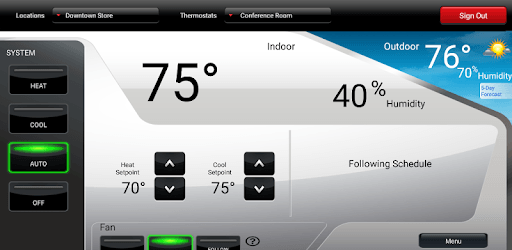
Total Connect Comfort is an Android app developed and published by Honeywell International, Inc. at Google Play Store on Jan 31, 2012 for Android users. Total Connect Comfort is so popular that it has gained 2937386 installs so far and growing.
Are you tired of constantly adjusting your thermostat manually? Do you want a convenient and efficient way to control the temperature in your home? Look no further than the Total Connect Comfort app. With its easy interface and dependable performance, this app is a game-changer when it comes to managing your home's temperature.
One of the standout features of the Total Connect Comfort app is its regular updates. The developers understand the importance of staying up to date with the latest technology and improvements. You can rest assured that this app will continue to evolve and provide you with the best user experience possible.
Gone are the days of manually adjusting your thermostat. With the Total Connect Comfort app, you have the power to make changes to your home's temperature with just a few taps on your phone. Whether you're at home or on the go, you can easily control your thermostat via Wi-Fi. It's convenience at your fingertips.
Imagine if your thermostat could remind you when it's time to change your filter. With the Total Connect Comfort app, this becomes a reality. You can set up push notifications to receive reminders to change your filter at regular intervals. Additionally, this app goes above and beyond by measuring airflow and sensing when a new filter is needed. It's like having a personal assistant for your HVAC system.
Are you someone who loves to travel? The Total Connect Comfort app is the perfect companion for your vacations. With this app, you can easily turn down the heat in the winter or adjust the air conditioning when you're away. Say goodbye to wasted energy and hello to a more efficient home.
Worried about power outages? The Total Connect Comfort app has you covered. If the app is unable to connect to your thermostat, it will notify you. This can be a helpful indicator of a power outage or internet connectivity issues. Stay informed and prepared with this smart feature.
Yes, absolutely! The Total Connect Comfort app allows you to control your thermostat from anywhere using Wi-Fi.
Yes, the Total Connect Comfort app offers regular updates to ensure you have the latest features and improvements.
Yes, the Total Connect Comfort app can send you push notifications to remind you when it's time to change your filter.
Yes, if the app is unable to connect to your thermostat, it will notify you, indicating a potential power outage or internet connectivity issue.
Absolutely! The Total Connect Comfort app allows you to easily adjust the temperature schedule for your thermostat, whether it's on a daily or weekly basis.
Experience the convenience and efficiency of the Total Connect Comfort app today. Say goodbye to manual thermostat adjustments and hello to a smarter way of managing your home's temperature.
Yes, you can run Total Connect Comfort on PC, but first, you will need emulator software installed on your Windows or MAC, which you can download for free. In the below video, you will find Total Connect Comfort in action. Before you install the emulator, check out the minimum and recommended system requirements to run it seamlessly. They may change depending on which version of the emulator you choose. Therefore, we recommend you download the latest version of the emulator. Below you will find three free Android emulators that we have shortlisted based on their popularity:
Up to date graphics drivers from Microsoft or the chipset vendor.
Storage: 1 GB available under installation path, 1.5GB available hard drive space
Internet: Broadband Internet connection
Regardless of which Android emulator you install, the steps to install, configure, and running the Total Connect Comfort app on PC are the same.