
Published by Abhinandan Narendra
Updated March 23, 2026
Divya chakshu is designed for astrologers to fulfill their calculation needs
| Version | 8.5 |
| Size | 27.8 MB |
| What's New | Fixed the expiry issue |
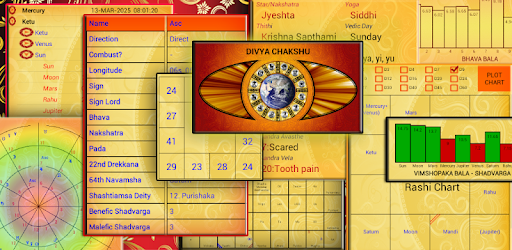
Divya Chakshu is an Android app developed and published by Abhinandan Narendra at Google Play Store on May 8, 2017 for Android users. Divya Chakshu is so popular that it has gained 137745 installs so far and growing.
Welcome to the world of Divya Chakshu, the ultimate app for astrology enthusiasts and professionals alike. This app has garnered rave reviews for its incredible features and user-friendly interface. Let's dive into the wonderful world of Divya Chakshu and explore what makes it so special.
One of the standout features of Divya Chakshu is its Vedic grid in numerology. This feature takes the app to a whole new level, allowing you to unlock the secrets of numerology and gain deeper insights into your life. With the Vedic grid, you can tap into the mystical world of numbers and discover their profound impact on your destiny.
Divya Chakshu prides itself on providing a highly organized and intuitive user experience. The app is designed in such a way that it presents information in a clear and concise manner, making it easy for users to navigate and find what they need. Whether you're a seasoned astrologer or just starting your journey, Divya Chakshu ensures that you have all the tools you need at your fingertips.
Curious about Daily Dasha and how it's calculated? Divya Chakshu has you covered. Daily Dasha is a unique feature that allows you to understand the influences of planetary movements on a daily basis. By shedding light on the cosmic energies at play, Daily Dasha empowers you to make informed decisions and navigate life's ups and downs with confidence.
Divya Chakshu has become an indispensable tool for astrologers worldwide. Its comprehensive set of features and accurate calculations make it a go-to resource for professionals in the field. Whether you're analyzing birth charts, calculating Shadabala, or exploring divisional charts, Divya Chakshu provides the precision and reliability that astrologers rely on.
If you're experiencing difficulties accessing the Horoscope page, we recommend checking for any updates available for the app. Updating to the latest version often resolves such issues. If the problem persists, please reach out to our support team for further assistance.
To update the birth places in your mobile, please follow these steps:
Currently, Divya Chakshu is only available as a mobile app. However, you can explore alternative astrology software options that are compatible with laptops and desktop computers.
We understand that ads can sometimes be intrusive. To remove ads from the Divya Chakshu app, you may consider upgrading to the premium version. The premium version offers an ad-free experience, allowing you to focus solely on the app's incredible features.
As of now, all the features in the Jamakkol category are fully accessible to all users. Enjoy exploring the depths of Jamakkol without any restrictions!
Divya Chakshu is more than just an app; it's a gateway to the mystical world of astrology. With its powerful features, user-friendly interface, and accurate calculations, this app has become a favorite among astrology enthusiasts and professionals alike. Experience the magic of Divya Chakshu today and unlock the secrets of the cosmos.
Yes, you can run Divya Chakshu on PC, but first, you will need emulator software installed on your Windows or MAC, which you can download for free. In the below video, you will find Divya Chakshu in action. Before you install the emulator, check out the minimum and recommended system requirements to run it seamlessly. They may change depending on which version of the emulator you choose. Therefore, we recommend you download the latest version of the emulator. Below you will find three free Android emulators that we have shortlisted based on their popularity:
Up to date graphics drivers from Microsoft or the chipset vendor.
Storage: 1 GB available under installation path, 1.5GB available hard drive space
Internet: Broadband Internet connection
Regardless of which Android emulator you install, the steps to install, configure, and running the Divya Chakshu app on PC are the same.