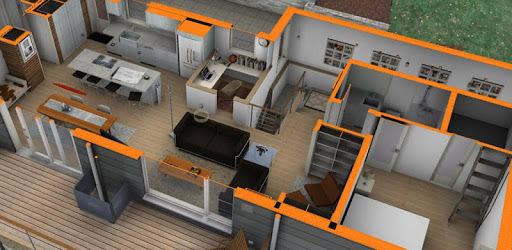
BIMx - BIM eXplorer for PC

BIMx - BIM eXplorer for PC

Published by Graphisoft SE

Updated November 15, 2025

Explore architectural designs interactively through the BIM model

What's New

Version2025.7061
Size143.5 MB
What's NewMinor bug fixes and improvements. Install or update to the newest version to check it out!

BIMx - BIM eXplorer Screenshots

BIMx - BIM eXplorer PC screenshot

About BIMx - BIM eXplorer For PC

BIMx - BIM eXplorer is an Android app developed and published by Graphisoft SE at Google Play Store on Jul 25, 2012 for Android users. BIMx - BIM eXplorer is so popular that it has gained 100000 installs so far and growing.

Discover the Power of BIMx - BIM eXplorer

BIMx - BIM eXplorer is creating a buzz in the world of architecture, simplifying workflows and delivering powerful visual tools. Designed with impressive user-friendliness, the app allows easy navigation throughout entire buildings, making it accessible even for those outside the architectural field.

User-Friendly Navigation

One standout feature of BIMx - BIM eXplorer is its intuitive interface. Navigating through complex building designs is smooth and straightforward, even for beginners. The app's seamless operation ensures that viewing plans and moving through 3D models is a hassle-free experience, providing essential visual information that is crucial for construction and design projects.

Mobile and PC Compatibility

While the app excels on mobile devices, many users wish for the same level of performance on their PCs. The convenience of showcasing projects on the go without needing bulky equipment cannot be overstated. Being able to present your architectural designs anytime, anywhere, is a significant advantage, making client presentations both efficient and impressive.

Workflow Enhancements

Another key benefit is how BIMx - BIM eXplorer integrates with various CAD systems. The app allows the export of projects to BIMx files, ensuring continuity in your workflow. Although some users desire support for additional file formats like .rvt files, the app still keeps work dynamic by supporting essential BIM files. This helps maintain a smooth and efficient design process.

Advanced Functionalities

BIMx - BIM eXplorer goes beyond replacing physical drawings. It provides live links viewable in both plan view and overlaid in 3D models. This feature enriches the visual information accessible to builders and designers, transforming how architectural plans are interpreted and utilized. Running around the 3D model adds depth to the visual data, making it easier to build and understand designs.

Performance Requirements

Given the complexity of architectural models, BIMx - BIM eXplorer performs best on powerful devices. For optimal performance, especially with buildings loaded with objects, a quad-core or octa-core processor is recommended. Upgrading to a more robust device can alleviate any performance issues, ensuring the app runs smoothly and efficiently.

Professional Enhancements

The pro version of BIMx - BIM eXplorer comes with additional features. Although it might be considered pricey because it requires an expensive CAD system to create BIMx documents, the functionalities it offers are substantial. Future updates could introduce the ability to include engineering PDFs and specification and report documents, offering even more comprehensive tools for professionals in the field.

International Appeal

BIMx - BIM eXplorer is instrumental for architects looking to work on an international scale. Its potential to streamline presentations and enhance project visualization makes it an invaluable tool for professionals aiming to push their designs globally. The app does exactly what it is supposed to, serving as a robust companion for modern architectural practices.

Overall, BIMx - BIM eXplorer demonstrates significant promise in revolutionizing architectural design workflows. It's a game-changing tool that simplifies the visualization of complex designs, making the architectural process more efficient and engaging.

Can I run BIMx - BIM eXplorer on PC?

Yes, you can run BIMx - BIM eXplorer on PC, but first, you will need emulator software installed on your Windows or MAC, which you can download for free. In the below video, you will find BIMx - BIM eXplorer in action. Before you install the emulator, check out the minimum and recommended system requirements to run it seamlessly. They may change depending on which version of the emulator you choose. Therefore, we recommend you download the latest version of the emulator. Below you will find three free Android emulators that we have shortlisted based on their popularity:

How to Install BIMx - BIM eXplorer on Windows PC

BlueStacks

Minimum
  • OS: Microsoft Windows 7 and above.
  • Processor: Intel or AMD Processor.
  • RAM: Your PC must have at least 4GB of RAM. (Note that having 4GB or more disk space is not a substitute for RAM)
  • Storage: 5GB Free Disk Space.
  • You must be an Administrator on your PC.
Recommended:
  • OS: Microsoft Windows 10
  • Processor: Intel or AMD Multi-Core Processor with Single Thread benchmark score > 1000.
  • Graphics: Intel/Nvidia/ATI, Onboard or Discrete controller with benchmark score >= 750.
  • Please ensure Virtualization is enabled on your PC/Laptop.
  • RAM: 8GB or higher
  • Storage: SSD (or Fusion/Hybrid Drives)
  • Internet: Broadband connection to access games, accounts and related content.

Up to date graphics drivers from Microsoft or the chipset vendor.

  • To start with, download Bluestacks from its official website. The latest version of BluesStacks is v 5, and it is around 400 MB.
  • Once the download is done, click on the Bluestacks set up file to install it on your Windows PC. Follow the on-screen instructions and install it accordingly.
  • The next step is to launch the emulator using the desktop shortcut and sign in using your Google account.
  • Now, head over to Bluestacks home screen and click on the Google Play Store icon.
  • Hit the search bar in Google Play and search for BIMx - BIM eXplorer.
  • Install BIMx - BIM eXplorer from the Play Store by clicking the Install option, which completes downloading of BIMx - BIM eXplorer on PC.

NoxPlayer

Minimum
  • Operating System: Windows XP SP3, Windows Vista, Windows 7, Windows 8, Windows 10, and DirectX 9.0c
  • Processor: At least dual-core processor, both Intel, and AMD are OK
  • Video: Supports Open GL 2.0 or above
  • Memory: 1.5 GB RAM
Recommended
  • Operating System: Windows 7, Windows 8, Windows 10
  • Processor: Multiple core processors which support VT-x or AMB-V Virtualization Technology, better performance with this function enabled
  • Video: The higher performance, the better
  • Memory: 4 GB RAM

Storage: 1 GB available under installation path, 1.5GB available hard drive space

Internet: Broadband Internet connection

  • Download NoxPlayer from the official website. The latest version of NoxPlayer is v 3, and it is around 600 MB.
  • Now install the emulator using the downloaded setup file. Just go through the on-screen instructions and install NoxPlayer on your computer or laptop.
  • After the installation process, launch the Nox Android emulator and log in using your Google account when it asks you.
  • Click on the Google Play Store icon and head over to the search bar to search BIMx - BIM eXplorer. Once found, click on the Install button to install BIMx - BIM eXplorer for PC.
  • If you do not find BIMx - BIM eXplorer on Google Play Store or if you want to skip logging in to Google, you can sideload APK (download the .APK file from this page and open it with NoxPlayer).
  • Launch BIMx - BIM eXplorer from home-screen and start playing it on PC right away!

MEmu

Minimum
  • 2 cores x86/x86_64 Processor (Intel or AMD CPU)
  • WinXP SP3 / Win7 / Win8 / Win10 (Not recommended to run on Server/Enterprise)
  • Latest Windows DirectX 11 / Graphics driver with OpenGL 2.0
  • Hardware Virtualization Technology (Intel VT-x/AMD-V) shall be enabled in BIOS
  • 2GB of RAM (4GB for x64 system)
  • 5GB of hard disk free space
Recommended
  • OS: Microsoft Windows 10 with VT Enabled
  • CPU: Single Thread PassMark score > 1500 (Intel/AMD Multi-Core).
  • Graphics: Intel/Nvidia/ATI, Onboard or Discrete controller with PassMark score > 750.
  • Latest Windows DirectX 11 / Graphics driver with OpenGL 4.5 or higher
  • RAM: 8GB or higher
  • HDD: SSD, 10GB of hard disk free space
  • Internet: Broadband connection with low latency for FPS games
  • Download MEmu Play from the official website. The latest version of NoxPlayer is v 7.5.
  • When the download is completed, install the MEmu emulator on your PC. Follow the on-screen instructions and keep on clicking the Next button until the final step.
  • Now, using the desktop shortcut, look for the MEmu Play emulator and launch it. Once done, it will ask you to log in using your Google account, proceed with the same.
  • MEmu Play will ask you to log in using your Google account. When you log in, it will sync your Google account to MEmu Play. Launch the Google Play Store by clicking on the icon and search for BIMx - BIM eXplorer.
  • Click on the Install button once you find BIMx - BIM eXplorer from the search results. You can also sideload APK (download the .APK file from this page and open it with MEmu) if you want to skip above step.
  • After the installation of BIMx - BIM eXplorer, you're all set to use the app on PC!

Regardless of which Android emulator you install, the steps to install, configure, and running the BIMx - BIM eXplorer app on PC are the same.


Download BIMx - BIM eXplorer For PC