Published by Google LLC
Updated October 10, 2025
Android TV Remote
| Version | 1.1.0.3876957 |
| Size | 6.7 MB |
| What's New | Visual RefreshBug fixes |
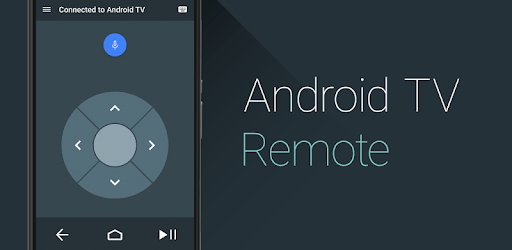
Android TV Remote Control is an Android app developed and published by Google LLC at Google Play Store on Jun 25, 2014 for Android users. Android TV Remote Control is so popular that it has gained 5000000 installs so far and growing.
Getting started with Android TV Remote Control is incredibly simple. Upon launching the app, it quickly searches for your TV and connects almost instantly. Once connected, the app is ready to use, and you won't need to reconnect it each time you want to use it. The ease of setup makes it a fantastic option for anyone, even those who aren’t tech-savvy.
Misplacing your TV remote is no longer a big issue with Android TV Remote Control. Instead of stressing over finding or replacing your lost remote, simply use this app. It provides a seamless replacement that functions as a regular remote, allowing you to navigate your TV with ease. It’s a brilliant solution if you find yourself without a physical remote for your Android TV.
Whether you own a Mi TV, Sony Android TV, or even an Android TV box, Android TV Remote Control works effectively across a wide range of devices. This universal compatibility ensures that you can control various types of Android TVs using a single app, making it an essential tool for homes with multiple or different brands of TVs.
Android TV Remote Control boasts an intuitive user interface, ensuring that even first-time users can navigate and operate their TVs effortlessly. The interface is designed to be user-friendly, allowing you to control your TV seamlessly from your smartphone. This simplicity makes it a preferred choice for many users.
The app includes an array of useful features. For instance, you can use your mobile phone’s volume keys to control the TV volume, which simplifies the entire user experience. Additionally, its responsiveness is impressive, often outperforming traditional remotes in terms of speed and ease of navigation.
The Android TV Remote Control allows you to operate your TV even from different rooms. This feature is particularly convenient as it provides the freedom to control your TV without being restricted to the same room. This flexibility is a game-changer, especially for larger homes or those who prefer multitasking.
One of the standout qualities of Android TV Remote Control is its ad-free experience. The absence of ads ensures continuous use without any interruptions, making your viewing experience more enjoyable. Moreover, the app runs smoothly without glitches, providing a reliable remote control solution.
To maintain optimal performance, it’s important to be cautious with updates. Some users have found that updating the TV remote can sometimes lead to connectivity issues. If this happens, uninstalling the updates usually rectifies the problem, preserving the app’s functionality.
Android TV Remote Control is versatile and can be used on both Android phones and iPhones. This cross-platform compatibility ensures that more users can take advantage of its powerful features, regardless of the type of smartphone they own.
While Android TV Remote Control excels in many areas, some users have pointed out the need for additional features, like an input or source button to easily switch between HDMI channels and the Android TV interface. Incorporating such features would further enhance the app’s usability.
Android TV Remote Control manages to be a vital tool for anyone looking to simplify their TV viewing experience. With its user-friendly interface, wide compatibility, and reliable performance, this app stands out as a must-have.
Yes, you can run Android TV Remote Control on PC, but first, you will need emulator software installed on your Windows or MAC, which you can download for free. In the below video, you will find Android TV Remote Control in action. Before you install the emulator, check out the minimum and recommended system requirements to run it seamlessly. They may change depending on which version of the emulator you choose. Therefore, we recommend you download the latest version of the emulator. Below you will find three free Android emulators that we have shortlisted based on their popularity:
Up to date graphics drivers from Microsoft or the chipset vendor.
Storage: 1 GB available under installation path, 1.5GB available hard drive space
Internet: Broadband Internet connection
Regardless of which Android emulator you install, the steps to install, configure, and running the Android TV Remote Control app on PC are the same.