Published by Google LLC
Updated September 24, 2026
A smart news app for you, by Google. Featuring the latest world & local stories.
| Version | 5.163.0.947799485 |
| Size | 17.9 MB |
| What's New | · Bug fixes and performance improvements |
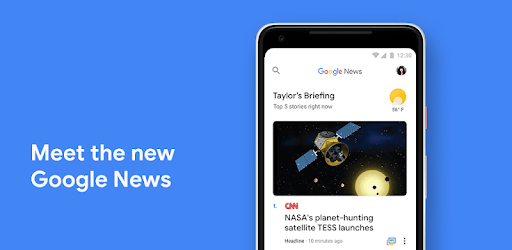
Google News is an Android app developed and published by Google LLC at Google Play Store on Jun 27, 2012 for Android users. Google News is so popular that it has gained 4263302916 installs so far and growing.
When it comes to news apps, Google News stands out as the top choice for millions of users worldwide. With its exceptional features and user-friendly interface, it has become the go-to app for staying informed about the latest happenings. Whether you are interested in global news, local updates, or specific topics, Google News has got you covered.
One of the remarkable aspects of Google News is its ability to personalize news content according to your preferences. By setting it up properly, you can ensure that you receive news that truly matters to you. Gone are the days of scrolling through irrelevant articles. With Google News, you can save time and get straight to the news you want to read.
Google News has received rave reviews from users all over the world, and it's not hard to see why. Its excellence shines through in every aspect, making it a must-have app for every respectable person's smartphone. Congratulations to Google for creating such a remarkable platform that keeps us all well-informed.
One of the standout features of Google News is its clear and precise news coverage. It provides a wide range of news articles, ensuring that you never miss out on any important information. From global events to local news, Google News keeps you updated on everything that matters.
Many users have praised Google News for its inclusion of news pertaining to Indian corporate entities. The app's informative and accurate coverage of Indian businesses has been highly appreciated. It's great to see a platform that caters to the diverse needs of its users.
Google News has gained a reputation for being a reliable source of news. With its vast network of trusted news sources, you can rest assured that the information you receive is accurate and credible. Say goodbye to unreliable news sources and embrace the reliability of Google News.
Furthermore, Google News ensures that you don't get trapped in a political bubble. By showing articles from across the political spectrum, it helps you stay well-informed without being biased towards any particular ideology. This feature has been highly appreciated by users who value diverse perspectives.
Not only does Google News provide excellent news coverage, but it also offers a seamless user experience. The app is designed to be fast and efficient, ensuring that you can access news articles without any delays. Its intuitive interface and easy navigation make it a joy to use.
Whether you are a tech-savvy individual or someone who prefers simplicity, Google News caters to all types of users. The fonts, design, and overall aesthetics of the app are visually appealing and enhance the reading experience. It's a well-rounded package that ticks all the boxes.
Yes, absolutely! Google News allows you to personalize your news feed according to your interests and preferences. By setting it up properly, you can ensure that you receive news articles that align with your interests.
Yes, Google News is a free app that can be downloaded on any smartphone. Enjoy access to a vast range of news articles without any subscription fees.
Like any app, Google News may occasionally have bugs that need to be fixed. However, the Google team is constantly working on improving the app's performance and addressing any issues that arise.
Yes, you can trust the news articles on Google News. The app sources its news content from reputable and trusted news sources, ensuring that the information you receive is reliable and accurate.
Google News aims to provide a balanced view of news by showing articles from across the political spectrum. This helps users avoid getting trapped in a right or left-wing political bubble and encourages exposure to diverse perspectives.
In conclusion, Google News is undoubtedly the ultimate news app for every smartphone user. Its personalized news coverage, reliability, and user-friendly experience make it a must-have for staying informed. Download Google News today and unlock a world of news at your fingertips.
Yes, you can run Google News on PC, but first, you will need emulator software installed on your Windows or MAC, which you can download for free. In the below video, you will find Google News in action. Before you install the emulator, check out the minimum and recommended system requirements to run it seamlessly. They may change depending on which version of the emulator you choose. Therefore, we recommend you download the latest version of the emulator. Below you will find three free Android emulators that we have shortlisted based on their popularity:
Up to date graphics drivers from Microsoft or the chipset vendor.
Storage: 1 GB available under installation path, 1.5GB available hard drive space
Internet: Broadband Internet connection
Regardless of which Android emulator you install, the steps to install, configure, and running the Google News app on PC are the same.