3X VPN - Free, Unlimited, Safe surf, Speed up apps for PC

3X VPN - Free, Unlimited, Safe surf, Speed up apps for PC

Published by Fruit Security Studio

Updated May 2, 2026

Unlimited worldwide servers, access webs&apps restricted, fix internet problem

What's New

Version5.6.395
Size53.3 MB
What's New1.Enhance user experience for seamless navigation and interaction.2.Expand server availability to provide more options for users.3.Measure internet speed while connected to the VPN for informed performance insights.4.Implement user feedback to continuously improve features and functionality.5.Ensure reliable connectivity to minimize downtime and interruptions.

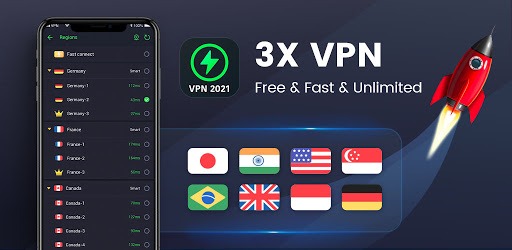
3X VPN - Free, Unlimited, Safe surf, Speed up apps Screenshots

3X VPN - Free, Unlimited, Safe surf, Speed up apps PC screenshot

About 3X VPN - Free, Unlimited, Safe surf, Speed up apps For PC

3X VPN - Free, Unlimited, Safe surf, Speed up apps is an Android app developed and published by Fruit Security Studio at Google Play Store on Apr 30, 2020 for Android users. 3X VPN - Free, Unlimited, Safe surf, Speed up apps is so popular that it has gained 21015592 installs so far and growing.

3X VPN: Free, Unlimited, Safe Surf, Speed Up Apps

Welcome to the world of 3X VPN, where free, unlimited, and safe surfing meets exceptional speed for your favorite apps. If you're looking for a reliable service to access content effortlessly and enhance your online experience, 3X VPN is the perfect choice for you.

Effortless Access to Content

3X VPN makes downloading movies, reading fiction, and accessing news updates a breeze. Whether you're streaming, downloading, or just browsing the web, this VPN ensures you have uncomplicated and seamless access to all your favorite content. The ease of use and reliability will make you wonder how you managed without it.

Seamless Spotify Access

Finding the right VPN for Spotify can be tricky, but with 3X VPN, you can connect in seconds. Say goodbye to the frustration of failed connections and enjoy your music effortlessly. Listen to your playlists, discover new tunes, and groove to the beats without any interruptions.

Easy to Connect

One of the standout features of 3X VPN is its simple connection process. With a single click, you're connected to the server of your choice. This ease of use is perfect for both beginners and advanced users alike.

While there are some ads, they are minimal and do not significantly disrupt your browsing experience. You can enjoy hours of surfing with just a short ad, making the trade-off well worth it for the remarkable service you receive.

Stay Connected with Friends

Keeping in touch with friends online has never been easier. 3X VPN offers a dependable connection, allowing you to chat and play online games smoothly. If you're an avid online gamer, this VPN will enhance your gaming experience by providing a stable and fast connection.

Enhanced Download Speeds

When it comes to downloading, 3X VPN significantly improves your speeds. Imagine jumping from 1MB/sec to 3MB/sec. This kind of speed enhancement means you spend less time waiting and more time enjoying your downloads.

Low Ping for Gamers

Gamers will love 3X VPN for its ability to reduce ping, improving the gameplay experience tremendously. Lag and delays are minimized, giving you smooth and responsive controls. Experience pings as low as 20ms in games like PUBG, ensuring you stay competitive and ahead of the game.

Reliable Performance

Another noteworthy feature of 3X VPN is its consistent and reliable performance. Whether you're watching YouTube or browsing the web, this VPN boosts your network strength, offering an effortless streaming experience. Enjoy watching videos without the dreaded buffering.

Minimal Ads

While ads can sometimes be a nuisance, 3X VPN manages to keep them to a minimum. A brief 1 to 5 seconds ad can grant you an hour of uninterrupted service. This fair trade keeps the service free while supporting the developers, making it an excellent balance.

Wide Array of Servers

3X VPN offers a multitude of servers across different nations. This vast selection ensures you always have a fast and reliable server to connect to, no matter where you are. Traveling or staying in a region with heavy internet restrictions? 3X VPN's server diversity has got you covered.

Overall, 3X VPN stands out as a top choice for those seeking a free yet powerful VPN service. With its easy connection process, minimal ads, and outstanding speed enhancements, it's a tool you won't want to navigate the internet without.

Can I run 3X VPN - Free, Unlimited, Safe surf, Speed up apps on PC?

Yes, you can run 3X VPN - Free, Unlimited, Safe surf, Speed up apps on PC, but first, you will need emulator software installed on your Windows or MAC, which you can download for free. In the below video, you will find 3X VPN - Free, Unlimited, Safe surf, Speed up apps in action. Before you install the emulator, check out the minimum and recommended system requirements to run it seamlessly. They may change depending on which version of the emulator you choose. Therefore, we recommend you download the latest version of the emulator. Below you will find three free Android emulators that we have shortlisted based on their popularity:

How to Install 3X VPN - Free, Unlimited, Safe surf, Speed up apps on Windows PC

BlueStacks

Minimum
  • OS: Microsoft Windows 7 and above.
  • Processor: Intel or AMD Processor.
  • RAM: Your PC must have at least 4GB of RAM. (Note that having 4GB or more disk space is not a substitute for RAM)
  • Storage: 5GB Free Disk Space.
  • You must be an Administrator on your PC.
Recommended:
  • OS: Microsoft Windows 10
  • Processor: Intel or AMD Multi-Core Processor with Single Thread benchmark score > 1000.
  • Graphics: Intel/Nvidia/ATI, Onboard or Discrete controller with benchmark score >= 750.
  • Please ensure Virtualization is enabled on your PC/Laptop.
  • RAM: 8GB or higher
  • Storage: SSD (or Fusion/Hybrid Drives)
  • Internet: Broadband connection to access games, accounts and related content.

Up to date graphics drivers from Microsoft or the chipset vendor.

  • To start with, download Bluestacks from its official website. The latest version of BluesStacks is v 5, and it is around 400 MB.
  • Once the download is done, click on the Bluestacks set up file to install it on your Windows PC. Follow the on-screen instructions and install it accordingly.
  • The next step is to launch the emulator using the desktop shortcut and sign in using your Google account.
  • Now, head over to Bluestacks home screen and click on the Google Play Store icon.
  • Hit the search bar in Google Play and search for 3X VPN - Free, Unlimited, Safe surf, Speed up apps.
  • Install 3X VPN - Free, Unlimited, Safe surf, Speed up apps from the Play Store by clicking the Install option, which completes downloading of 3X VPN - Free, Unlimited, Safe surf, Speed up apps on PC.

NoxPlayer

Minimum
  • Operating System: Windows XP SP3, Windows Vista, Windows 7, Windows 8, Windows 10, and DirectX 9.0c
  • Processor: At least dual-core processor, both Intel, and AMD are OK
  • Video: Supports Open GL 2.0 or above
  • Memory: 1.5 GB RAM
Recommended
  • Operating System: Windows 7, Windows 8, Windows 10
  • Processor: Multiple core processors which support VT-x or AMB-V Virtualization Technology, better performance with this function enabled
  • Video: The higher performance, the better
  • Memory: 4 GB RAM

Storage: 1 GB available under installation path, 1.5GB available hard drive space

Internet: Broadband Internet connection

  • Download NoxPlayer from the official website. The latest version of NoxPlayer is v 3, and it is around 600 MB.
  • Now install the emulator using the downloaded setup file. Just go through the on-screen instructions and install NoxPlayer on your computer or laptop.
  • After the installation process, launch the Nox Android emulator and log in using your Google account when it asks you.
  • Click on the Google Play Store icon and head over to the search bar to search 3X VPN - Free, Unlimited, Safe surf, Speed up apps. Once found, click on the Install button to install 3X VPN - Free, Unlimited, Safe surf, Speed up apps for PC.
  • If you do not find 3X VPN - Free, Unlimited, Safe surf, Speed up apps on Google Play Store or if you want to skip logging in to Google, you can sideload APK (download the .APK file from this page and open it with NoxPlayer).
  • Launch 3X VPN - Free, Unlimited, Safe surf, Speed up apps from home-screen and start playing it on PC right away!

MEmu

Minimum
  • 2 cores x86/x86_64 Processor (Intel or AMD CPU)
  • WinXP SP3 / Win7 / Win8 / Win10 (Not recommended to run on Server/Enterprise)
  • Latest Windows DirectX 11 / Graphics driver with OpenGL 2.0
  • Hardware Virtualization Technology (Intel VT-x/AMD-V) shall be enabled in BIOS
  • 2GB of RAM (4GB for x64 system)
  • 5GB of hard disk free space
Recommended
  • OS: Microsoft Windows 10 with VT Enabled
  • CPU: Single Thread PassMark score > 1500 (Intel/AMD Multi-Core).
  • Graphics: Intel/Nvidia/ATI, Onboard or Discrete controller with PassMark score > 750.
  • Latest Windows DirectX 11 / Graphics driver with OpenGL 4.5 or higher
  • RAM: 8GB or higher
  • HDD: SSD, 10GB of hard disk free space
  • Internet: Broadband connection with low latency for FPS games
  • Download MEmu Play from the official website. The latest version of NoxPlayer is v 7.5.
  • When the download is completed, install the MEmu emulator on your PC. Follow the on-screen instructions and keep on clicking the Next button until the final step.
  • Now, using the desktop shortcut, look for the MEmu Play emulator and launch it. Once done, it will ask you to log in using your Google account, proceed with the same.
  • MEmu Play will ask you to log in using your Google account. When you log in, it will sync your Google account to MEmu Play. Launch the Google Play Store by clicking on the icon and search for 3X VPN - Free, Unlimited, Safe surf, Speed up apps.
  • Click on the Install button once you find 3X VPN - Free, Unlimited, Safe surf, Speed up apps from the search results. You can also sideload APK (download the .APK file from this page and open it with MEmu) if you want to skip above step.
  • After the installation of 3X VPN - Free, Unlimited, Safe surf, Speed up apps, you're all set to use the app on PC!

Regardless of which Android emulator you install, the steps to install, configure, and running the 3X VPN - Free, Unlimited, Safe surf, Speed up apps app on PC are the same.

Download 3X VPN - Free, Unlimited, Safe surf, Speed up apps For PC