Published by Fitbod
Updated October 6, 2026
Home & Gym Personal Trainer
| Version | 8.2.0-1 |
| Size | 63.9 MB |
| What's New | We did a little gym cleaning. Bugs were squashed. Dumbbells were put away. Mats were squeegeed. Performance got a boost. We get better with every release to be the best trainer for you.As always, please reach out with any feedback or issues: [email protected] |
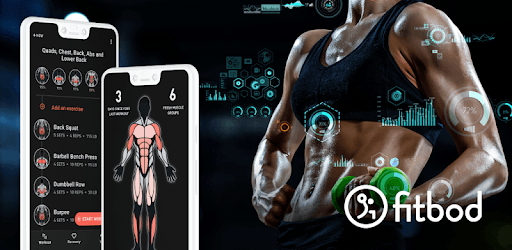
Fitbod Workout & Fitness Plans is an Android app developed and published by Fitbod at Google Play Store on May 22, 2020 for Android users. Fitbod Workout & Fitness Plans is so popular that it has gained 4350745 installs so far and growing.
Are you tired of generic workout plans that don't take your individual needs and goals into account? Look no further than Fitbod Workout & Fitness Plans, the app that revolutionizes the way you approach exercise. With its personalized approach, progress tracking, and intuitive features, Fitbod is the ultimate tool to help you achieve your fitness goals.
Fitbod takes the guesswork out of your workout routine. With just a few taps, you can generate a customized workout plan tailored to your specific needs. Whether you're a beginner or a seasoned gym-goer, Fitbod adapts to your fitness level, ensuring that every workout is challenging yet achievable.
One of the standout features of Fitbod is its ability to curate workouts that consider your body's unique requirements. No more wasting time on exercises that don't work for you. Fitbod takes into account any physical limitations or preferences you may have, allowing you to switch out exercises and customize your routine with ease.
Progress tracking is essential for maintaining motivation and seeing tangible results. Fitbod excels in this area, providing you with a comprehensive overview of your fitness journey. From the total pounds lifted during a workout to body fat percentage changes, Fitbod keeps you informed and motivated every step of the way.
Fitbod's integration with fitness tracking apps such as Samsung Health and Google Fit would be a welcome addition for users who want to consolidate their fitness data in one place. While this feature is currently not available, Fitbod's own progress tracking system more than makes up for it.
Fitbod is designed with simplicity and ease of use in mind. The app's user interface is intuitive, allowing you to navigate through your workouts effortlessly. Whether you have a few minutes or an hour to spare, Fitbod lets you choose the length of your workout, ensuring that you can fit exercise into your busy schedule.
For those who prefer video workouts but find them impractical, Fitbod offers the perfect solution. With Fitbod, you can enjoy the benefits of guided workouts without the need for extensive equipment or time-consuming routines. It's the app you've been waiting for, providing the flexibility and customization you need to make fitness a sustainable part of your life.
Fitbod stands out from other fitness apps for several reasons. Firstly, its ability to generate personalized workouts sets it apart, ensuring that you get the most out of every session. Secondly, Fitbod's user-friendly interface and intuitive features make it accessible to users of all fitness levels. Finally, the app's commitment to progress tracking and motivation keeps you engaged and excited about your fitness journey.
Don't just take our word for it. Fitbod has garnered a loyal following of users who swear by its effectiveness. From beginners to experienced gym enthusiasts, Fitbod has something to offer everyone.
Absolutely! Fitbod allows you to personalize your workouts based on your preferences, fitness level, and any physical limitations you may have.
Yes, Fitbod provides comprehensive progress tracking, allowing you to monitor changes in body fat percentage, total pounds lifted, and more.
Fitbod caters to users of all fitness levels, including beginners. The app's clear instructions and demo videos make it easy for beginners to follow along and get started on their fitness journey.
Absolutely! Fitbod allows you to switch out exercises or never see a particular exercise again, ensuring that your workout plan is tailored to your preferences.
Currently, Fitbod does not integrate with fitness tracking apps such as Samsung Health or Google Fit. However, Fitbod has its own progress tracking system that provides a comprehensive overview of your fitness journey.
In conclusion, Fitbod Workout & Fitness Plans is the ultimate app for personalized fitness. With its tailored workouts, progress tracking, and user-friendly interface, Fitbod takes the hassle out of exercise and helps you achieve your fitness goals. Try Fitbod today and experience the difference for yourself!
Yes, you can run Fitbod Workout & Fitness Plans on PC, but first, you will need emulator software installed on your Windows or MAC, which you can download for free. In the below video, you will find Fitbod Workout & Fitness Plans in action. Before you install the emulator, check out the minimum and recommended system requirements to run it seamlessly. They may change depending on which version of the emulator you choose. Therefore, we recommend you download the latest version of the emulator. Below you will find three free Android emulators that we have shortlisted based on their popularity:
Up to date graphics drivers from Microsoft or the chipset vendor.
Storage: 1 GB available under installation path, 1.5GB available hard drive space
Internet: Broadband Internet connection
Regardless of which Android emulator you install, the steps to install, configure, and running the Fitbod Workout & Fitness Plans app on PC are the same.