Published by Classic Games Emulator
Updated November 10, 2025
High quality game emulator for NES. Play all the amazing games on Android
| Version | 2.2.2 |
| Size | 24.5 MB |
| What's New | Support more games |
📺 🎮 Classic Emulator for NES 🆓 is an Android app developed and published by Classic Games Emulator at Google Play Store on May 13, 2019 for Android users. 📺 🎮 Classic Emulator for NES 🆓 is so popular that it has gained 10000 installs so far and growing.
📺 🎮 Classic Emulator for NES 🆓 brings back the nostalgia of playing your favorite old-school games. This emulator is not just about NES games; it supports multiple platforms, making it a versatile choice for anyone who loves classic gaming. With easy access to games and simple navigation, it’s a perfect way to relive the golden days of gaming. Let’s dive into what makes this emulator so special!
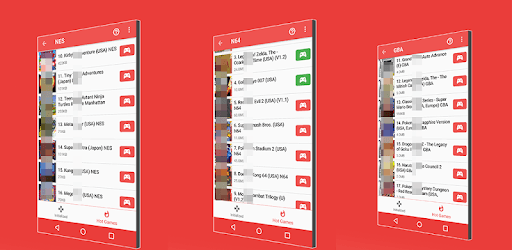
Imagine having your entire childhood collection of games on your device. 📺 🎮 Classic Emulator for NES 🆓 offers just that! It supports not only NES, but also SNES, Gameboy Color, GBA, N64, and PSP games. You can find all your old favorites like Zelda, Mario, and Resident Evil neatly organized.
To access games, simply tap on the "Hot Games" section on the bottom right of the screen. This is where you’ll find a treasure trove of classic games. Whether you're in the mood for action, adventure, or puzzles, there’s something for everyone.
The user-friendly design of 📺 🎮 Classic Emulator for NES 🆓 makes it easy for anyone to start playing. The intuitive layout ensures that finding and playing games is a breeze. The "Hot Games" icon at the bottom right corner is a quick gateway to start your gaming session without any hassle.
One of the standout features of 📺 🎮 Classic Emulator for NES 🆓 is its performance. The emulator ensures that all games run smoothly, providing an authentic and enjoyable gaming experience. The d-pad works perfectly, allowing you to play games like Zelda and Mario 3 without any issues.
For gamers who like to tweak their playing experience, this emulator offers customization options. You can adjust button placements and even use a Bluetooth controller to enhance your gameplay. The emulator supports various emulations which means you can adjust settings to suit your preferences.
While the free version of 📺 🎮 Classic Emulator for NES 🆓 contains ads, upgrading to the premium version eliminates ads completely. The premium version is affordably priced and well worth the investment for a seamless gaming experience.
Compatibility is another strong suit of this emulator. It works efficiently on Android devices, ensuring that you can enjoy your favorite games on-the-go. Whether you’re playing SNES, N64, or PSP games, the performance is consistently good across all platforms.
If you have ROM hacks stored on your computer, you can easily transfer and play them on your phone using this emulator. It’s an excellent way to keep all your retro games in one accessible place.
Overall, 📺 🎮 Classic Emulator for NES 🆓 is a fantastic choice for anyone looking to revisit classic games. With its extensive range of supported platforms, user-friendly interface, and excellent performance, it stands out as one of the best options for retro gaming enthusiasts. So why wait? Dive back into the world of classic gaming with 📺 🎮 Classic Emulator for NES 🆓 today!
Yes, you can run 📺 🎮 Classic Emulator for NES 🆓 on PC, but first, you will need emulator software installed on your Windows or MAC, which you can download for free. In the below video, you will find 📺 🎮 Classic Emulator for NES 🆓 in action. Before you install the emulator, check out the minimum and recommended system requirements to run it seamlessly. They may change depending on which version of the emulator you choose. Therefore, we recommend you download the latest version of the emulator. Below you will find three free Android emulators that we have shortlisted based on their popularity:
Up to date graphics drivers from Microsoft or the chipset vendor.
Storage: 1 GB available under installation path, 1.5GB available hard drive space
Internet: Broadband Internet connection
Regardless of which Android emulator you install, the steps to install, configure, and running the 📺 🎮 Classic Emulator for NES 🆓 app on PC are the same.