ELLIPAL: Crypto Bitcoin Wallet for PC

ELLIPAL: Crypto Bitcoin Wallet for PC

Published by ellipal

Updated November 3, 2025

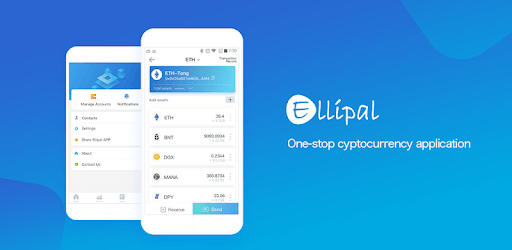
One-stop crypto wallet for Bitcoin, Ethereum, XRP and more

What's New

Version4.10.0
Size58.8 MB
What's NewELLIPAL App Version 4.10.0 Updates:1.Supports MON, GNO, XPL, and SEI networks;2.Optimized the parsing logic of common smart contracts for mainstream DApps, making DApp interactions more secure;3.Upgraded multiple security features to further enhance transaction security.

ELLIPAL: Crypto Bitcoin Wallet Screenshots

ELLIPAL: Crypto Bitcoin Wallet PC screenshot

About ELLIPAL: Crypto Bitcoin Wallet For PC

ELLIPAL: Crypto Bitcoin Wallet is an Android app developed and published by ellipal at Google Play Store on Jul 2, 2018 for Android users. ELLIPAL: Crypto Bitcoin Wallet is so popular that it has gained 21001 installs so far and growing.

ELLIPAL: Crypto Bitcoin Wallet

The world of cryptocurrency demands a secure and reliable way to manage digital assets. ELLIPAL: Crypto Bitcoin Wallet stands out as a top choice for both beginners and experienced traders. It's designed with simplicity, security, and usability in mind, making it a popular option for those looking to safeguard their investments.

Exceptional Security Features

ELLIPAL is often hailed as the most secure wallet on the market. Its cold wallet technology ensures that assets are stored offline, making them immune to online hacking attempts. Unlike other wallets that might have vulnerabilities, ELLIPAL provides peace of mind by offering robust security features. Users appreciate the confidence it brings, knowing that their funds are safe and secure.

Easy to Use for Beginners

One of the standout features of ELLIPAL is its user-friendly interface. Even those new to cryptocurrency can navigate the wallet with ease. The setup process is straightforward and quick, allowing users to start their crypto journey without hassle. Features like the "Maximum Out" toggle add to the simplicity and convenience, making operations smooth and intuitive.

Versatile and Convenient

ELLIPAL isn't just about security; it's also about functionality. The wallet supports sending, swapping, and selling of cryptocurrencies seamlessly. It effectively serves as a one-stop shop for all crypto needs. Although some users wish for more supported networks, like the Casper Network, the current offerings still meet a wide range of needs.

Robust Hardware and Software

The hardware of ELLIPAL is praised for its strong build and durability. It's designed to be tough and reliable, ensuring long-term use without issues. The software, while effective, has room for improvement. Users have experienced occasional issues with functions like swapping and discovering, hinting at the need for more intuitive and faster updates. Overall, though, the combination of hardware and software makes ELLIPAL a solid choice.

Customer Support and Community Feedback

ELLIPAL's customer support is responsive and quick to address issues, adding to the overall positive experience. Community feedback is generally positive, with many users recommending it to friends and family. This word-of-mouth praise further solidifies ELLIPAL's reputation as a leading wallet in the crypto space.

User Experience and Performance

The performance of ELLIPAL in handling transactions is commendable. Transfers of popular cryptocurrencies like XRP and XLM are fast and efficient. Users feel confident leaving their funds in the wallet, thanks to its strong security measures and easy-to-use interface. The inclusion of L2 protocols like Arbitrum and Optimism in future updates could enhance its functionality even further.

In conclusion, ELLIPAL: Crypto Bitcoin Wallet offers a combination of security, ease of use, and robust performance, making it a preferred choice for many in the crypto community. Its continuous improvements and responsive customer service further enhance its value, securing its place as a top-tier crypto wallet.

Can I run ELLIPAL: Crypto Bitcoin Wallet on PC?

Yes, you can run ELLIPAL: Crypto Bitcoin Wallet on PC, but first, you will need emulator software installed on your Windows or MAC, which you can download for free. In the below video, you will find ELLIPAL: Crypto Bitcoin Wallet in action. Before you install the emulator, check out the minimum and recommended system requirements to run it seamlessly. They may change depending on which version of the emulator you choose. Therefore, we recommend you download the latest version of the emulator. Below you will find three free Android emulators that we have shortlisted based on their popularity:

How to Install ELLIPAL: Crypto Bitcoin Wallet on Windows PC

BlueStacks

Minimum
  • OS: Microsoft Windows 7 and above.
  • Processor: Intel or AMD Processor.
  • RAM: Your PC must have at least 4GB of RAM. (Note that having 4GB or more disk space is not a substitute for RAM)
  • Storage: 5GB Free Disk Space.
  • You must be an Administrator on your PC.
Recommended:
  • OS: Microsoft Windows 10
  • Processor: Intel or AMD Multi-Core Processor with Single Thread benchmark score > 1000.
  • Graphics: Intel/Nvidia/ATI, Onboard or Discrete controller with benchmark score >= 750.
  • Please ensure Virtualization is enabled on your PC/Laptop.
  • RAM: 8GB or higher
  • Storage: SSD (or Fusion/Hybrid Drives)
  • Internet: Broadband connection to access games, accounts and related content.

Up to date graphics drivers from Microsoft or the chipset vendor.

  • To start with, download Bluestacks from its official website. The latest version of BluesStacks is v 5, and it is around 400 MB.
  • Once the download is done, click on the Bluestacks set up file to install it on your Windows PC. Follow the on-screen instructions and install it accordingly.
  • The next step is to launch the emulator using the desktop shortcut and sign in using your Google account.
  • Now, head over to Bluestacks home screen and click on the Google Play Store icon.
  • Hit the search bar in Google Play and search for ELLIPAL: Crypto Bitcoin Wallet.
  • Install ELLIPAL: Crypto Bitcoin Wallet from the Play Store by clicking the Install option, which completes downloading of ELLIPAL: Crypto Bitcoin Wallet on PC.

NoxPlayer

Minimum
  • Operating System: Windows XP SP3, Windows Vista, Windows 7, Windows 8, Windows 10, and DirectX 9.0c
  • Processor: At least dual-core processor, both Intel, and AMD are OK
  • Video: Supports Open GL 2.0 or above
  • Memory: 1.5 GB RAM
Recommended
  • Operating System: Windows 7, Windows 8, Windows 10
  • Processor: Multiple core processors which support VT-x or AMB-V Virtualization Technology, better performance with this function enabled
  • Video: The higher performance, the better
  • Memory: 4 GB RAM

Storage: 1 GB available under installation path, 1.5GB available hard drive space

Internet: Broadband Internet connection

  • Download NoxPlayer from the official website. The latest version of NoxPlayer is v 3, and it is around 600 MB.
  • Now install the emulator using the downloaded setup file. Just go through the on-screen instructions and install NoxPlayer on your computer or laptop.
  • After the installation process, launch the Nox Android emulator and log in using your Google account when it asks you.
  • Click on the Google Play Store icon and head over to the search bar to search ELLIPAL: Crypto Bitcoin Wallet. Once found, click on the Install button to install ELLIPAL: Crypto Bitcoin Wallet for PC.
  • If you do not find ELLIPAL: Crypto Bitcoin Wallet on Google Play Store or if you want to skip logging in to Google, you can sideload APK (download the .APK file from this page and open it with NoxPlayer).
  • Launch ELLIPAL: Crypto Bitcoin Wallet from home-screen and start playing it on PC right away!

MEmu

Minimum
  • 2 cores x86/x86_64 Processor (Intel or AMD CPU)
  • WinXP SP3 / Win7 / Win8 / Win10 (Not recommended to run on Server/Enterprise)
  • Latest Windows DirectX 11 / Graphics driver with OpenGL 2.0
  • Hardware Virtualization Technology (Intel VT-x/AMD-V) shall be enabled in BIOS
  • 2GB of RAM (4GB for x64 system)
  • 5GB of hard disk free space
Recommended
  • OS: Microsoft Windows 10 with VT Enabled
  • CPU: Single Thread PassMark score > 1500 (Intel/AMD Multi-Core).
  • Graphics: Intel/Nvidia/ATI, Onboard or Discrete controller with PassMark score > 750.
  • Latest Windows DirectX 11 / Graphics driver with OpenGL 4.5 or higher
  • RAM: 8GB or higher
  • HDD: SSD, 10GB of hard disk free space
  • Internet: Broadband connection with low latency for FPS games
  • Download MEmu Play from the official website. The latest version of NoxPlayer is v 7.5.
  • When the download is completed, install the MEmu emulator on your PC. Follow the on-screen instructions and keep on clicking the Next button until the final step.
  • Now, using the desktop shortcut, look for the MEmu Play emulator and launch it. Once done, it will ask you to log in using your Google account, proceed with the same.
  • MEmu Play will ask you to log in using your Google account. When you log in, it will sync your Google account to MEmu Play. Launch the Google Play Store by clicking on the icon and search for ELLIPAL: Crypto Bitcoin Wallet.
  • Click on the Install button once you find ELLIPAL: Crypto Bitcoin Wallet from the search results. You can also sideload APK (download the .APK file from this page and open it with MEmu) if you want to skip above step.
  • After the installation of ELLIPAL: Crypto Bitcoin Wallet, you're all set to use the app on PC!

Regardless of which Android emulator you install, the steps to install, configure, and running the ELLIPAL: Crypto Bitcoin Wallet app on PC are the same.


Download ELLIPAL: Crypto Bitcoin Wallet For PC