Published by EFI Analytics
Updated June 29, 2026
Awesome dashboards and data logging for your MegaSquirt by EFI Analytics
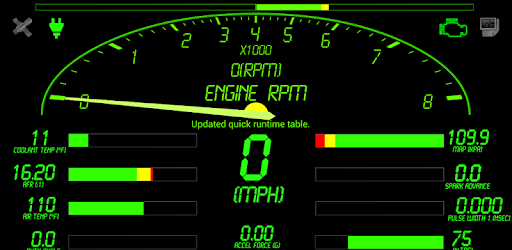
Shadow Dash MS is an Android app developed and published by EFI Analytics at Google Play Store on Dec 21, 2012 for Android users. Shadow Dash MS is so popular that it has gained 5000 installs so far and growing.
Are you tired of juggling multiple gauges to monitor your engine's performance? Look no further than Shadow Dash MS, the revolutionary app that brings all your engine data right to your fingertips. With its seamless integration between your laptop, phone, and even tablet, this app is a game-changer for any car enthusiast. Let's dive into the features that make Shadow Dash MS a must-have for every gearhead.
One of the standout features of Shadow Dash MS is its ability to sync your dashboards across multiple devices. Whether you're using your laptop or phone, you can rest assured that your dash will look exactly the same. Thanks to the seamless Dropbox sync, you can easily access log files and never miss a beat. The auto/manual start/stop log options give you complete control over your data, ensuring you have all the information you need at your fingertips.
While Shadow Dash MS excels in engine monitoring, some users have expressed a desire to tune or change other parameters. While this feature is not currently available, the developers are constantly working on updates and fixes to enhance the app's functionality. With regular updates and new features, you can expect Shadow Dash MS to keep evolving and meeting the needs of its users.
If you're a fan of Phil Tobin's MSEFI platform, you'll be thrilled to know that Shadow Dash MS is fully compatible. As a loyal supporter of Tobin's releases, you can trust that this app is a reliable addition to your engine monitoring arsenal. The community owes a debt of gratitude to the developers for their contribution to the MSEFI platform.
For those who prefer USB connectivity over Bluetooth, Shadow Dash MS offers a convenient solution. By using an Ardunio USB to serial board and a 10 USD Bluetooth module, you can easily connect your Megasquirt to your phone. This cost-effective method ensures that you can enjoy the benefits of Bluetooth without breaking the bank.
Currently, the app does not support editing basic parameters. However, the developers are actively working on expanding the app's capabilities, and this feature may be added in future updates.
Absolutely! Shadow Dash MS allows you to save multiple tunes on your phone, making it easy to switch between different fuel types as needed. Whether you're running on E85, water/meth, or regular gasoline, this app has got you covered.
While the app works seamlessly on both laptops and phones, some users have found that the phone screen is not large enough to fully appreciate the excellent dashboards. If you prefer a larger display, investing in a tablet would be a great choice to enhance your Shadow Dash MS experience.
Shadow Dash MS is more than just an app; it's a game-changer for engine monitoring. With its seamless integration, customization options, and commitment to regular updates, this app is a must-have for any car enthusiast. Say goodbye to multiple gauges and hello to the future of engine monitoring with Shadow Dash MS.
Yes, you can run Shadow Dash MS on PC, but first, you will need emulator software installed on your Windows or MAC, which you can download for free. In the below video, you will find Shadow Dash MS in action. Before you install the emulator, check out the minimum and recommended system requirements to run it seamlessly. They may change depending on which version of the emulator you choose. Therefore, we recommend you download the latest version of the emulator. Below you will find three free Android emulators that we have shortlisted based on their popularity:
Up to date graphics drivers from Microsoft or the chipset vendor.
Storage: 1 GB available under installation path, 1.5GB available hard drive space
Internet: Broadband Internet connection
Regardless of which Android emulator you install, the steps to install, configure, and running the Shadow Dash MS app on PC are the same.