
Published by Photo2Photo
Updated May 2, 2026
Easily swap faces, background, people. Morph any photo into a funny!
| Version | 36.7 |
| Size | 13.7 MB |
| What's New | Several technological fixes 🚀 |
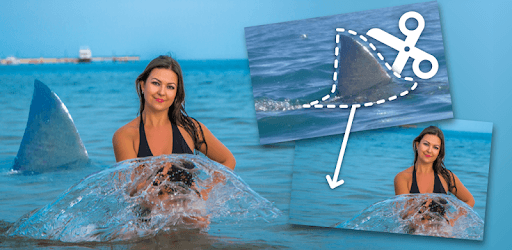
Cut Paste Photo Seamless Edit is an Android app developed and published by Photo2Photo at Google Play Store on Jun 18, 2015 for Android users. Cut Paste Photo Seamless Edit is so popular that it has gained 74033831 installs so far and growing.
Welcome to the world of Cut Paste Photo Seamless Edit, a fantastic app that allows you to blend and merge photos with incredible ease. This app transforms photo editing from a challenging chore into a fun and engaging activity. Whether you're a student, a creative enthusiast, or just someone who wants to prank their family, Cut Paste Photo Seamless Edit is the tool for you.
Imagine impressing your teacher with a superb photomontage. With Cut Paste Photo Seamless Edit, creating high-quality photo collages is a breeze. Teachers often ask for creative photo projects, and this app can help you achieve top marks. Whether it's combining different images to tell a story or making an educational montage, the results will surely be impressive and get you noticed.
If you enjoy a good laugh with family and friends, Cut Paste Photo Seamless Edit can take your pranks to the next level. One user shared how much fun they had tricking their family into thinking doctored photos were real. The reactions are priceless, and the laughter is endless. With this app, you can make your family and friends do a double-take with your cleverly edited photos.
Ever wanted to place yourself in a fantasy world or take on a different persona, like a character from your favorite movie? With Cut Paste Photo Seamless Edit, you can do just that. Transforming into beloved characters or placing yourself in scenes from films is not just a dream, but a reality. The app's seamless editing capabilities ensure that your creations look believable.
Those who love their pets know how difficult it can be to get perfect photos with them. But with Cut Paste Photo Seamless Edit, you can effortlessly add your furry friends to any photo. Whether your pet simply wasn't there at the time, or you wanted to add a touch of whimsy to your photos, the options are endless. Merging your pets into your favorite pictures has never been easier.
For fans of creative editing, like making "Five Nights at Freddy’s" hybrids, this app is a must-have. Cut Paste Photo Seamless Edit offers a unique blend of tools that make combining different elements into one seamless image simple. Bring your imaginative concepts to life and share them with others!
Creating eye-catching thumbnails for your YouTube videos can significantly impact your video's success. Cut Paste Photo Seamless Edit is perfect for making thumbnails that stand out. The app allows you to merge images creatively, ensuring your thumbnails capture viewers’ attention and drive clicks.
Cut Paste Photo Seamless Edit is an intuitive app that anyone can use, regardless of their experience with photo editing. The app’s user-friendly interface makes it straightforward to navigate, ensuring you can achieve great results without any technical difficulties. From superimposing family faces onto group photos to creating personalized WhatsApp photos, this app delivers on its promises.
Cut Paste Photo Seamless Edit is much more than just a photo editing app; it's a gateway to creativity and fun. Whether you need a reliable tool for your school project, love pulling pranks on your family, or are a content creator looking to enhance your visual content, this app has you covered. It’s an essential tool for anyone wanting to dive into the world of seamless photo editing and produce stunning results easily.
Yes, you can run Cut Paste Photo Seamless Edit on PC, but first, you will need emulator software installed on your Windows or MAC, which you can download for free. In the below video, you will find Cut Paste Photo Seamless Edit in action. Before you install the emulator, check out the minimum and recommended system requirements to run it seamlessly. They may change depending on which version of the emulator you choose. Therefore, we recommend you download the latest version of the emulator. Below you will find three free Android emulators that we have shortlisted based on their popularity:
Up to date graphics drivers from Microsoft or the chipset vendor.
Storage: 1 GB available under installation path, 1.5GB available hard drive space
Internet: Broadband Internet connection
Regardless of which Android emulator you install, the steps to install, configure, and running the Cut Paste Photo Seamless Edit app on PC are the same.