Published by Desh Keyboard
Updated April 11, 2026
Type faster in Tamil & English. Voice typing, handwriting, stickers & more!
| Version | 17.2.3 |
| Size | 48.0 MB |
| What's New | - Save WhatsApp status by swiping up 💾 - Tamil voice typing in English letters 🗣 |
Desh Tamil Keyboard is an Android app developed and published by Desh Keyboard at Google Play Store on for Android users. Desh Tamil Keyboard is so popular that it has gained 22135883 installs so far and growing.
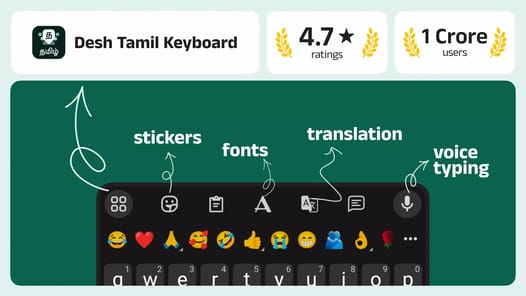
Have you ever struggled with typing in Tamil and English at the same time? The Tamil Keyboard app is here to make your life easier. This keyboard brilliantly caters to those who need to switch between Tamil and English seamlessly. Offering a range of exceptional functionalities, it's perfect for everyday use.
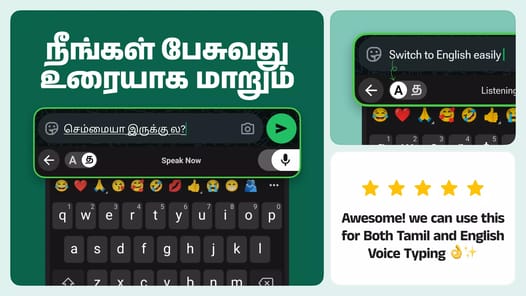
One standout feature of the Tamil Keyboard is its voice typing capability. It allows you to speak in Tamil, converting your speech into text effortlessly. The app's predictive text feature is also noteworthy, with 80 to 90 percent accuracy, ensuring smooth and quick typing without any glitches. It's like having your personal assistant predicting your next word.
Who doesn't love a personal touch? The Tamil Keyboard app allows users to customize their keyboard themes, making your typing experience not just functional but beautiful. You can even add your own pictures as the background, bringing a touch of your personality to the app. It's truly a visually appealing and user-friendly interface, making your daily typing a more enjoyable task.
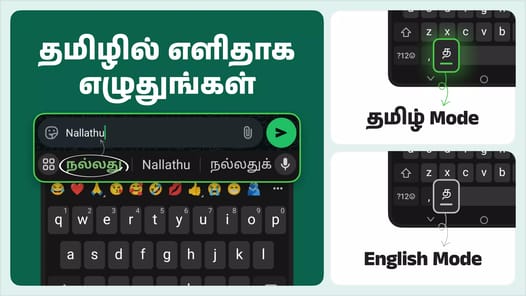
If typing through Tamil letters seems troublesome, this keyboard simplifies the process with easy switching between languages. You can effortlessly type in English and convert it into Tamil. This makes it ideal for people who are comfortable with English but need to communicate in Tamil. Additionally, the app supports multiple languages, making it a versatile tool for multilingual users.
The Tamil Keyboard includes a useful chatbot that guides you through any questions you might have. It also provides informative tutorials to help you get started. These tutorials are designed to explain functionalities in a simple way, ensuring that even beginners can use the app with ease.
One of the best aspects of the Tamil Keyboard app is that all its premium features are available at no cost. This makes it accessible to everyone, regardless of budget. Offering high-quality features without a price tag is commendable and makes it the go-to choice for many.
Ease of use is a significant factor for any app, and the Tamil Keyboard does not disappoint. Its user-friendly interface ensures that everyone can use it easily, whether you are tech-savvy or not. The app is also free of glitches, providing a seamless and smooth typing experience.
The Tamil Keyboard app remembers your typings, so you don't have to retype commonly used words or phrases frequently. This feature enhances productivity and saves time. Additionally, the text stickers add a playful element to your messages, making communication more fun and engaging.
Whether for school, work, or personal use, the Tamil Keyboard app has features that boost your typing efficiency. It makes switching between languages easy and convenient, allowing for faster communication. With features like voice typing and predictive text, you can type more efficiently than ever before.
In summary, the Tamil Keyboard is more than just a keyboard; it’s a comprehensive tool for bilingual users. From voice typing to customizable themes, multilingual support, and free premium features, the Tamil Keyboard offers everything you need for a smooth and enjoyable typing experience. Say goodbye to the hassles of bilingual typing and embrace the ease and convenience of the Tamil Keyboard.
Yes, you can run Desh Tamil Keyboard on PC, but first, you will need emulator software installed on your Windows or MAC, which you can download for free. In the below video, you will find Desh Tamil Keyboard in action. Before you install the emulator, check out the minimum and recommended system requirements to run it seamlessly. They may change depending on which version of the emulator you choose. Therefore, we recommend you download the latest version of the emulator. Below you will find three free Android emulators that we have shortlisted based on their popularity:
Up to date graphics drivers from Microsoft or the chipset vendor.
Storage: 1 GB available under installation path, 1.5GB available hard drive space
Internet: Broadband Internet connection
Regardless of which Android emulator you install, the steps to install, configure, and running the Desh Tamil Keyboard app on PC are the same.