Published by Burak Kuyucu
Updated November 18, 2026
Beat Your Smartphone Addiction & Battery Friendly Usage Tracker
| Version | 19.14.2 |
| Size | 80.6 MB |
| What's New | Smashing bugs and improving your experience |
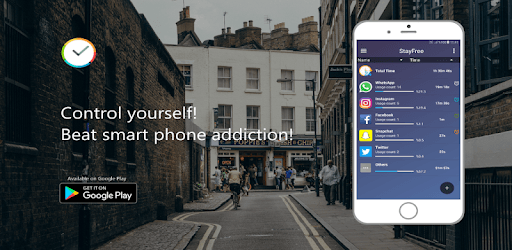
StayFree - Phone Usage Tracker & Overuse Reminder is an Android app developed and published by Burak Kuyucu at Google Play Store on Aug 25, 2017 for Android users. StayFree - Phone Usage Tracker & Overuse Reminder is so popular that it has gained 19290021 installs so far and growing.
Are you tired of spending too much time on your phone, mindlessly scrolling through social media or playing games? Do you wish you had a way to track your device usage and limit your screen time? Look no further than StayFree - Phone Usage Tracker & Overuse Reminder, the app that will help you take control of your phone habits and live a more balanced life.
StayFree is a feature-packed app that offers a wide range of tools to help you manage your screen time effectively. With no ads to distract you, you can focus on using the app to its full potential. It's like having a personal assistant right on your phone, guiding you towards a healthier relationship with your device.
StayFree goes beyond the default device usage tracker on your Samsung phone. It provides you with detailed insights into your daily device usage, allowing you to see exactly how much time you spend on each app. This information is invaluable for understanding your habits and making positive changes.
But StayFree doesn't stop at just tracking your usage. It also offers a range of useful features that make it incredibly hard to break your own rules. Whether you want to limit your time on social media or increase your productivity by focusing on more important tasks, StayFree has got you covered.
One of the standout features of StayFree is its ability to help you limit your time in certain apps, such as social media platforms, while encouraging you to spend more time on productive apps. By setting usage limits and receiving reminders, you can stay on track and make the most of your valuable time.
Additionally, StayFree allows you to schedule focus time, ensuring that you have dedicated periods for deep work or studying. This feature is perfect for those who struggle with distractions and need a little extra motivation to stay focused.
StayFree offers a user-friendly system that is highly customizable to suit your individual needs. You can set timers, create app usage limits, and even block specific websites or apps during focus mode. The app puts you in control, allowing you to tailor your experience and make it work for you.
And if you're worried about losing your progress or data, don't be. StayFree keeps a record of your activities for up to a month, so you can always look back and see how far you've come in your journey towards a healthier screen time balance.
If you're ready to take control of your screen time and improve your overall well-being, StayFree - Phone Usage Tracker & Overuse Reminder is the app for you. With its intuitive interface, powerful features, and positive user feedback, it's no wonder that StayFree is considered one of the best apps in its category.
So why wait? Download StayFree today and start your journey towards a more balanced and mindful use of your phone. Your future self will thank you.
StayFree is currently available for Android devices only. There is no iOS version of the app at the moment.
Yes, you can use StayFree on multiple Android devices as long as you sign in with the same Google account on each device.
No, StayFree is designed to be lightweight and efficient, so it won't significantly impact your phone's battery life.
While StayFree is mostly free, the developers welcome donations to support the ongoing development and maintenance of the app. You can find more information on how to donate within the app.
StayFree can block specific apps or websites during focus mode, but it does not have the ability to completely block them at all times. It is designed to help you manage and limit your usage, rather than completely restrict access.
Yes, you can run StayFree - Phone Usage Tracker & Overuse Reminder on PC, but first, you will need emulator software installed on your Windows or MAC, which you can download for free. In the below video, you will find StayFree - Phone Usage Tracker & Overuse Reminder in action. Before you install the emulator, check out the minimum and recommended system requirements to run it seamlessly. They may change depending on which version of the emulator you choose. Therefore, we recommend you download the latest version of the emulator. Below you will find three free Android emulators that we have shortlisted based on their popularity:
Up to date graphics drivers from Microsoft or the chipset vendor.
Storage: 1 GB available under installation path, 1.5GB available hard drive space
Internet: Broadband Internet connection
Regardless of which Android emulator you install, the steps to install, configure, and running the StayFree - Phone Usage Tracker & Overuse Reminder app on PC are the same.