
Published by Bublup, Inc
Updated May 26, 2026
Save Visually & Share
| Version | 24.1.4 (2) |
| Size | 18.4 MB |
| What's New | - User experience improvements and bug fixes |
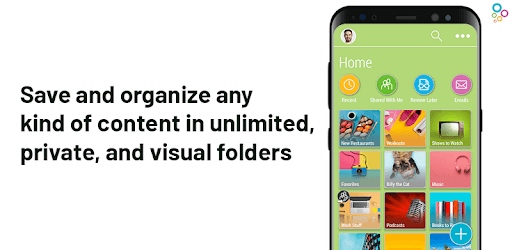
Bublup is an Android app developed and published by Bublup, Inc at Google Play Store on Jul 21, 2019 for Android users. Bublup is so popular that it has gained 380024 installs so far and growing.
Are you tired of having countless tabs open on your browser, struggling to keep track of important information? Look no further than Bublup, the app that will revolutionize the way you organize and share content. With its intuitive design and plethora of features, Bublup is a game-changer in the world of productivity apps.
Bublup is the ultimate organizer and sharing app that simplifies the way you store and access important documents, notes, and media. Whether you're a student, professional, or simply someone who wants to stay organized, Bublup has got you covered.
One of the standout features of Bublup is its ability to handle various file types. From documents to videos, Bublup supports it all, allowing you to store and access your files with ease. Say goodbye to scattered files and hello to a neatly organized digital space.
Using Bublup is a breeze, thanks to its intuitive interface. Navigating through the app is a seamless experience, and you'll find yourself effortlessly finding what you need. The app's visually appealing design adds to the overall user experience, making it a pleasure to use.
But Bublup is not just about aesthetics; it's packed with features that will make your life easier. Whether it's hierarchical folders, tags, or notes, Bublup offers a range of tools to help you stay organized. You can even forward relevant emails directly to Bublup, and they'll appear in the exact folder you specify.
Bublup goes beyond just organizing your files; it also sparks your creativity. With its AI creator, you can gather information on any given subject and keep it all in one place. The app generates suggestions from the internet, making it a valuable tool for researchers and collectors.
Additionally, Bublup allows you to create personalized websites and portals, perfect for showcasing your work or sharing it with others. Whether you're a professional or someone who loves to document their experiences, Bublup provides the perfect platform for creating and sharing content.
While Bublup offers a range of features and benefits, it's important to address the concern of affordability. Some users have expressed their reservations about the monthly price, which may be high for some individuals. However, Bublup offers a free version that allows users to access most features without any advertisements.
As for support, Bublup has received rave reviews for its excellent tech support. Users have praised the team for their prompt assistance in resolving any issues they encountered. This level of customer responsiveness sets Bublup apart from other apps in the market.
Bublup offers a free version that allows users to access most features without any advertisements. However, there is also a paid version with additional benefits.
Absolutely! Bublup supports various file types, including documents, videos, and more. You can store and access all your files in one place.
Bublup is designed with user-friendliness in mind. Its intuitive interface makes it easy to navigate and find what you need. You'll be up and running in no time!
Yes, Bublup has received praise for its excellent tech support. The team is dedicated to resolving any issues you may encounter promptly.
Absolutely! Bublup allows you to create personalized websites and portals, perfect for showcasing your work or sharing it with others. Unleash your creativity!
In conclusion, Bublup is the ultimate organizer and sharing app that simplifies your life. With its intuitive design, support for various file types, and creative features, Bublup is a must-have for anyone looking to stay organized and productive. Try it today and experience the difference!
Yes, you can run Bublup on PC, but first, you will need emulator software installed on your Windows or MAC, which you can download for free. In the below video, you will find Bublup in action. Before you install the emulator, check out the minimum and recommended system requirements to run it seamlessly. They may change depending on which version of the emulator you choose. Therefore, we recommend you download the latest version of the emulator. Below you will find three free Android emulators that we have shortlisted based on their popularity:
Up to date graphics drivers from Microsoft or the chipset vendor.
Storage: 1 GB available under installation path, 1.5GB available hard drive space
Internet: Broadband Internet connection
Regardless of which Android emulator you install, the steps to install, configure, and running the Bublup app on PC are the same.