Published by Noritel Mobile Kommunikation GmbH
Updated August 21, 2025
Control your ACE 2.0.
| Version | 2.2.5 |
| Size | 71.6 MB |
| What's New | Bug fixes and performance improvements |
Advanced Car Eye 2.0 is an Android app developed and published by Noritel Mobile Kommunikation GmbH at Google Play Store on May 10, 2018 for Android users. Advanced Car Eye 2.0 is so popular that it has gained 10000 installs so far and growing.
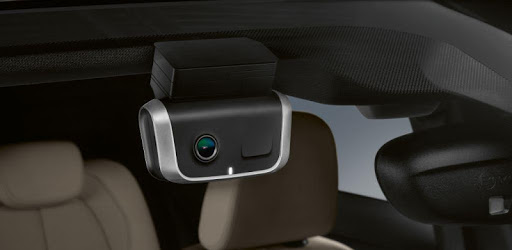
Are you tired of facing camera issues with your BMWACE2.0 car camera? Look no further! Advanced Car Eye 2.0 is here to solve all your problems and provide you with a seamless car camera experience. Our team of dedicated software engineers and support staff are committed to delivering top-notch support and ensuring that your camera functions flawlessly.
At Advanced Car Eye 2.0, we understand the frustration that comes with encountering bugs in your camera system. Rest assured, our software engineers work diligently to identify and resolve any issues that may arise. With our prompt support, you can expect your camera issues to be resolved within a short span of just 2 days. We value your time and strive to provide you with a hassle-free experience.
One common concern among users is the difficulty in connecting their cameras. However, we have found a simple solution that works every time. Before starting the app, switch on airplane mode on your mobile phone and enable wireless connectivity. This ensures a smooth and uninterrupted connection between your phone and the camera. No more teething problems with connectivity!
Downloading videos from your camera to your phone has never been easier. With Advanced Car Eye 2.0, you can effortlessly download videos directly to your phone, allowing you to access and share them with ease. Additionally, our camera system is designed to alert you with a beep if the camera is triggered while you're away from your car. This ensures that you stay informed and in control of your vehicle's security.
Wondering why Advanced Car Eye 2.0 is the perfect choice for your BMW camera system? Here are a few reasons:
With a little patience and following the instructions, Advanced Car Eye 2.0 proves to be an easy-to-use and reliable solution. Our user-friendly interface ensures that you can navigate through the app effortlessly, making your car camera experience a breeze.
When it comes to capturing moments on the road, quality matters. Advanced Car Eye 2.0 delivers crystal-clear images and videos that are easy to view via the app or on your PC. Say goodbye to blurry footage and enjoy the clarity that our camera system provides.
Advanced Car Eye 2.0 seamlessly integrates with the twin BMW camera system, ensuring optimal performance and compatibility. Our app is designed to work flawlessly with your BMW cameras, providing you with a seamless and hassle-free experience.
We pride ourselves on our exceptional customer support. In case you encounter any issues, our support team is just a message away. Contact us through the app, and we'll guide you through the step-by-step process to resolve any camera-related problems. We are dedicated to ensuring your satisfaction and making your experience with Advanced Car Eye 2.0 a positive one.
To connect your smartphone to the Car Eye, follow these steps:
Absolutely! Advanced Car Eye 2.0 allows you to download videos directly to your phone, making it convenient for you to access and share them as needed.
If you encounter any issues with your camera, reach out to our support team through the app. They will guide you through the process of rebooting the camera, ensuring that it functions perfectly. Our support team is always ready to assist you.
Unfortunately, the Advanced Car Eye 2.0 app is currently available only for Android phones. If you are using an iOS system, we recommend searching for alternative solutions that cater to your specific needs.
With Advanced Car Eye 2.0, you can say goodbye to camera issues and enjoy a seamless car camera experience. Download the app today and experience the convenience and reliability that our solution offers!
Yes, you can run Advanced Car Eye 2.0 on PC, but first, you will need emulator software installed on your Windows or MAC, which you can download for free. In the below video, you will find Advanced Car Eye 2.0 in action. Before you install the emulator, check out the minimum and recommended system requirements to run it seamlessly. They may change depending on which version of the emulator you choose. Therefore, we recommend you download the latest version of the emulator. Below you will find three free Android emulators that we have shortlisted based on their popularity:
Up to date graphics drivers from Microsoft or the chipset vendor.
Storage: 1 GB available under installation path, 1.5GB available hard drive space
Internet: Broadband Internet connection
Regardless of which Android emulator you install, the steps to install, configure, and running the Advanced Car Eye 2.0 app on PC are the same.