
Published by Bagan Innovation Technology
Updated August 2, 2025
Best Myanmar Keyboard with smart typing Myanmar Unicode, Zawgyi ျမန္မာကီးဘုတ္
| Version | 14.62 |
| Size | 105.3 MB |
| What's New | - Google API Level update - Emoji Update - Bagan Games Feature added - Bug Fixes - Optimization Fixes |
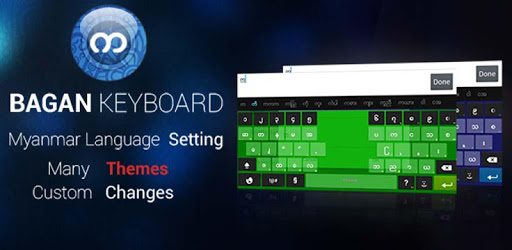
Bagan - Myanmar Keyboard is an Android app developed and published by Bagan Innovation Technology at Google Play Store on May 29, 2013 for Android users. Bagan - Myanmar Keyboard is so popular that it has gained 41893376 installs so far and growing.
Bagan - Myanmar Keyboard has emerged as a highly valued tool that allows users to type in Burmese with ease and precision. Its unique features and functionalities can transform your typing experience, making it one of the best options for anyone needing to communicate in Burmese.
One standout feature of Bagan - Myanmar Keyboard is its user-friendly design. The keyboard offers an intuitive layout that simplifies the typing process, even for those who are new to the Burmese script. Users can quickly learn to navigate the different characters and symbols, enhancing their typing speed and efficiency.
Bagan - Myanmar Keyboard makes it easy to type various Burmese characters, including complex letters and symbols. It covers the full range of Unicode characters, ensuring that you can write any word or phrase without limitations. This comprehensive support makes it ideal for both casual users and professional writers.
Bagan is more than just a keyboard; it carries cultural significance that resonates with the Burmese community. The name Bagan itself evokes a sense of history and romance. Stories of young love, ancient harps, and beautiful princesses are intertwined with the essence of Bagan, a city rich in history and romance. This cultural depth adds an emotional connection for users, making the keyboard feel like a piece of home.
The developers of Bagan - Myanmar Keyboard work tirelessly to enhance its features and fix issues. Regular updates ensure that the keyboard remains compatible with new operating systems and devices. For instance, bugs and errors in new versions have been addressed promptly, allowing for a seamless user experience across different devices.
Bagan - Myanmar Keyboard provides ample customization options to cater to individual preferences. Users can switch between different Burmese fonts, such as Zawgyi and Unicode, with ease. This flexibility ensures that you can adapt your keyboard layout to meet your specific needs, whether you are composing a formal document or a casual message.
Another noteworthy feature is the keyboard's enhanced text editing capabilities. Users can easily navigate through their text, make corrections, and format their writing in various ways. Functions like auto-correction, voice typing, and paste options are well-integrated, contributing to a smoother typing experience.
Bagan - Myanmar Keyboard is designed to be compatible with various devices, including smartphones, tablets, and more. Whether you're using an Android device like Xiaomi Redmi or Vivo Y55, the keyboard adjusts to offer a consistent and reliable typing experience. This wide compatibility ensures that you can use the keyboard across multiple platforms without any issues.
Installing Bagan - Myanmar Keyboard is a straightforward process. The app guides users through the setup, making it accessible for everyone. Once installed, users can start typing in Burmese immediately, without any complicated configurations.
Bagan - Myanmar Keyboard has a dedicated support team that is always ready to assist users with any issues they may encounter. Whether you need help with switching fonts or fixing compatibility issues, support is readily available. Additionally, the community of users often shares tips and solutions, making it easier for newcomers to get the most out of the keyboard.
In summary, Bagan - Myanmar Keyboard offers an exceptional typing experience for anyone needing to communicate in Burmese. Its comprehensive features, cultural significance, and user-friendly design make it a standout choice. Whether for work, study, or personal use, Bagan - Myanmar Keyboard is a valuable tool for typing in Burmese.
Yes, you can run Bagan - Myanmar Keyboard on PC, but first, you will need emulator software installed on your Windows or MAC, which you can download for free. In the below video, you will find Bagan - Myanmar Keyboard in action. Before you install the emulator, check out the minimum and recommended system requirements to run it seamlessly. They may change depending on which version of the emulator you choose. Therefore, we recommend you download the latest version of the emulator. Below you will find three free Android emulators that we have shortlisted based on their popularity:
Up to date graphics drivers from Microsoft or the chipset vendor.
Storage: 1 GB available under installation path, 1.5GB available hard drive space
Internet: Broadband Internet connection
Regardless of which Android emulator you install, the steps to install, configure, and running the Bagan - Myanmar Keyboard app on PC are the same.