Caldwell Ballistic Chronograph for PC

Caldwell Ballistic Chronograph for PC

Published by Battenfeld Technologies

Updated August 4, 2025

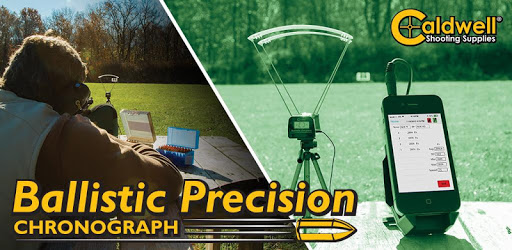
Ballistic Chronograph app for the Caldwell line of Ballistic Chronographs.

What's New

Version1.50
Size1.6 MB
What's NewVersion 1.50 contains the following changes/updates: • Additional Fixes for Android 14+ support.

Caldwell Ballistic Chronograph Screenshots

Caldwell Ballistic Chronograph PC screenshot

About Caldwell Ballistic Chronograph For PC

Caldwell Ballistic Chronograph is an Android app developed and published by Battenfeld Technologies at Google Play Store on Mar 7, 2014 for Android users. Caldwell Ballistic Chronograph is so popular that it has gained 50000 installs so far and growing.

The Caldwell Ballistic Chronograph: Enhancing Shooting Precision

When it comes to measuring the velocity of bullets, arrows, or other projectiles, the Caldwell Ballistic Chronograph stands out as a superb tool. It's not just reliable; paired with its dedicated app, it provides shooters with accurate, detailed data to enhance their shooting sessions.

Setup and Compatibility

The Caldwell Ballistic Chronograph is known for its versatility with various devices. From Android phones like the Samsung Galaxy S5, HTC One M9, and Motorola Moto G, to iOS devices like iPhones and iPads, the chronograph connects smoothly and operates efficiently.

The connectivity often hinges on the proper use of USB or audio cables. Sometimes, the initial setup might require a bit of tweaking, such as enabling USB debugging or using compatibility modes to get everything working seamlessly. If needed, the customer support team is always ready to assist with any troubleshooting.

Key Features and Performance

Once set up, the Caldwell Ballistic Chronograph shines with its accuracy and ease of use. Users can record multiple shot sequences without any hitches. This consistency is critical for any shooting enthusiast who wants precise measurements during their practice or competitions.

The accompanying app enhances the experience by providing detailed data on each shot. It even allows users to export this data, making external analysis straightforward. This export feature is much appreciated by shooters who wish to review their data later or integrate it into other ballistic apps.

User Experience

One of the high points of the Caldwell Ballistic Chronograph is the user-friendly experience it offers. With quick customer support and responsive technical assistance, any potential issues are swiftly addressed. This ensures that users spend more time improving their shooting skills rather than troubleshooting the device.

Many shooters have found that when there are issues, they are often resolved by the company’s support team. Whether it's a new USB cord or enabling specific settings on your phone, solutions are typically quick and effective.

Room for Improvement

While the device performs exceptionally well, there is always room for enhancements. Some users have noted the wish for more advanced features, such as finer resolutions for energy readings, especially for air rifle enthusiasts. Additionally, a PC version of the app could vastly expand the chronograph’s usability, providing an even more comprehensive tool for shooters.

An improved manual detailing the technical data and features of the device would also help users make the most of their chronographs. Understanding terms like standard deviation and other technical details can assist shooters in fine-tuning their performance.

The Value Proposition

Overall, the Caldwell Ballistic Chronograph, paired with its dedicated app, offers significant value. It provides shooters with reliable, accurate data, backed by stellar customer support. While there are always areas to enhance, the current features and performance make it a top choice for measuring projectile velocity. With consistent updates and support from the company, users can expect it to meet their needs effectively in various shooting conditions.

Can I run Caldwell Ballistic Chronograph on PC?

Yes, you can run Caldwell Ballistic Chronograph on PC, but first, you will need emulator software installed on your Windows or MAC, which you can download for free. In the below video, you will find Caldwell Ballistic Chronograph in action. Before you install the emulator, check out the minimum and recommended system requirements to run it seamlessly. They may change depending on which version of the emulator you choose. Therefore, we recommend you download the latest version of the emulator. Below you will find three free Android emulators that we have shortlisted based on their popularity:

How to Install Caldwell Ballistic Chronograph on Windows PC

BlueStacks

Minimum
  • OS: Microsoft Windows 7 and above.
  • Processor: Intel or AMD Processor.
  • RAM: Your PC must have at least 4GB of RAM. (Note that having 4GB or more disk space is not a substitute for RAM)
  • Storage: 5GB Free Disk Space.
  • You must be an Administrator on your PC.
Recommended:
  • OS: Microsoft Windows 10
  • Processor: Intel or AMD Multi-Core Processor with Single Thread benchmark score > 1000.
  • Graphics: Intel/Nvidia/ATI, Onboard or Discrete controller with benchmark score >= 750.
  • Please ensure Virtualization is enabled on your PC/Laptop.
  • RAM: 8GB or higher
  • Storage: SSD (or Fusion/Hybrid Drives)
  • Internet: Broadband connection to access games, accounts and related content.

Up to date graphics drivers from Microsoft or the chipset vendor.

  • To start with, download Bluestacks from its official website. The latest version of BluesStacks is v 5, and it is around 400 MB.
  • Once the download is done, click on the Bluestacks set up file to install it on your Windows PC. Follow the on-screen instructions and install it accordingly.
  • The next step is to launch the emulator using the desktop shortcut and sign in using your Google account.
  • Now, head over to Bluestacks home screen and click on the Google Play Store icon.
  • Hit the search bar in Google Play and search for Caldwell Ballistic Chronograph.
  • Install Caldwell Ballistic Chronograph from the Play Store by clicking the Install option, which completes downloading of Caldwell Ballistic Chronograph on PC.

NoxPlayer

Minimum
  • Operating System: Windows XP SP3, Windows Vista, Windows 7, Windows 8, Windows 10, and DirectX 9.0c
  • Processor: At least dual-core processor, both Intel, and AMD are OK
  • Video: Supports Open GL 2.0 or above
  • Memory: 1.5 GB RAM
Recommended
  • Operating System: Windows 7, Windows 8, Windows 10
  • Processor: Multiple core processors which support VT-x or AMB-V Virtualization Technology, better performance with this function enabled
  • Video: The higher performance, the better
  • Memory: 4 GB RAM

Storage: 1 GB available under installation path, 1.5GB available hard drive space

Internet: Broadband Internet connection

  • Download NoxPlayer from the official website. The latest version of NoxPlayer is v 3, and it is around 600 MB.
  • Now install the emulator using the downloaded setup file. Just go through the on-screen instructions and install NoxPlayer on your computer or laptop.
  • After the installation process, launch the Nox Android emulator and log in using your Google account when it asks you.
  • Click on the Google Play Store icon and head over to the search bar to search Caldwell Ballistic Chronograph. Once found, click on the Install button to install Caldwell Ballistic Chronograph for PC.
  • If you do not find Caldwell Ballistic Chronograph on Google Play Store or if you want to skip logging in to Google, you can sideload APK (download the .APK file from this page and open it with NoxPlayer).
  • Launch Caldwell Ballistic Chronograph from home-screen and start playing it on PC right away!

MEmu

Minimum
  • 2 cores x86/x86_64 Processor (Intel or AMD CPU)
  • WinXP SP3 / Win7 / Win8 / Win10 (Not recommended to run on Server/Enterprise)
  • Latest Windows DirectX 11 / Graphics driver with OpenGL 2.0
  • Hardware Virtualization Technology (Intel VT-x/AMD-V) shall be enabled in BIOS
  • 2GB of RAM (4GB for x64 system)
  • 5GB of hard disk free space
Recommended
  • OS: Microsoft Windows 10 with VT Enabled
  • CPU: Single Thread PassMark score > 1500 (Intel/AMD Multi-Core).
  • Graphics: Intel/Nvidia/ATI, Onboard or Discrete controller with PassMark score > 750.
  • Latest Windows DirectX 11 / Graphics driver with OpenGL 4.5 or higher
  • RAM: 8GB or higher
  • HDD: SSD, 10GB of hard disk free space
  • Internet: Broadband connection with low latency for FPS games
  • Download MEmu Play from the official website. The latest version of NoxPlayer is v 7.5.
  • When the download is completed, install the MEmu emulator on your PC. Follow the on-screen instructions and keep on clicking the Next button until the final step.
  • Now, using the desktop shortcut, look for the MEmu Play emulator and launch it. Once done, it will ask you to log in using your Google account, proceed with the same.
  • MEmu Play will ask you to log in using your Google account. When you log in, it will sync your Google account to MEmu Play. Launch the Google Play Store by clicking on the icon and search for Caldwell Ballistic Chronograph.
  • Click on the Install button once you find Caldwell Ballistic Chronograph from the search results. You can also sideload APK (download the .APK file from this page and open it with MEmu) if you want to skip above step.
  • After the installation of Caldwell Ballistic Chronograph, you're all set to use the app on PC!

Regardless of which Android emulator you install, the steps to install, configure, and running the Caldwell Ballistic Chronograph app on PC are the same.


Download Caldwell Ballistic Chronograph For PC